
Data Structures
Arrays
Master 1D & 2D Arrays — what/why/applications, types, initialization, reading and writing data — using LEARNCODEGURU’s 6-level learning model.
Level 1 Basics Content
C Arrays Overview
An array stores many values of the same type in one named block of contiguous memory. You access each value with an index (starting at 0). This level covers 1D and 2D arrays: what they are, why they matter, types, declaration, initialization, writing data in, reading data out, and one sample program.
Think of a 1D array as a single row of boxes, and a 2D array as a matrix (rows × columns). Both use the same ideas: fixed size at declaration (for classic arrays), zero-based indexing, and loops for fill / print.
Overview — storing many values together
Without arrays you would need many separate variables (m1, m2, …).
Arrays give you one name and an index: marks[0], marks[1], …
- Element — one value in the array
- Index — position; first element is index
0 - Size / length — how many elements (1D) or rows×cols (2D)
- Same type — all elements share one type (
int,float, …)
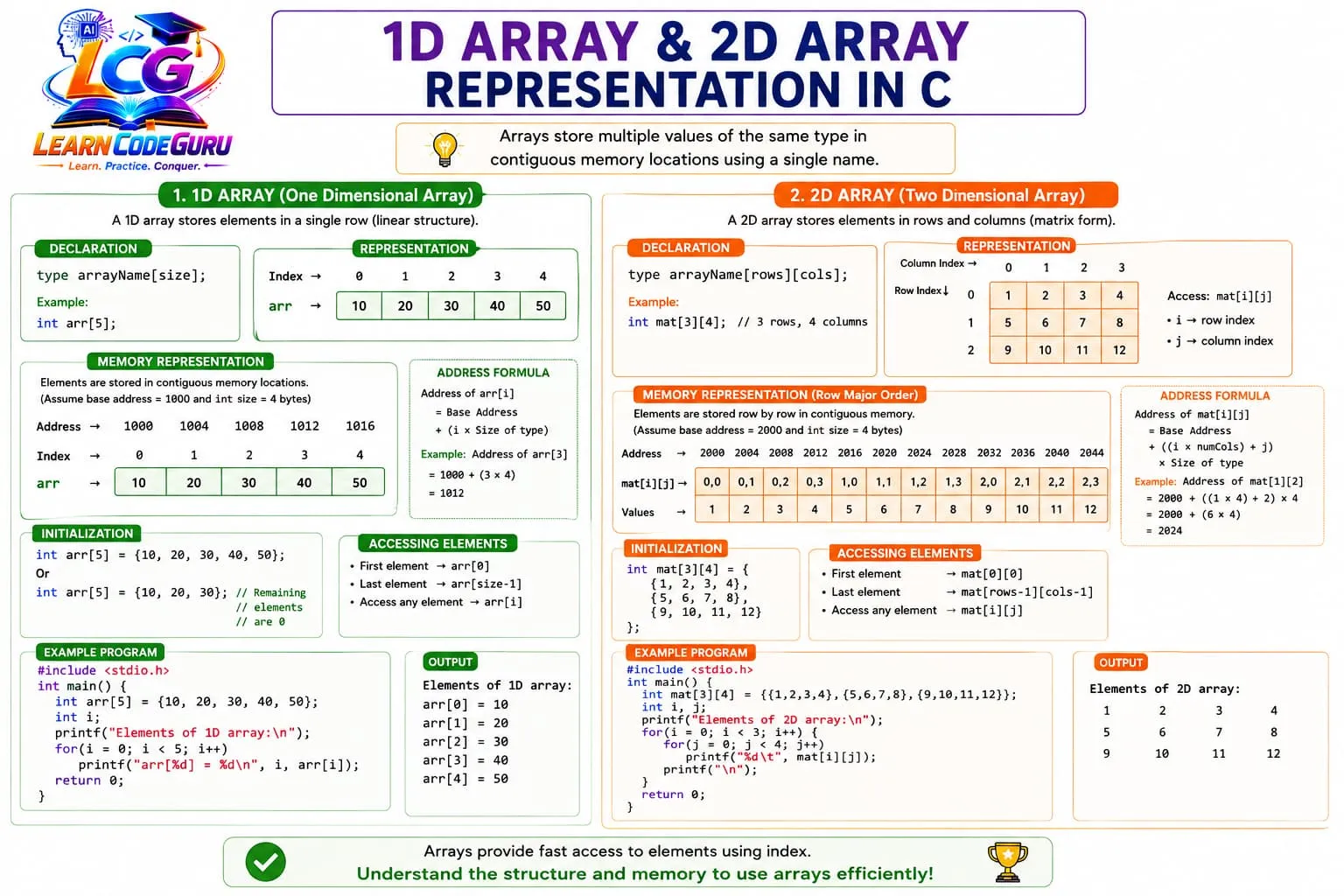
What is an array? — 1D then 2D
A 1D array is a contiguous sequence of elements. Address of element
i is conceptually base address + i × sizeof(element).
int a[5]; /* 5 ints: a[0] a[1] a[2] a[3] a[4] */
A 2D array is like a table: first index = row, second =
column. m[i][j] is the element in row i, column j.
int m[2][3];   /* 2 rows, 3 columns — 6 ints total */
/* m[0][0] m[0][1] m[0][2] */
/* m[1][0] m[1][1] m[1][2] */
0. For a[n], last valid
index is n - 1. For m[r][c], last row is r - 1, last col is c - 1.
Why arrays?
- Store many values under one name instead of dozens of variables
- Random access — jump to any index in constant time with
a[i] - Easy looping —
forfrom0ton - 1for fill, sum, search, print - Natural for tables — 2D arrays model matrices, grids, and game boards
- Less clutter — algorithms stay readable when data lives in arrays
Applications of arrays
- Marks / scores list — 1D array of student marks
- Matrices — addition, multiplication (conceptually), transpose with 2D arrays
- Images (conceptually) — pixels as a 2D grid of values
- Lookup tables — precomputed values indexed by an integer key
- Strings (related) —
chararrays hold text ending with'\0'
Types of arrays
| Type | Idea | Example declaration | Access |
|---|---|---|---|
| 1D (one-dimensional) | Single list / vector | int a[10]; | a[i] |
| 2D (two-dimensional) | Matrix / table (rows × cols) | int m[3][4]; | m[i][j] |
| Multi-dimensional | 3D+ (cube, layers) — rare in intro courses | int t[2][3][4]; | t[i][j][k] |
Array of char / string | Characters in a row; C string if null-terminated | char s[20]; | s[i] or %s |
'\0' terminator — covered deeply in a strings lesson.
Declaration syntax — 1D and 2D
1D:
type name[size];

int marks[5];
float temp[7];
char vowels[5];
2D:
type name[rows][cols];

int matrix[3][3];   /* 3×3 ints */
int grid[2][4];     /* 2 rows, 4 columns */
Initialization of arrays — 1D and 2D
Compile-time (initializer list) — 1D:
int a[5] = {10, 20, 30, 40, 50};
int b[]  = {1, 2, 3};           /* size becomes 3 */
int c[5] = {1, 2};            /* partial: rest become 0 */
int z[5] = {0};              /* all zeros */
| 1D form | Meaning |
|---|---|
int a[3] = {1, 2, 3}; | Full init — every element set |
int a[5] = {1, 2}; | Partial — a[2]..a[4] are 0 |
int a[] = {1, 2, 3}; | Size inferred as 3 |
int a[5]; (no init) | Automatic storage → indeterminate until you write |
Compile-time — 2D:
int m[2][3] = {
    {1, 2, 3},
    {4, 5, 6}
};

int p[2][3] = {1, 2};   /* partial: rest 0 */
int q[2][3] = {0};     /* all zeros */
| 2D form | Meaning |
|---|---|
| Nested braces per row | Clearest — each inner list is one row |
Flat list {1,2,3,4,5,6} | Filled in row-major order |
| Partial init | Unspecified elements become 0 |
Writing data into arrays — 1D and 2D
Assignment (1D):
a[0] = 10;
a[1] = 20;
a[2] = 30;
Loop + scanf (1D):
for (i = 0; i < n; i++)
    scanf("%d", &a[i]);
Assignment (2D):
m[0][0] = 1;
m[0][1] = 2;
m[1][0] = 3;
Nested loop + scanf (2D):
for (i = 0; i < rows; i++)
    for (j = 0; j < cols; j++)
        scanf("%d", &m[i][j]);
scanf:
&a[i] or &m[i][j].
Reading data from arrays — 1D and 2D
Loop + printf (1D):
for (i = 0; i < n; i++)
    printf("%d ", a[i]);
printf("\n");
Nested loops + printf (2D matrix form):
for (i = 0; i < rows; i++) {
    for (j = 0; j < cols; j++)
        printf("%d ", m[i][j]);
    printf("\n");          /* new line after each row */
}
Sample program — 1D input/print + small 2D print
Reads n integers into a 1D array and prints them. Then shows a tiny hardcoded
2×3 matrix printed with nested loops:
/* Arrays — 1D read/print + small 2D print sample */
#include <stdio.h>

int main(void) {
    int n, i, j;
    int a[100];
    int m[2][3] = {
        {1, 2, 3},
        {4, 5, 6}
    };

    printf("Enter n (1..100): ");
    scanf("%d", &n);

    printf("Enter %d integers:\n", n);
    for (i = 0; i < n; i++)
        scanf("%d", &a[i]);

    printf("1D array: ");
    for (i = 0; i < n; i++)
        printf("%d ", a[i]);
    printf("\n");

    printf("2D matrix:\n");
    for (i = 0; i < 2; i++) {
        for (j = 0; j < 3; j++)
            printf("%d ", m[i][j]);
        printf("\n");
    }

    return 0;
}
&a[i] / a[i];
2D uses nested loops and a newline per row. Keep n within the declared capacity (here 100).
Level 2 Advanced Content
Going deeper into arrays
Level 1 covered declare / init / read / write. Level 2 explains memory layout,
bounds safety, array-to-pointer decay, sizeof for length,
passing arrays to functions, 2D as an array of rows, and common mistakes.
Memory layout — 1D and row-major 2D
A 1D array occupies consecutive addresses. For int a[4], elements sit next to each
other in order a[0], a[1], a[2], a[3].
A 2D array in C is stored in row-major order: all of row 0, then row 1, and so on.
For int m[2][3] the sequence in memory is:
m[i][j]: skip i full rows of cols elements, then add j.
Index out of bounds — undefined behavior
C does not automatically stop you from writing a[n] or
m[i][j] outside the declared ranges. Doing so is undefined behavior:
the program may crash, corrupt data, or seem fine until later.
- 1D: use only
0 .. size-1 - 2D: use only
0 .. rows-1and0 .. cols-1 - Prefer
i < noveri <= nfor 0-based loops
Array name decays to a pointer (high-level)
In most expressions, the array name a decays to a pointer to its
first element (&a[0]). That is why you can pass a to a function that
expects int *, and why a[i] relates to *(a + i).
Important exception: sizeof(a) still sees the whole array object (in the declaring
scope), not a pointer — until the name has decayed in a parameter.
Length with sizeof(array) / sizeof(array[0])
int a[] = {10, 20, 30, 40};
int n = sizeof(a) / sizeof(a[0]);  /* n == 4 */
| Context | What sizeof(a) means | Safe length trick? |
|---|---|---|
| Same scope as declaration | Total bytes of the array | Yes — divide by element size |
Function parameter int a[] | Size of a pointer | No — pass n explicitly |
2D int m[2][3] | Bytes for all 6 ints | Rows = sizeof(m)/sizeof(m[0]); cols = sizeof(m[0])/sizeof(m[0][0]) |
Passing arrays to functions — intro
Functions receive a pointer to the first element (decay), not a copy of the whole array. Changes inside the function affect the caller’s array. Always pass the length for 1D.
void print1d(int a[], int n) {
    int i;
    for (i = 0; i < n; i++)
        printf("%d ", a[i]);
}

/* 2D: column size must be known (or use other pointer forms) */
void print2d(int m[][3], int rows) {
    int i, j;
    for (i = 0; i < rows; i++) {
        for (j = 0; j < 3; j++)
            printf("%d ", m[i][j]);
        printf("\n");
    }
}
2D as array of arrays — nested traversal
You can think of int m[rows][cols] as rows arrays of length
cols. m[i] is row i; m[i][j] is one cell.
/* Row-major walk — visit every cell once */
for (row = 0; row < rows; row++)
    for (col = 0; col < cols; col++)
        /* use m[row][col] */ ;
- By rows: outer = row, inner = col (most common)
- By columns: outer = col, inner = row (still valid; different visit order)
- Always print
\nafter finishing one row when showing a matrix
Common mistakes
| Mistake | Why it hurts | Fix |
|---|---|---|
Off-by-one (i <= n) | Touches a[n] — out of bounds | Use i < n for 0-based arrays |
| Wrong 2D dimensions | Loops use different rows/cols than declaration | Match declared sizes; name rows/cols |
| Reading uninitialized elements | Garbage output / UB if used | Init with list, zeros, or write before read |
sizeof inside a function on parameter | Gets pointer size, not length | Pass n (and cols for 2D) |
Forgetting & in scanf | Wrong address / crash | scanf("%d", &a[i]) |
Level 3 C Tricky Interview Points
Advanced tricky interview points on 1D / 2D arrays, indexing, sizeof, decay, bounds, initialization zeros, and row-major layout.
Tricky Interview Point-1:
Array index starts at 0 — last index is size − 1
For int a[5], valid indices are 0..4. Accessing a[5] is out of bounds. Interviewers often ask “what is the last element?” — answer a[4], not a[5]. Same rule for each dimension of a 2D array.
Tricky Interview Point-2:
Out-of-bounds access is undefined behavior — may not always crash
C does not check array bounds at runtime. a[n] or a[-1] can overwrite other memory, appear to “work,” or crash later. Never rely on “it printed something” as proof that an index is valid.
Tricky Interview Point-3:
sizeof(arr) / sizeof(arr[0]) gives element count only for real arrays
Inside the same scope where the array is declared, sizeof(a)/sizeof(a[0]) is the length. After the array decays to a pointer (e.g. in a function parameter), sizeof(a) is the pointer size — not the array length. Pass n separately.
Tricky Interview Point-4:
Array name decays to &arr[0] in most expressions
Except for sizeof, & (address-of the whole array), and a few other contexts, arr means &arr[0] — a pointer to the first element. That is why you pass arr to a function without & for 1D arrays of ints.
Tricky Interview Point-5:
int a[5] = {1, 2}; remaining elements become 0
Partial initialization zeros the rest of the array (for static/automatic with initializer list). int a[5] = {0}; zeros all five. Uninitialized automatic arrays hold indeterminate (garbage) values — a common exam trap.
Tricky Interview Point-6:
2D arrays are stored in row-major order in C
For int m[2][3], memory is row0 then row1: m[0][0], m[0][1], m[0][2], m[1][0], …. Address of m[i][j] advances by j within a row, then by whole rows. Column-major is Fortran’s style, not C’s.
Tricky Interview Point-7:
When passing 2D arrays, all dimensions except the first must be known
void f(int a[][3], int rows) is valid; void f(int a[][], int r, int c) is not (without VLAs / pointers). The compiler needs the column size to compute row offsets in row-major layout.
Tricky Interview Point-8:
char s[] = "Hi"; has size 3 — includes the null terminator
String literals end with '\0'. sizeof(s) is 3 (H, i, \0). Length from strlen is 2. Arrays of char are closely related to C strings; confusing sizeof and strlen is a classic interview point.
Tricky Interview Point-9:
a[i] is identical to *(a + i) — and i[a] also works
Subscripting is defined via pointer arithmetic. a[i] ≡ *(a + i). Because addition is commutative, i[a] also compiles — a trick question, not a style to use. Same idea extends to 2D via nested offsets.
Tricky Interview Point-10:
Missing row size in int a[][COLS] vs wrong COLS breaks indexing
If you declare or pass with COLS = 3 but treat columns as 4 in nested loops, you silently read/write the wrong elements. Always match declared columns with loop bounds.
Tricky Interview Point-11:
VLA (C99): int a[n]; size from runtime — not allowed as a global
Variable-length arrays need a local (block) scope and a positive size. They cannot be initialized with = {…} in older rules the same way as fixed arrays. Many interviewers ask whether VLAs are ISO C++ — they are not standard C++.
Tricky Interview Point-12:
Nested loops for 2D: outer = rows, inner = columns
for (i = 0; i < rows; i++) for (j = 0; j < cols; j++) visits a[i][j] in row-major order. Swapping bounds or using <= instead of < causes off-by-one or out-of-bounds bugs — same traps as pattern printing.
sizeof is applied to a real array or a decayed pointer parameter.
Level 4 Simple Programs
Short programs demonstrating 1D I/O with sum/max, 2D matrix I/O, and 2D init + matrix print.
Program 1 — 1D array input/output + sum/max
/* 1D: read n ints, print them, sum, and maximum */
#include <stdio.h>

int main(void) {
    int n, i, sum = 0, max;
    int a[100];

    printf("Enter n: ");
    scanf("%d", &n);

    printf("Enter %d integers:\n", n);
    for (i = 0; i < n; i++)
        scanf("%d", &a[i]);

    max = a[0];
    printf("Array: ");
    for (i = 0; i < n; i++) {
        printf("%d ", a[i]);
        sum += a[i];
        if (a[i] > max)
            max = a[i];
    }
    printf("\nSum = %d\nMax = %d\n", sum, max);

    return 0;
}
Program 2 — 2D matrix input/output
/* 2D: read rows×cols matrix and print it */
#include <stdio.h>

int main(void) {
    int rows, cols, i, j;
    int m[20][20];

    printf("Enter rows and cols: ");
    scanf("%d %d", &rows, &cols);

    printf("Enter matrix elements:\n");
    for (i = 0; i < rows; i++)
        for (j = 0; j < cols; j++)
            scanf("%d", &m[i][j]);

    printf("Matrix:\n");
    for (i = 0; i < rows; i++) {
        for (j = 0; j < cols; j++)
            printf("%d ", m[i][j]);
        printf("\n");
    }

    return 0;
}
Program 3 — Initialize 2D and print in matrix form
/* 2D: compile-time init, print as matrix */
#include <stdio.h>

int main(void) {
    int i, j;
    int m[3][3] = {
        {1, 2, 3},
        {4, 5, 6},
        {7, 8, 9}
    };

    printf("3x3 matrix:\n");
    for (i = 0; i < 3; i++) {
        for (j = 0; j < 3; j++)
            printf("%4d", m[i][j]);
        printf("\n");
    }

    return 0;
}
Level 5 Problem Solving Tricks
How to master arrays while solving problems
Most array bugs come from wrong indices, uninitialized elements, mismatched 2D dimensions, and forgetting that C does not check bounds. Use these colorful habits every time you fill, traverse, or print 1D and 2D arrays.
Trace indices on paper for a tiny size first
Before coding, draw a[0]..a[n-1] or a small 2×3 matrix and label every index. Hand-trace one read loop and one write loop. Most off-by-one bugs die on paper before they reach the compiler.
Decide rows × cols once — then lock loop bounds
Write rows and cols (or R and C) at the top. Outer loop: 0 .. rows-1. Inner: 0 .. cols-1. Never mix 1-based thinking with 0-based arrays without converting carefully.
Validate bounds before every access
Ask: is index >= 0 and < size? For 2D: 0 <= i < rows and 0 <= j < cols. If the problem gives positions from the user, reject invalid indices instead of accessing blindly.
Initialize before you read — zeros or input
Uninitialized automatic arrays are garbage. Either fill with scanf/assignment loops, or use = {0} / explicit zeros when “empty” means zero. Never print an array you have not written into.
Draw the matrix when doing 2D tasks
For transpose, diagonal, or neighbor problems, sketch the grid and mark the cells you touch. Code follows the drawing: row i, column j — not the other way around unless the problem says so.
Use sizeof only on the real array object
Compute n = sizeof(a)/sizeof(a[0]) in the declaring scope. In functions, take an explicit length parameter. For 2D, track rows and cols yourself; do not assume sizeof “knows” both dimensions after decay.
Name counters i/j or row/col — never reuse one index for both
int i for 1D is fine. For 2D prefer row and col (or i and j consistently). Reusing one variable for outer and inner loops corrupts the outer counter and scrambles the matrix walk.
Match scanf/printf format to the element type
int → %d with &a[i] or &m[i][j]. float → %f. char arrays/strings → %s without & on the array name. One mismatched specifier and the whole array fill looks “random.”
Quick success checklist
- Before run: size declared? indices 0..n-1? written before read? scanf has &?
- Debug order: trace tiny n / 2×3 on paper → check loop bounds → verify row newlines
- 2D habit: draw the matrix → lock rows/cols → outer=row, inner=col → validate every i,j
Level 6 Practice Programs List
Programming questions only — focused on 1D and 2D arrays: init, read, write, traverse, and simple matrix tasks.
- 1. Write a C program that reads n integers into a 1D array, then prints them in order and in reverse.
- 2. Write a C program that reads n integers into a 1D array and prints their sum and average.
- 3. Write a C program that finds the maximum and minimum values in a 1D array of n integers.
- 4. Write a C program that initializes a 1D array at compile time and prints each element with its index.
- 5. Write a C program that reads a 2D matrix of size r×c, then prints it in matrix (row) form.
- 6. Write a C program that reads two 2×2 matrices, adds them element-wise, and prints the result matrix.
- 7. Write a C program that prints the main diagonal elements of an n×n matrix (read n and the matrix).
- 8. Write a C program that counts how many even numbers appear in a 2D integer matrix.