
Control Flow
Loops
Master Types of Loops, while vs do-while vs for, Nested Loops, Patterns, and break / continue using LEARNCODEGURU’s 6-level learning model.
Level 1 Basics Content
C Loops Overview
Loops (iteration) repeat a block of statements while a condition holds.
In C, the main loop forms are while, do-while, and for.
You also use break and continue to control early exit or skip.
This level covers why loops matter, each loop type with syntax and examples, a comparison
table, nested loops, break / continue basics, and one complete sample program.
Overview — iteration & why loops
Without loops you would copy-paste the same statements dozens of times. Loops let you repeat work with a changing counter, until a condition fails, or until the user says stop.
- Iteration — one pass through the loop body
- Condition — expression tested to decide whether to keep looping (non-zero = true)
- Control variable — often a counter like
ithat updates each pass - Infinite loop — condition never becomes false (sometimes intentional with
break)
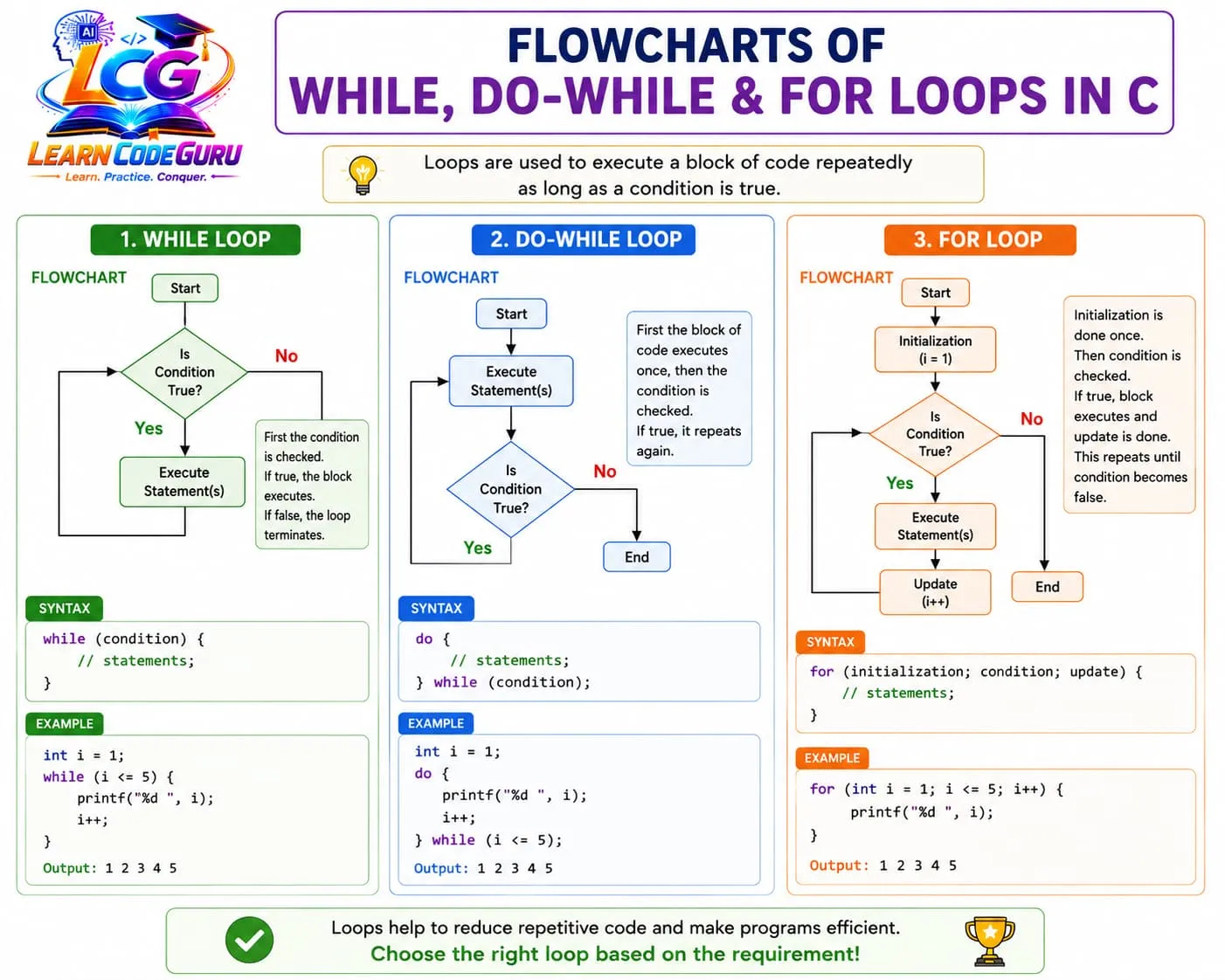
while loop
A while loop is entry-controlled: it checks the condition first. If the condition is false at the start, the body never runs.
Syntax:
while (condition) {
    /* statements repeated while condition is true */
}
Example — print 1 to 5:
int i = 1;
while (i <= 5) {
    printf("%d ", i);
    i++;
}
do-while loop
A do-while loop is exit-controlled: the body runs first, then the condition is checked. The body always executes at least once.
Syntax:
do {
    /* statements — run at least once */
} while (condition);
Example — menu-style repeat:
int choice;
do {
    printf("1.Hello  2.Exit: ");
    scanf("%d", &choice);
} while (choice != 2);
for loop
A for loop packs init, condition, and update in one header. It is also entry-controlled — ideal when the number of iterations is known or easy to express with a counter.
Syntax:
for (init; condition; update) {
    /* loop body */
}
Example — print 1 to 5:
int i;
for (i = 1; i <= 5; i++)
    printf("%d ", i);
for (;;) or while (1) runs until
break / return. Use deliberately, not by accident (forgotten update).
Comparison — while vs do-while vs for
| Feature | while | do-while | for |
|---|---|---|---|
| Condition check timing | Before body (entry) | After body (exit) | Before body (entry) |
| Body runs at least once? | No | Yes | No |
| Typical use | Unknown count; sentinel | Menus; must-run-once | Known count; counters |
| Use case highlight | Read until end / flag | Repeat until valid choice | 1..n, arrays, patterns |
| Syntax sketch | while (cond) { … } | do { … } while (cond); | for (i; cond; i++) { … } |
Nested loops — intro
A nested loop places one loop inside another. The outer loop often controls rows; the inner loop controls columns (or symbols on that row).
Example — 3×4 rectangle of stars:
int row, col;
for (row = 1; row <= 3; row++) {
    for (col = 1; col <= 4; col++)
        printf("*");
    printf("\n");
}
break and continue — basics
break leaves the innermost loop immediately.
continue skips the rest of the current iteration and starts the next one.
break example:
for (int i = 1; i <= 10; i++) {
    if (i == 5)
        break;           /* stop loop when i is 5 */
    printf("%d ", i);
}
/* prints: 1 2 3 4 */
continue example:
for (int i = 1; i <= 5; i++) {
    if (i == 3)
        continue;        /* skip printing 3 */
    printf("%d ", i);
}
/* prints: 1 2 4 5 */
Sample program — sum 1 to n with for
This complete program reads n and prints the sum of integers from 1 through n:
/* Loops — for loop sum 1..n sample */
#include <stdio.h>

int main(void) {
    int n, i, sum = 0;

    printf("Enter n: ");
    scanf("%d", &n);

    for (i = 1; i <= n; i++)
        sum = sum + i;

    printf("Sum = %d\n", sum);
    return 0;
}
i = 1, condition keeps going while
i <= n, update does i++ after each addition. Same idea works to print 1..10.
Level 2 Advanced Content
Going deeper into loops
Level 1 showed the forms. Level 2 explains entry vs exit control, the three parts of
for, nested-loop complexity and shadowing, pattern-building, how
break / continue / return differ, intentional infinite
loops, and an optional while vs do-while flowchart.
Entry-controlled vs exit-controlled loops
- Entry-controlled —
while,for: test first; body may run zero times - Exit-controlled —
do-while: body first; then test; body runs ≥ 1 time - Choose entry-controlled when “do nothing if already done” is correct
- Choose exit-controlled when the first pass must happen (show menu, read then validate)
| Kind | Loops | When body can be skipped |
|---|---|---|
| Entry-controlled | while, for | Yes — if condition is false on entry |
| Exit-controlled | do-while | No — first iteration always runs |
for loop parts — init; condition; update
Each header slot is optional. Empty condition means “always true” (infinite until break).
- init — runs once before the loop (e.g.
i = 0) - condition — checked before each iteration; empty ⇒ forever
- update — runs after each body (e.g.
i++), including aftercontinue - Empty expressions:
for (; i < n; )orfor (;;)are legal
int i = 0;
for (; i < 3; ) {          /* init done outside; update in body */
    printf("%d ", i);
    i++;
}

for (;;) {                     /* intentional infinite loop */
    /* ... break when done ... */
    break;
}
Nested loops — O(n²) intuition & shadowing
If the outer loop runs n times and the inner loop runs n times each,
the body runs about n × n times — often described as O(n²) time.
Triple nesting is roughly O(n³). That is why nested loops on large n can feel slow.
- Prefer distinct names:
row/colinstead of twois - C99 nested
for (int i = ...)inside anotherishadows the outer variable - Reusing one
ifor both loops without care can break the outer counter
Pattern building — rows / cols thinking
Almost every star or number pattern follows: outer = rows, inner = what to print on that row (stars, digits, or spaces then stars).
1) Right triangle of stars (n = 4):
/* Row i prints i stars */
for (int row = 1; row <= n; row++) {
    for (int col = 1; col <= row; col++)
        printf("*");
    printf("\n");
}
/* *   **   ***   **** */
2) Number triangle:
for (int row = 1; row <= n; row++) {
    for (int col = 1; col <= row; col++)
        printf("%d ", col);
    printf("\n");
}
/* 1 / 1 2 / 1 2 3 / ... */
3) Inverted star triangle:
for (int row = n; row >= 1; row--) {
    for (int col = 1; col <= row; col++)
        printf("*");
    printf("\n");
}
row or n - row + 1).
break vs continue vs return
| Keyword | Effect | Scope |
|---|---|---|
break | Exit the innermost loop or switch now | One loop / switch only |
continue | Skip rest of this iteration; next iteration | Innermost loop; for still runs update |
return | Leave the whole function immediately | Function (e.g. main); code after loop does not run |
Infinite loops — intentional stop
Infinite loops are useful for interactive menus or servers — but only if you plan an exit:
while (1) { … if (done) break; }for (;;) { … if (quit) return 0; }- Accidental infinity: forgotten
i++, wrong condition, orcontinueskipping the update inwhile
while (1) {
    printf("Enter 0 to stop: ");
    scanf("%d", &x);
    if (x == 0)
        break;              /* intentional exit */
}
Optional flowchart — while vs do-while
How the two loops decide whether the body runs:
Level 3 C Tricky Interview Points
Advanced tricky interview points on while / do-while / for, off-by-one, for(;;), break / continue, nested scope, and patterns.
Tricky Interview Point-1:
for (;;); is an infinite loop — empty condition is always true
Omitting the condition in for (init; ; update) means “always true.” Combined with an empty body semicolon, for (;;); spins forever. Interviewers ask you to spot this and to exit with break or return when the loop is intentional.
Tricky Interview Point-2:
Off-by-one: i <= n vs i < n changes iteration count
for (i = 0; i < n; i++) runs n times; for (i = 1; i <= n; i++) also runs n times but with different values. Mixing 0-based and 1-based bounds is the classic off-by-one bug — count iterations on paper before coding.
Tricky Interview Point-3:
while (n--); drains n then exits — empty body is easy to miss
A semicolon after while (cond) makes an empty loop body. while (n--); still evaluates and updates n until the condition becomes false. Trace post-decrement carefully: the old value is tested, then n decreases.
Tricky Interview Point-4:
do-while always runs the body once — even if condition starts false
Unlike while and for (entry-controlled), do-while checks after the body. If you need “run at least once” (menus, retry prompts), do-while fits; if the body must never run when the condition is initially false, use while or for.
Tricky Interview Point-5:
break exits only the innermost loop / switch
In nested loops, break leaves the inner loop; the outer loop continues. To escape multiple levels you need a flag, goto (rare), or restructure. Interview output questions often hide a break inside the inner for.
Tricky Interview Point-6:
continue skips to the next iteration — for still runs the update
In a for loop, continue jumps to the update expression (i++), then rechecks the condition. In while/do-while, continue jumps to the condition check — so you must update the control variable before continue or you can infinite-loop.
Tricky Interview Point-7:
Nested loop variable reuse / shadowing confuses output
Declaring int i in both outer and inner for (C99+) shadows the outer i inside the inner block. Reusing one i across both loops without redeclaration can corrupt the outer counter. Prefer distinct names: row and col.
Tricky Interview Point-8:
for (i = 0; i < n; i++) body runs 0 times when n is 0 or negative
If the condition is false on entry, the body never executes. Interviewers contrast this with do-while. Always state assumptions about n (n > 0) when predicting output.
Tricky Interview Point-9:
Comma operator in for init/update packs multiple expressions
for (i = 0, j = n - 1; i < j; i++, j--) is valid: commas sequence expressions; the condition is still a single expression. The value of a comma expression is the rightmost sub-expression — useful but easy to misread.
Tricky Interview Point-10:
Infinite while (1) needs an intentional exit path
while (1) { ... break; } or while (1) { if (done) return 0; } is idiomatic for servers/menus. Without break, return, exit, or a condition that becomes false, the program hangs — a common “find the bug” question.
Tricky Interview Point-11:
Pattern rows/cols: outer = rows, inner = columns (or stars per row)
For a right triangle of height n, outer loop runs n rows; inner loop runs i stars on row i (1-based) or i+1 (0-based). Wrong inner bound is the usual mistake — draw a 3-row grid before writing code.
Tricky Interview Point-12:
return leaves the whole function — stronger than break
break exits one loop; return exits main (or the current function) immediately. Mixing them in interview traces changes whether later statements after the loop still run.
continue in for, remember the update still runs; in
while, you must update yourself.
Level 4 Simple Programs
Short programs demonstrating while / do-while, nested patterns, and break / continue.
Program 1 — while / do-while (digit count + menu)
/* while: count digits; do-while: simple menu */
#include <stdio.h>

int main(void) {
    int n, count = 0, choice;

    printf("Enter a positive integer: ");
    scanf("%d", &n);

    if (n == 0)
        count = 1;
    else {
        while (n > 0) {
            count++;
            n = n / 10;
        }
    }
    printf("Digits = %d\n", count);

    do {
        printf("1.Ping  2.Exit: ");
        scanf("%d", &choice);
        if (choice == 1)
            printf("Pong\n");
    } while (choice != 2);

    return 0;
}
Program 2 — nested for (star triangle)
/* nested for: right triangle of stars */
#include <stdio.h>

int main(void) {
    int n, row, col;

    printf("Enter rows: ");
    scanf("%d", &n);

    for (row = 1; row <= n; row++) {
        for (col = 1; col <= row; col++)
            printf("*");
        printf("\n");
    }

    return 0;
}
Program 3 — break and continue demo
/* break + continue: print 1..10, skip 3, stop at 8 */
#include <stdio.h>

int main(void) {
    int i;

    for (i = 1; i <= 10; i++) {
        if (i == 3)
            continue;      /* skip 3 */
        if (i == 8)
            break;         /* stop before printing 8 */
        printf("%d ", i);
    }
    printf("\n");
    /* output: 1 2 4 5 6 7 */

    return 0;
}
Level 5 Problem Solving Tricks
How to master loops while solving problems
Most loop bugs come from off-by-one bounds, missing updates, wrong
break/continue, and nested counters that fight each other.
Use these colorful habits every time you write a loop or pattern.
Trace loops on paper with a small n first
Before coding or predicting output, pick n = 3 or 4. Make a table of i (and j if nested) each iteration. Paper traces catch off-by-one and break/continue mistakes faster than guessing.
Prefer for when the iteration count is known
Counting 1..n, array indices, or fixed pattern rows → for. Unknown count until a sentinel / user choice → while or do-while. Matching the loop form to the problem reduces missing updates.
Watch off-by-one: decide 0-based vs 1-based once
Pick a convention: for (i = 0; i < n; i++) or for (i = 1; i <= n; i++) — and stick to it for that problem. Mixing both in nested pattern loops is the #1 source of wrong star counts.
Name outer/inner counters row and col
Avoid double-i nesting. int row, col; makes pattern logic readable and prevents accidental reuse of one counter that breaks the outer loop.
Put the update before continue in while loops
If you continue early in a while, ensure the loop variable still advances (or the exit condition can become true). for handles this via the update clause; while does not.
Use break for “found it / stop early”; continue for “skip this case”
Searching for a value → break when found. Filtering (skip negatives, skip multiples) → continue. return when the whole function is done. Saying the intent aloud picks the right keyword.
Build patterns as rows × columns
Ask: How many rows? How many symbols on this row? Spaces before stars? Code outer = rows, inner = symbols (and maybe a second inner for spaces). Explain the pattern in words before typing braces.
Guard infinite loops with a clear exit
If you write while (1) or for (;;), immediately plan break / return / flag. Add a comment at the exit point. Never leave a “temporary” infinite loop without a way out.
Quick success checklist
- Before run: init set? condition correct (< vs <=)? update present? continue still advances?
- Debug order: trace n=3 on paper → check inner bound → verify break only exits one loop
- Choose form: known count → for; unknown / sentinel → while; must-run-once → do-while
Level 6 Practice Programs List
Programming questions only — focused on loops, nested patterns, and break / continue.
- 1. Write a C program that uses a for loop to print numbers from 1 to n (read n from the user).
- 2. Write a C program that uses a while loop to compute the sum of digits of a positive integer.
- 3. Write a C program that uses do-while to show a simple menu (e.g. 1=Hello, 2=Exit) until the user chooses Exit.
- 4. Write a C program that prints a right-angled triangle of stars with n rows using nested for loops.
- 5. Write a C program that prints a number triangle (row i prints 1..i) using nested loops.
- 6. Write a C program that prints an inverted star triangle with n rows.
- 7. Write a C program that demonstrates break: read integers until -1, then print how many were read before -1.
- 8. Write a C program that demonstrates continue: print numbers 1..20 but skip multiples of 3.