
C Basics
Data Types & I/O
Master Types of Data Types, the size / range / format specifier table, and printf() / scanf() syntax with examples using LEARNCODEGURU’s 6-level learning model.
Level 1 Basics Content
Data Types & Input/Output Overview
Every variable in C has a data type that tells the compiler how much memory to allocate
and what kind of values can be stored. Once you know the type, you can choose the correct
format specifier for printf() (output) and scanf() (input).
This tutorial covers the fundamental types, a reference table, and your first complete I/O program.
Remember: exact sizes of types can vary between compilers and platforms. The table below uses
common teaching values for typical 32/64-bit systems — always verify with sizeof() on your machine.
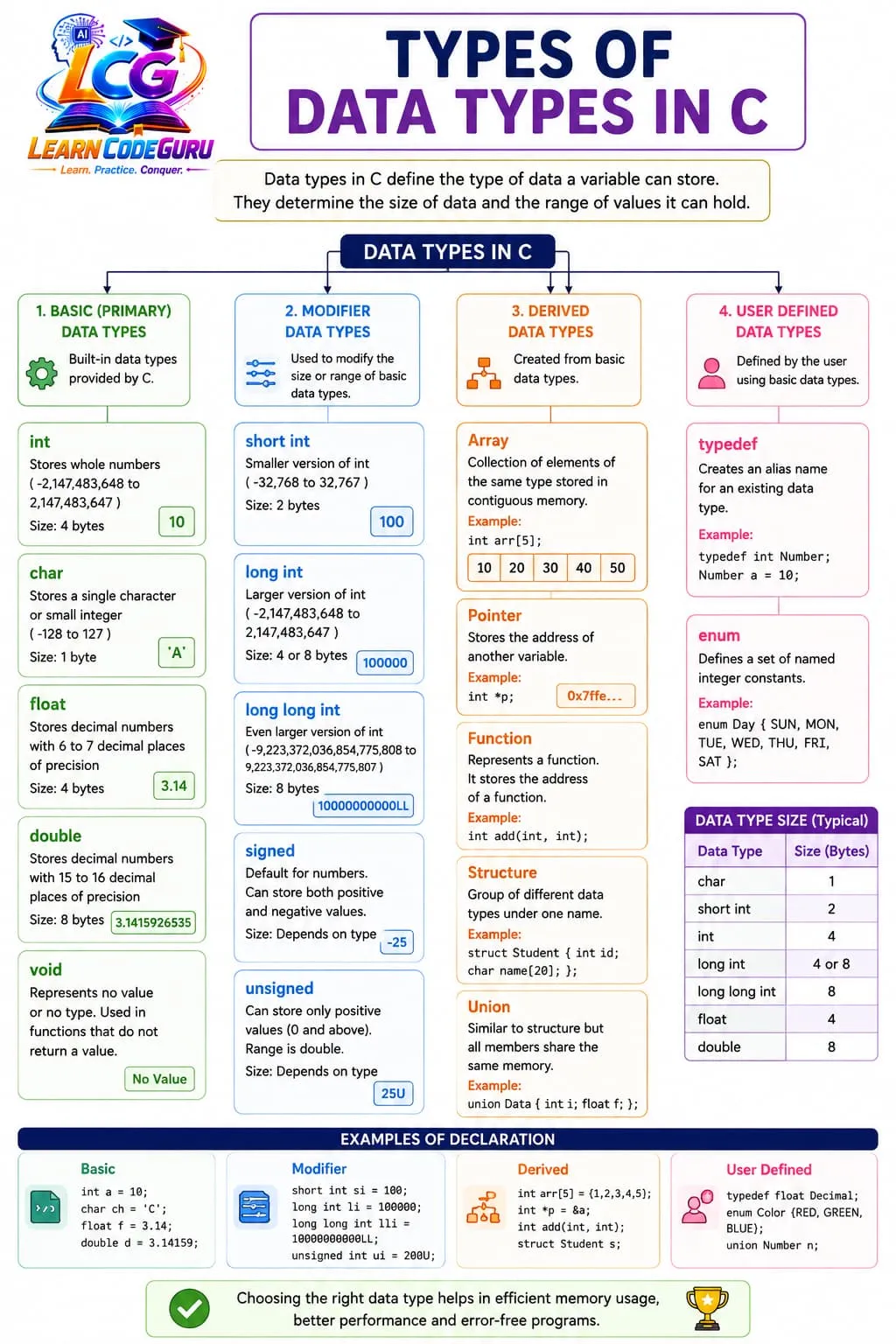
Types of Data Types in C
C organizes data types into three broad categories. Understanding this classification helps you pick the right type for each problem and explains why some types are built-in while others you create yourself.
- Primary / Basic data types:
int,char,float,double— the atomic types provided directly by the language - Derived data types: built from basic types —
array,pointer,function(covered in later tutorials) - User-defined data types: created by the programmer —
struct,union,enum,typedef
Type modifiers change the size or signedness of basic types:
- signed / unsigned — control whether negative values are allowed (
unsigned intstores only ≥ 0) - short / long / long long — change integer width (
short int,long int,long long int) - long (with double) — extended-precision floating point (
long double)
Data Types Reference Table
Use this table as a quick reference when declaring variables or choosing format specifiers. Sizes and ranges are approximate and implementation-dependent — they are typical values on common desktop compilers (GCC/MSVC on 32/64-bit systems).
| Data Type | Size (typical) | Range (approx) | Format Specifier | Example |
|---|---|---|---|---|
char | 1 byte | −128 to 127 | %c / %d | char ch = 'A'; |
unsigned char | 1 byte | 0 to 255 | %c / %u | unsigned char u = 200; |
int | 4 bytes | −2,147,483,648 to 2,147,483,647 | %d | int n = 42; |
unsigned int | 4 bytes | 0 to 4,294,967,295 | %u | unsigned int x = 100U; |
short | 2 bytes | −32,768 to 32,767 | %hd | short s = -100; |
long | 4 or 8 bytes | platform-dependent | %ld | long L = 100000L; |
long long | 8 bytes | ±9.2 × 10¹⁸ | %lld | long long ll = 9999999999LL; |
float | 4 bytes | ≈ ±3.4 × 1038 (6–7 digits) | %f | float f = 3.14f; |
double | 8 bytes | ≈ ±1.7 × 10308 (15 digits) | %lf | double d = 3.14159; |
long double | 8–16 bytes | higher precision than double | %Lf | long double ld = 3.141592653589793238L; |
printf("%zu", sizeof(int)); on your system to see actual sizes. Never hard-code
"int is always 4 bytes" in portable code without checking.
printf() — formatted output
printf() displays formatted text on the screen. It is declared in <stdio.h>.
The general syntax is:
printf("format string", arg1, arg2, ...);
- Format string — text in double quotes with conversion specifiers like
%d,%f - Arguments — variables whose values replace the specifiers, in the same order
- Escape sequences:
\n(newline),\t(tab),\\(backslash)
Common examples:
printf("Hello, World!\n");                    /* no variables */
printf("Age = %d\n", age);                    /* integer */
printf("Price = %.2f\n", price);              /* float, 2 decimals */
printf("Grade = %c\n", grade);                /* character */
printf("%d + %d = %d\n", a, b, a + b);    /* mixed */
scanf() — formatted input
scanf() reads formatted input from the keyboard (standard input). It is also declared in
<stdio.h>. The general syntax is:
scanf("format string", &variable1, &variable2, ...);
- Use the address-of operator
&before variable names (except arrays/strings) - Format specifiers must match the variable types — same rules as
printf scanfskips leading whitespace before numeric and string input- Reading stops at whitespace for
%s; usefgets()for lines with spaces
Common examples:
scanf("%d", &n);                         /* read integer into n */
scanf("%f", &price);                   /* read float */
scanf("%c", &ch);                       /* read single character */
scanf("%d %d", &a, &b);                /* read two integers */
scanf("%lf", &value);                   /* read double */
& in scanf("%d", n) passes the
value of n instead of its address — this causes undefined behavior and may crash the program.
Format specifiers — quick cheat sheet
The format specifier in the format string tells printf and scanf how to
interpret each value. Mismatching type and specifier is a top beginner mistake.
%d— signed decimal integer (int)%u— unsigned decimal integer (unsigned int)%hd/%ld/%lld— short / long / long long integers%f— floating-point (float/doublein printf)%lf— double inscanf%Lf— long double (capital L)%c— single character%s— string (char array)%.nf— float with n decimal places (e.g.%.2f)
First complete I/O program
The program below declares variables of different types, reads two integers from the user, and prints their sum along with a floating-point average:
/* Data Types & I/O — first complete program */
#include <stdio.h>

int main(void) {
    int a, b, sum;
    float avg;
    char grade = 'A';

    printf("Enter two integers: ");
    scanf("%d %d", &a, &b);

    sum = a + b;
    avg = (float)sum / 2;

    printf("Sum = %d\n", sum);
    printf("Average = %.2f\n", avg);
    printf("Grade = %c\n", grade);

    return 0;
}
%d for integers, %.2f for float with 2 decimals,
%c for character, &a and &b in scanf, and the cast
(float)sum to avoid integer division.
Level 2 Advanced Content
Going deeper into Data Types & I/O
Level 1 gave you the vocabulary. Level 2 explains signed vs unsigned behavior, how to measure type sizes
with sizeof, why float and double differ, precision control,
scanf pitfalls, input-buffer leftovers, and implicit type conversion — the topics that appear in exams and interviews.
Signed vs unsigned integers
By default, int, char, and short are signed — they can store
negative values using two's complement representation. Adding unsigned removes the sign bit,
doubling the positive range but forbidding negative values.
signed int x = -10;— valid, stores −10unsigned int y = 10;— valid, stores 10unsigned int z = -1;— compiles but wraps to a large positive value- Use
%dfor signed,%ufor unsigned in printf - Mixing signed and unsigned in comparisons can produce surprising results
char may be signed or unsigned depending on the compiler.
Use signed char or unsigned char when the range matters.
The sizeof operator
sizeof is a compile-time operator that returns the size of a type or variable in bytes.
It is essential for portable code because type sizes are not fixed by the C standard.
printf("sizeof(char)   = %zu bytes\n", sizeof(char));
printf("sizeof(int)    = %zu bytes\n", sizeof(int));
printf("sizeof(float)  = %zu bytes\n", sizeof(float));
printf("sizeof(double) = %zu bytes\n", sizeof(double));
- Returns type
size_t— print with%zu - Can be used as
sizeof(int)orsizeof variable - Does not evaluate its operand at runtime (except for variable-length arrays)
Why float vs double?
Both store floating-point numbers, but they differ in precision and memory:
- float — 4 bytes, ~6–7 significant digits; suffix
fon literals:3.14f - double — 8 bytes, ~15 significant digits; default for floating literals:
3.14is double - long double — extended precision, size varies (8–16 bytes)
- Use
floatwhen memory is tight; usedoublefor scientific/financial accuracy - In
printf,%fworks for both float and double; use%lfinscanffor double
Format specifier precision — %.2f and more
You can control width and decimal places by inserting numbers between % and the letter:
%.2f— print float with exactly 2 digits after the decimal (rounded)%10d— print integer in a field of width 10 (right-aligned)%-10d— left-aligned in width 10%05d— pad with zeros:00042%.4f— four decimal places for higher precision output
float pi = 3.14159265f;
printf("Default: %f\n", pi);       /* 3.141593 */
printf("Two dec: %.2f\n", pi);     /* 3.14 */
printf("Four dec: %.4f\n", pi);    /* 3.1416 */
scanf pitfalls — & required, buffer leftovers
Two classic scanf problems cause more debugging hours than almost anything else in beginner C:
1. Forgetting the address-of operator (&):
int n;
scanf("%d", n);    /* WRONG — undefined behavior */
scanf("%d", &n);   /* CORRECT */
2. Leftover newline after numeric input:
int num;
char ch;
scanf("%d", &num);        /* user types 10 and Enter */
scanf("%c", &ch);         /* reads leftover '\n', not your char! */
scanf(" %c", &ch);       /* space skips whitespace — FIX */
Type conversion and truncation
C performs implicit conversions when assigning between types. Converting from a larger range to a smaller type truncates — excess bits are lost:
int x = 3.9;→ x becomes 3 (fraction discarded)char c = 300;→ c keeps only lower 8 bits (value depends on char signedness)float f = 5;→ f becomes 5.0 (int promoted to float)- Explicit cast:
(float)a / bforces floating-point division - Always check whether the target type can hold the value before assigning
Level 3 C Tricky Interview Points
Advanced tricky interview points on data types, format specifiers, printf, and scanf.
Tricky Interview Point-1:
sizeof(int) is not always 4 bytes
The C standard only guarantees minimum sizes, not exact sizes. On many 64-bit systems int is 4 bytes, but on some embedded platforms it may differ. Always use sizeof() when size matters.
Tricky Interview Point-2:
printf with %d for float compiles but prints garbage
Using %d to print a float is undefined behavior. The format specifier must match the argument type. float → %f, int → %d, char → %c.
Tricky Interview Point-3:
scanf without & stores into random memory
For int, float, char variables you must pass the address: scanf("%d", &n). Forgetting & is one of the most common beginner bugs and can crash the program.
Tricky Interview Point-4:
float promoted to double in printf/scanf
In variable arguments (printf, scanf), float values are promoted to double. That is why printf uses %f for float, and scanf also expects %f with a float* (which becomes double* in the call).
Tricky Interview Point-5:
char is signed or unsigned — implementation-defined
Plain char may be signed char or unsigned char depending on the compiler. Values above 127 in a plain char can behave differently across platforms. Use signed char or unsigned char explicitly when range matters.
Tricky Interview Point-6:
unsigned subtraction can wrap around
If unsigned int a = 5 and b = 10, then a - b does not become -5 — it wraps to a large positive value. Mixing signed and unsigned in comparisons is a classic interview trap.
Tricky Interview Point-7:
%c after %d leaves newline in the input buffer
After scanf("%d", &n), the Enter key leaves '\n' in the buffer. A following scanf("%c", &ch) may read that newline instead of the character you expect. Use " %c" (space before %c) or flush/clear the buffer.
Tricky Interview Point-8:
scanf("%s") stops at whitespace
The %s format reads until the first space, tab, or newline. To read a full line with spaces, use fgets() instead. This is a common exam question about I/O limitations.
Tricky Interview Point-9:
Integer division truncates — no rounding
int a = 7, b = 2; printf("%d", a/b); prints 3, not 3.5. At least one operand must be float/double for floating-point division: (float)a / b.
Tricky Interview Point-10:
long double size varies widely
long double may be 8, 10, 12, or 16 bytes depending on the compiler and platform. Use %Lf for long double in printf (capital L). Never assume it equals double.
Tricky Interview Point-11:
Implicit conversion from larger to smaller type truncates
Assigning 300 to a char (typically 1 byte) keeps only the lower bits — value becomes 44 on many systems. Always check range before assigning to a smaller type.
Tricky Interview Point-12:
Format width %.2f rounds, does not truncate blindly
printf("%.2f", 3.146) prints 3.15 (rounded). Interviewers ask whether it prints 3.14 or 3.15 — know that printf rounds to the specified decimal places.
Level 4 Simple Programs
Short programs demonstrating data types, printf format specifiers, and scanf input.
Program 1 — Print mixed types
/* Print int, float, char, and double */
#include <stdio.h>

int main(void) {
    int age = 20;
    float height = 5.9f;
    char grade = 'A';
    double pi = 3.141592653589793;

    printf("Age    = %d\n", age);
    printf("Height = %.1f ft\n", height);
    printf("Grade  = %c\n", grade);
    printf("Pi     = %.10lf\n", pi);
    return 0;
}
Program 2 — scanf two ints and print sum
/* Read two integers and print their sum */
#include <stdio.h>

int main(void) {
    int a, b, sum;

    printf("Enter two integers: ");
    scanf("%d %d", &a, &b);

    sum = a + b;
    printf("%d + %d = %d\n", a, b, sum);
    return 0;
}
Program 3 — char + float I/O
/* Read a character and a float, then print both */
#include <stdio.h>

int main(void) {
    char letter;
    float value;

    printf("Enter a letter: ");
    scanf(" %c", &letter);

    printf("Enter a float value: ");
    scanf("%f", &value);

    printf("Letter = %c, Value = %.3f\n", letter, value);
    return 0;
}
Level 5 Problem Solving Tricks
How to master Data Types & I/O while solving problems
Most beginner bugs in C I/O come from format mismatches, missing & in scanf,
leftover buffer characters, and integer division when floats are needed. Use these colorful
problem-solving habits every time you write or debug a program.
Match every variable to its format specifier
Before writing printf or scanf, list each variable and its type, then pick the correct specifier: int↔%d, unsigned↔%u, long↔%ld, float↔%f, double↔%lf, char↔%c, string↔%s. A one-line mismatch can compile with warnings and still crash or print garbage.
Always write & before variable names in scanf
Create a habit: every scanf format with %d, %f, %c (except arrays/strings) gets &. Say it aloud: "scan eff percent d, ampersand n." Missing & is the #1 scanf bug in exams.
Use " %c" to skip leftover whitespace
When reading a character after reading a number, put a space before %c in the format string: scanf(" %c", &ch). The leading space tells scanf to skip any whitespace (including the leftover newline).
Print float with precision you need
Use %.2f for currency (two decimals), %.4f for scientific values, %g for automatic trimming. Writing just %f may print six default decimals — fine for debugging, messy for user output.
Verify sizes with sizeof before assuming
When an interview question says "int is 4 bytes," answer cautiously: "typically 4 on my platform." Run printf("%zu", sizeof(int)); to prove it. Same for long, double, and pointers.
Cast before division when you need decimals
If both operands are int, division is integer division. Write (float)a / b or (double)a / b when you need a fractional result. This trick alone fixes many "wrong average" programs.
Check return value of scanf
scanf returns the number of successfully assigned items. if (scanf("%d", &n) != 1) { printf("Invalid input"); } prevents silent failures when the user types letters instead of numbers.
Separate mixed-type printf arguments in order
Format string placeholders and arguments must match in count and type, left to right. printf("Age=%d Height=%.1f", age, height) — first %d gets age, first %f gets height. Trace on paper when debugging wrong output.
Quick success checklist
- Before run: types declared? format specifiers matched? & used in scanf? precision set?
- Debug order: fix compile errors → check scanf & → verify format specifiers → test buffer issues
- Trace on paper: write each printf/scanf argument next to its format placeholder before running
Level 6 Practice Programs List
Programming questions only — focused on data types, format specifiers, printf, and scanf.
- 1. Write a C program that declares variables of type int, float, char, and double, initializes them, and prints each using the correct format specifier.
- 2. Write a C program that reads two integers using scanf, calculates their sum and product, and prints the results with printf.
- 3. Write a C program that reads a character and a float, then prints both values on separate lines.
- 4. Write a C program that prints sizeof(char), sizeof(int), sizeof(float), and sizeof(double) using the sizeof operator.
- 5. Write a C program that reads an unsigned integer and prints it with %u.
- 6. Write a C program that reads a double value and prints it with %.3f precision.
- 7. Write a C program that demonstrates the newline-buffer problem: read an int, then a char, and show how " %c" fixes it.
- 8. Write a C program that reads two floating-point numbers and prints their average with two decimal places.