
C Basics
Introduction to C
Complete lesson for Introduction to C using LEARNCODEGURU’s 6-level learning model — from basics to advanced practice.
Level 1 Basics Content
Introduction to C
C is one of the most important programming languages in computer science. It is widely used to learn programming fundamentals, write system software, and understand how programs work close to the hardware.
What is C?
C is a general-purpose, procedural programming language developed to write efficient and portable programs. It allows the programmer to work with variables, functions, loops, conditions, arrays, pointers, and files.
- C is a compiled language (source code is converted into machine code)
- C follows a structured / modular programming style
- C is used in operating systems, embedded systems, compilers, and tools
- Many modern languages (C++, Java, C#, Python internals) are influenced by C
C Features
- Simple and powerful — easy core syntax with strong control over program flow
- Fast and efficient — close to hardware, so programs can run very quickly
- Portable — a C program can be compiled on different systems with small changes
- Modular — programs can be divided into functions and reusable files
- Rich operators and data types — supports int, float, char, arrays, pointers, and more
- Low-level access — pointers and memory control make C useful for system programming
- Extensible — large programs can grow using libraries and user-defined functions
C History
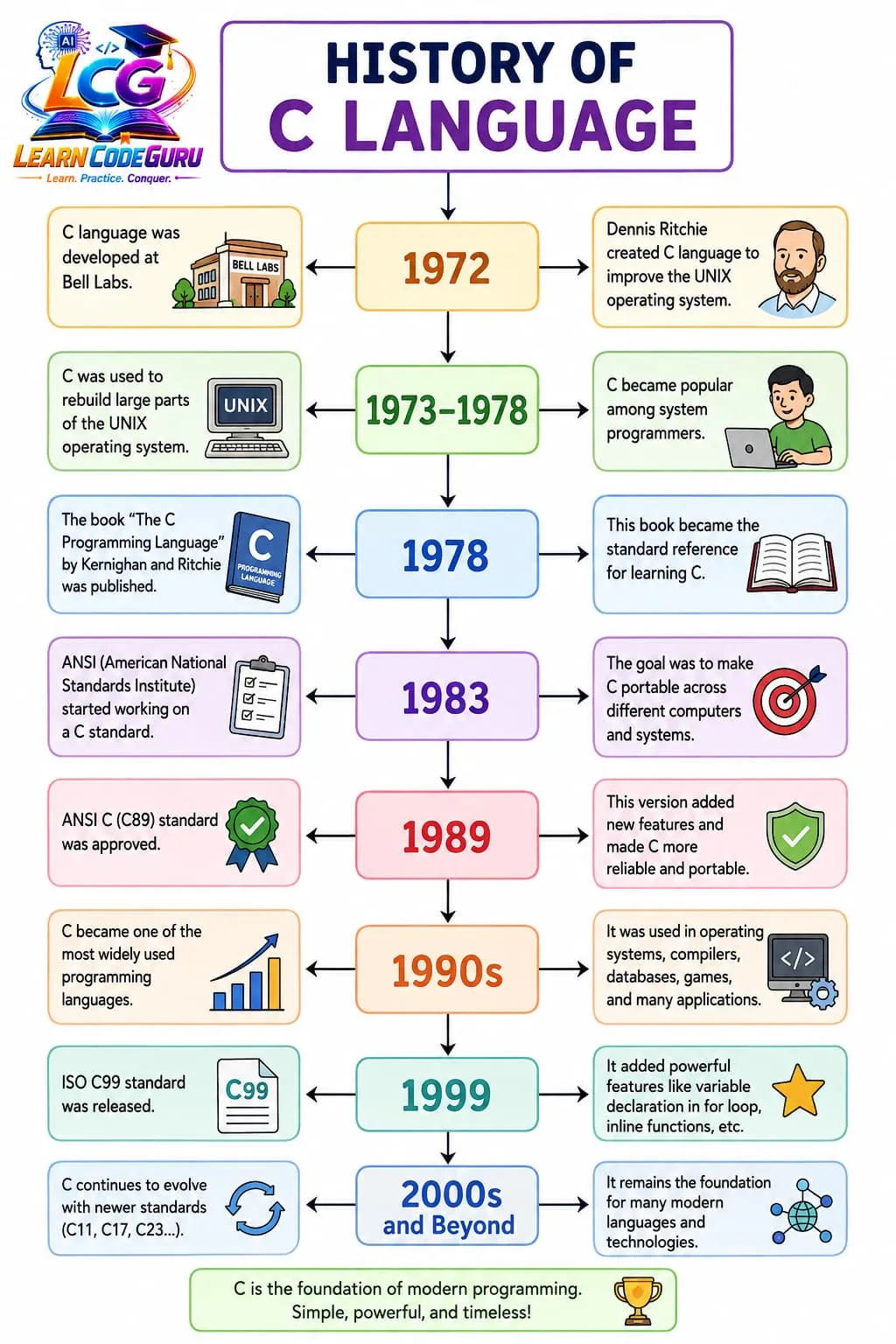
Why Learn C?
- Builds a strong base for learning other programming languages
- Helps understand memory, compilers, and program execution
- Useful for academics, GATE, interviews, and system-level coding
- Used widely in operating systems, embedded systems, and performance-critical software
- Improves logical thinking and problem-solving skills
- Makes it easier to learn C++, Java, and similar languages later
/* First C program — Introduction */
#include <stdio.h>

int main(void) {
    printf("Welcome to C Programming!\n");
    return 0;
}
Level 2 Advanced Content
How a C Program Executes
A C program does not run directly from the .c source file.
It goes through these stages before the computer can execute it:
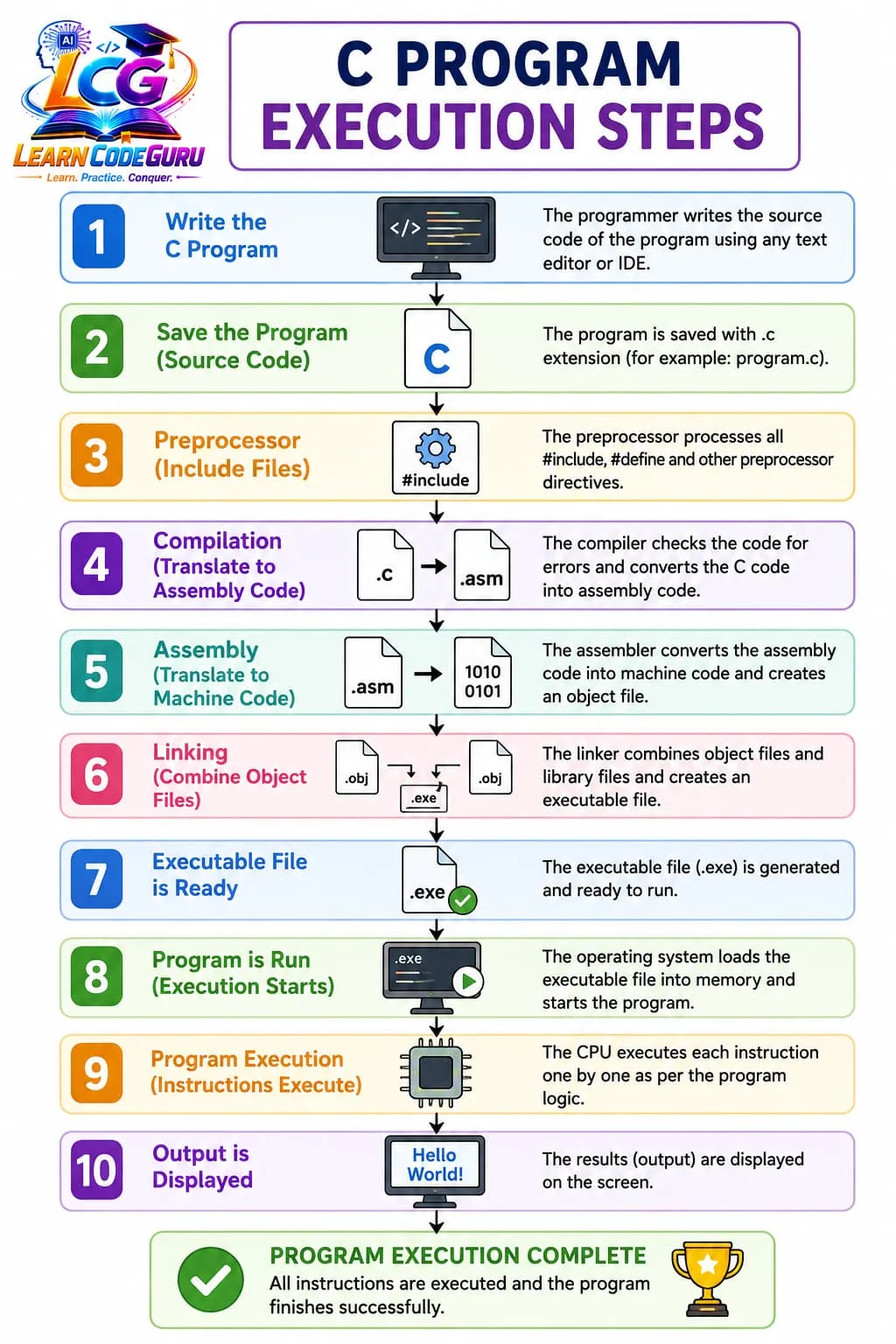
Language Translators
Language translators convert human-readable code into a form the machine can understand.
- Compiler — translates the complete program into machine code before execution (GCC, Clang, Turbo C)
- Interpreter — reads and executes code line by line (used in languages like Python)
- Assembler — converts assembly language into machine language
- Linker — links object code with library code and creates the final executable file
- Loader — loads the executable into main memory for running
Compiler vs Interpreter
- Compiler: Faster execution after translation; shows many errors together
- Interpreter: Easier debugging line by line; usually slower overall execution
- C approach: Compile once, then run the executable many times
Basic Structure of a C Program
- Preprocessor directives (
#include <stdio.h>) - Optional global declarations
main()function — starting point of execution- Statements and expressions inside
main() return 0;to indicate successful completion
Level 3 C Tricky Interview Points
Very advanced tricky points on C basics — commonly asked in interviews to test deep understanding beyond definitions.
Tricky Interview Point-1:
C is compiled, but not purely “high-level”
Interviewers expect: C sits between high-level and low-level — it supports abstraction like functions/structures, yet allows pointer arithmetic and direct memory access.
Tricky Interview Point-2:
main() is special, but still a function
The OS/runtime calls main. Return type should be int in standard C. void main() is non-standard (common in old Turbo C interviews as a trap).
Tricky Interview Point-3:
return 0; is not “just optional text”
It returns an exit status to the operating system. 0 usually means success; non-zero often means failure.
Tricky Interview Point-4:
Preprocessor is not the compiler
#include / #define are handled before compilation. Tricky question: “Does #define allocate memory?” → No, it is textual replacement.
Tricky Interview Point-5:
#include <stdio.h> vs #include "stdio.h"
Angle brackets search system/library paths; quotes usually search local project path first. Wrong include style is a classic interview check.
Tricky Interview Point-6:
Header files usually should not contain executable code
Headers declare interfaces. Putting full function definitions in headers can cause multiple-definition linker errors if included in many .c files.
Tricky Interview Point-7:
Compilation success ≠ correct program
A program can compile and still have undefined behavior (UB), wrong logic, or linker issues. Interviewers love: “Will this compile? Will this run correctly?”
Tricky Interview Point-8:
Undefined Behavior (UB) is more dangerous than a normal bug
Examples at basics level: using uninitialized variables, signed overflow assumptions, wrong format specifiers in printf/scanf. UB means anything can happen — crash, wrong output, or “works on my machine”.
Tricky Interview Point-9:
Format specifier mismatch is undefined behavior
Example trap: printing int with %f, or using %d for float. Many candidates think it only prints wrong value; in reality it can corrupt stack interpretation.
Tricky Interview Point-10:
scanf needs addresses, printf usually needs values
Classic trick: scanf("%d", n); is wrong; must be &n for scalars. Forgetting & is one of the most common beginner interview catches.
Tricky Interview Point-11:
Character constants are integers in C
'A' has type int in C (not char like some assume from other languages). This affects promotion and overload-style mental models.
Tricky Interview Point-12:
Automatic variables are not auto-initialized to zero
Local (auto) variables contain garbage if not initialized. Only static/global storage is zero-initialized by default.
Tricky Interview Point-13:
“Portable C” does not mean “identical output everywhere”
int size, endianness, signedness of char, and evaluation order of some expressions can differ across platforms/compilers.
Tricky Interview Point-14:
Sequence points / evaluation order traps
Expressions like a = a++ or i = i++ + ++i are undefined/unspecified traps. Never assume left-to-right modification of the same scalar in one expression.
Tricky Interview Point-15:
Linker errors are not syntax errors
“Undefined reference to …” usually means declaration existed but definition/library was missing. Distinguish: preprocessor error vs compile error vs link error vs runtime error.
Tricky Interview Point-16:
C has no built-in string type
Strings are char arrays ending with '\0'. Forgetting the null terminator is a deep basics trap even in “simple” I/O programs.
Tricky Interview Point-17:
Entry point myths
Not every C file needs main — only the final executable needs one entry point. Library/object files can exist without main.
Tricky Interview Point-18:
K&R C vs ANSI C vs modern C
Old interview papers may show outdated syntax. Prefer standard prototypes: int main(void) / int main(int argc, char *argv[]).
Level 4 Simple Programs
Start with short programs that demonstrate Introduction to C clearly.
Program 1 — Simple demo
/* Level 4: Simple Program 1 — Introduction to C */
#include <stdio.h>

int main(void) {
    printf("Simple demo: Introduction to C\n");
    return 0;
}
Program 2 — Input / output practice
/* Level 4: Simple Program 2 — input/output practice */
#include <stdio.h>

int main(void) {
    int n;
    printf("Enter a number: ");
    scanf("%d", &n);
    printf("You entered: %d\n", n);
    return 0;
}
Level 5 Problem Solving Tricks
- Trace first: Dry-run the logic of Introduction to C on paper before coding.
- Small inputs: Test with tiny values to catch boundary mistakes early.
- Name clearly: Use meaningful variable names related to Introduction to C.
- One change at a time: Modify and recompile after each small change.
- Watch warnings: Compiler warnings often point to concept misunderstandings.
- Compare patterns: Relate Introduction to C to a similar topic you already know.
Level 6 Practice Programs List
Introduction practice — input and output programs only (printf / scanf). Write and run each program.
- 1. Write a C program that prints "Hello, World!" using printf.
- 2. Write a C program that prints your name and a welcome message on separate lines.
- 3. Write a C program that reads an integer using scanf and prints it back.
- 4. Write a C program that reads two integers and prints their sum.
- 5. Write a C program that reads a character and prints it using printf.
- 6. Write a C program that reads a floating-point number and prints it with 2 decimal places.
- 7. Write a C program that asks for name (string) and age, then prints both in one sentence.
- 8. Write a C program that reads three numbers and prints them in reverse order.