
C Basics
C Fundamentals
Master C Program Structure, Tokens, Keywords, Variables, Constants, and Literals using LEARNCODEGURU’s 6-level learning model.
Level 1 Basics Content
C Fundamentals Overview
Before writing large programs, every C learner must understand the fundamental building blocks of the language. Just like an English sentence is made of words and grammar rules, a C program is made of a clear structure, small units called tokens, reserved keywords, named storage called variables, fixed named values called constants, and raw values written in code called literals.
This tutorial explains each idea in simple language with examples, so you can read any beginner C program and clearly identify what each part is doing.
C Program Structure
A C program is not a random collection of lines. It follows a standard layout that the compiler and
operating system expect. When you open a .c file, you can usually spot these parts in order.
First come comments (optional) that explain the purpose of the program to humans.
Next come preprocessor directives such as #include <stdio.h>, which
tell the preprocessor to bring in standard library support for input and output. After that, you may
declare optional global variables or function prototypes. Then comes the most important
function: main(). Program execution always starts from main. Inside
main, you write declarations and statements. Finally, return 0; tells the
operating system that the program finished successfully.
- Documentation / comments — notes for humans (ignored by the compiler)
- Preprocessor directives — e.g.
#include <stdio.h> - Global declarations — optional globals / function prototypes
- main() function — starting point of execution
- Statements & expressions — actual logic of the program
- return — exit status returned to the operating system
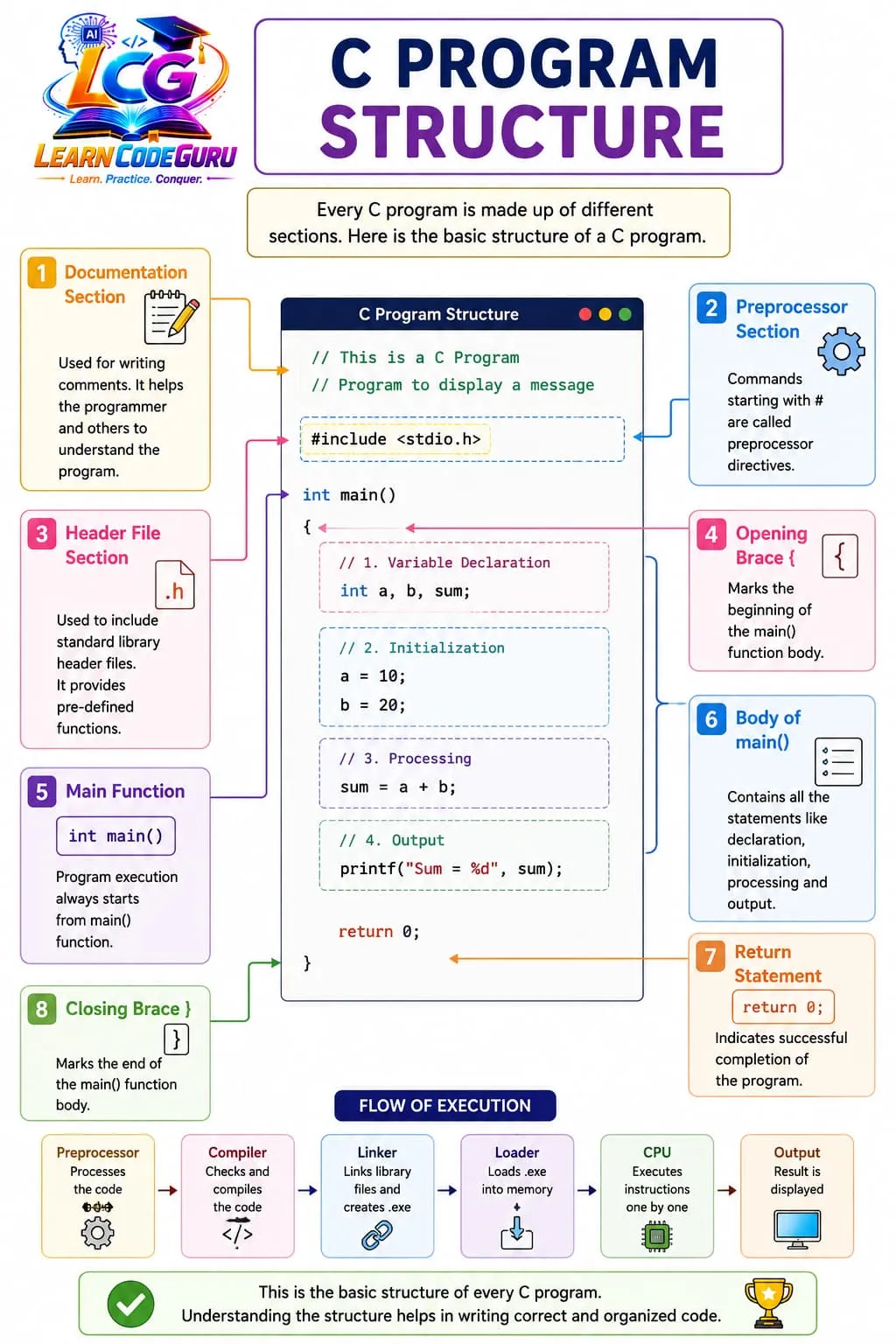
return 0;main is missing in an executable project, linking fails.
If a semicolon is missing after a statement, compilation fails.
Tokens — the smallest units of a C program
When the compiler reads your source code, it does not understand whole paragraphs at once. It first breaks the program into tiny meaningful pieces called tokens. A token is the smallest individual unit in C. Spaces and new lines are usually separators, not tokens themselves.
C tokens are grouped into these common categories:
- Keywords — reserved words with fixed meaning (
int,return,if) - Identifiers — names created by the programmer (
sum,studentAge) - Constants / Literals — fixed values written in code (
10,3.14,'A') - Operators — symbols that perform operations (
+,-,=,==) - Special symbols — punctuation used by grammar (
{},(),;,,) - String literals — text in double quotes (
"Hello")
Example: in int a = 10; the tokens are int, a, =,
10, and ; — five tokens in total.
Keywords
Keywords are predefined reserved words of the C language. Their meaning is already fixed
by the language standard, so you cannot redefine them or use them as variable names. For example,
int always means an integer type keyword — you cannot create a variable named int.
Beginners should first memorize the most frequently used keywords, then gradually learn the rest while studying control statements, functions, and storage classes.
- Data-type keywords:
int,float,char,double,void - Control keywords:
if,else,for,while,do,switch,case,break,return - Storage / qualifier keywords:
const,static,extern,auto,register - Other useful keywords:
sizeof,typedef,struct,union,enum
INT is not the same as the keyword
int, but such names are confusing and should be avoided.
Variables
A variable is a named location in memory used to store data during program execution.
The value of a variable can change as the program runs. For example, marks may first store
50 and later become 80 after an update.
To create a variable, you must tell the compiler two things: the data type (what kind of value it holds) and the name (how you will refer to it). Optionally, you can also give an initial value at the time of declaration.
- Declaration:
int age;— creates an integer variable named age - Initialization:
int age = 20;— creates and assigns 20 immediately - Assignment later:
age = 21;— updates the stored value - Naming rules: start with a letter or underscore; then letters, digits, underscore; no spaces; no keywords
- Valid names:
marks,total_sum,_temp,student1 - Invalid names:
2sum(starts with digit),total sum(space),int(keyword)
Always choose meaningful names. totalMarks is clearer than t or x1
when you revisit the program later.
Constants
A constant is a named value that should not change while the program is running. Use constants for fixed information such as maximum seats, pass marks, tax rate, or the value of π.
In beginner C, constants are commonly created in two ways:
- Using
const:const int MAX = 100;— typed and checked by the compiler - Using
#define:#define PI 3.14159— replaced by the preprocessor before compilation - Constants make programs easier to read and maintain (change the value in one place only)
- They also protect you from accidentally overwriting an important fixed value
Literals
A literal is a raw fixed value written directly in the source code. Literals are the actual numbers, characters, and text that appear in your statements. Constants often store literals, and variables are frequently initialized using literals.
- Integer literals:
25,0,0x1A(hex),010(octal) - Floating literals:
3.14,2.5e2(scientific form) - Character literals:
'A','1','\\n'(newline escape) - String literals:
"C Fundamentals","Hello\\n"
Quick relation: in const int MAX = 100;, MAX is a constant name, and
100 is an integer literal assigned to it.
First complete example
The program below shows structure, a variable, a constant, and literals working together:
/* C Fundamentals — basic structure */
#include <stdio.h>

int main(void) {
    int age = 20;                 /* variable + integer literal */
    const int MAX = 100;          /* constant */
    printf("Age=%d MAX=%d\n", age, MAX);
    return 0;
}
#include is a directive, int/const/return
are keywords, age/MAX are identifiers, 20/100 are literals,
and the whole layout follows standard C program structure.
Level 2 Advanced Content
Going deeper into C Fundamentals
Level 1 introduced the vocabulary of C. Level 2 explains how these ideas behave in real compilation,
where beginners get confused in interviews, and how to choose the correct form
(const vs #define, local vs global, decimal vs octal literals, and more).
Program structure — what the compiler really expects
An executable C project must provide an entry point. In hosted environments (normal desktop/console programs),
that entry point is main. You may write many helper functions, but execution still begins at
main. Statements inside a function are usually terminated by a semicolon. Related statements are
grouped using braces to form a block.
- Every normal executable needs exactly one
maindefinition - Most statements end with
;— missing semicolon is a classic compile error - Blocks use curly braces
{ }to group declarations and statements - Comments:
/* multi-line */and// single-line(C99 and later) - Header inclusion and macros are handled in the preprocessing stage, before true compilation
.c file used only as a library/object file does not need
main. Only the final executable needs one entry point.
How tokenization works (with flowchart)
Tokenization is the compiler’s first important reading pass. It scans characters left to right and forms
the longest valid token when possible. Spaces separate tokens, but the number of spaces does not change meaning.
That is why int a=10; and int a = 10 ; are treated the same.
Statement: int sum = a + 10;
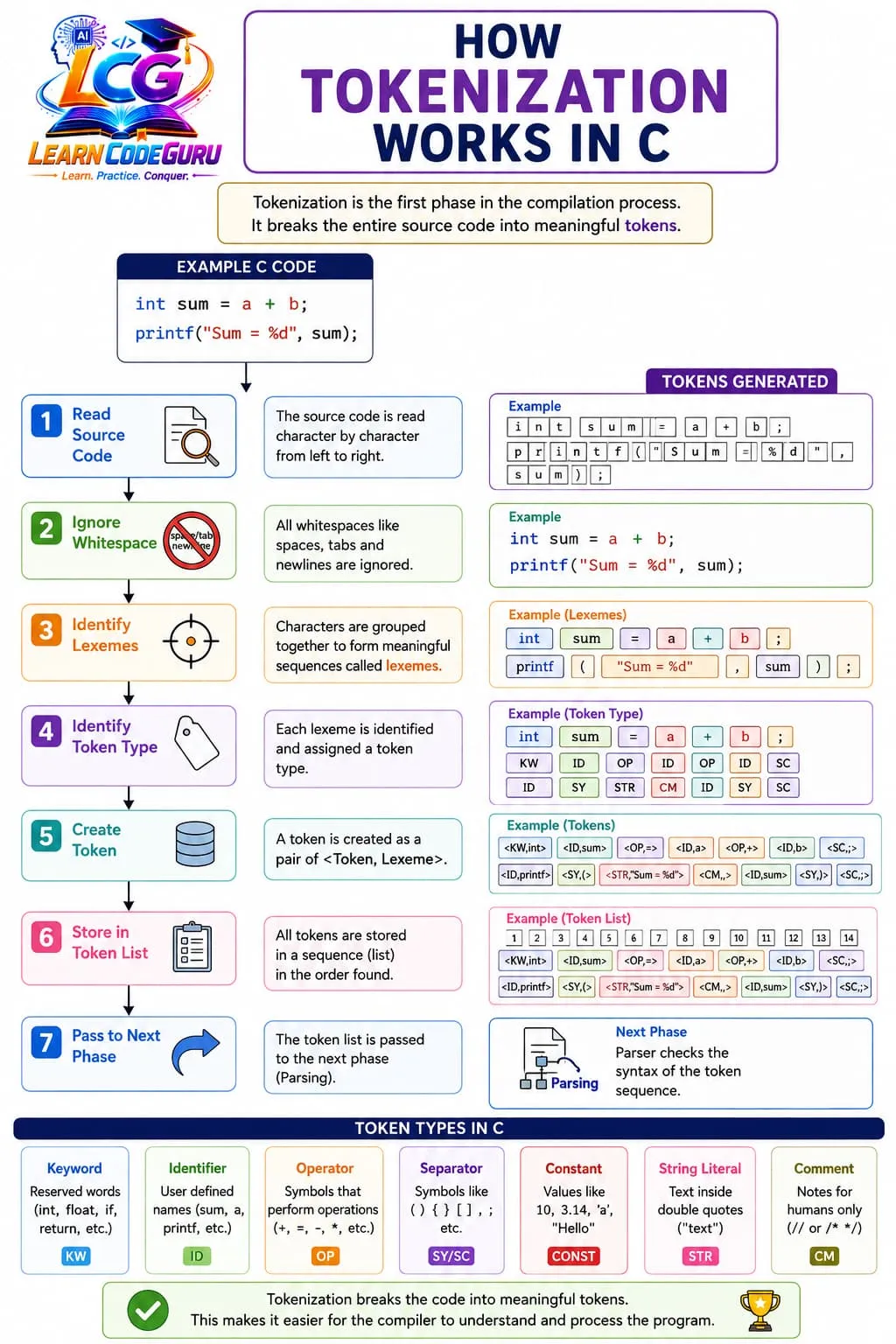
int sum = a + 10; into seven tokens
Interview practice: count tokens in short lines like printf("Hi"); and
x+=++y;. This skill shows that you understand how the compiler reads code.
Variables — scope, lifetime, and type safety
A variable is more than a name. It has a type (what it can store), a scope
(where it is visible), and a lifetime (how long it exists in memory). Local variables declared
inside main or any block are usually automatic: they are created when the block starts and destroyed
when the block ends. Global variables live for the whole program run.
- Scope: a local variable cannot be used outside its block
- Lifetime: automatic locals appear/disappear with the block
- Type conversion care: assigning
3.9tointkeeps only3 - Initialization: reading an uninitialized local variable is undefined behavior
- Declaration vs definition: declaration introduces the name; definition allocates storage
int x; defines an uninitialized local integer.
int x = 5; defines and initializes it. Prefer initialization whenever you know the first value.
Constants — choosing const or #define
Both const and #define can create fixed values, but they work differently.
#define PI 3.14 is handled by the preprocessor as text replacement. It has no C type and no true
scope in the same way variables do. const float PI = 3.14f; creates a typed read-only object that
the compiler can check.
const int MAX = 50;— typed, scoped, compiler-checked#define MAX 50— textual replace before compilation, no type checking- Prefer
constfor most modern C constants - Keep
#definefor macros, conditional compilation, and some header flags - Never assign to a
constvariable after initialization — that is a compile-time error
Literals — bases, suffixes, and escapes
The same number can be written in different literal forms. This is one of the most common advanced-basics traps in exams and interviews.
- Decimal:
42means forty-two - Octal:
052starts with 0 and means 42 in decimal (5×8 + 2) - Hexadecimal:
0x2Ameans 42 in decimal - Suffixes:
10L(long),10U(unsigned),3.14f(float) - Escape sequences:
\\nnewline,\\ttab,\\\\backslash,\\'quote
Also remember: a character literal like 'A' has type int in C, while a string literal
like "A" is a character array ending with '\\0'. These two are not the same.
Level 3 C Tricky Interview Points
Advanced tricky interview points on C program structure, tokens, keywords, variables, constants, and literals.
Tricky Interview Point-1:
Token is the smallest unit — not the keyword alone
Keywords, identifiers, constants, string literals, operators, and special symbols are all tokens. Interviewers ask you to count tokens in a statement like int a=10;
Tricky Interview Point-2:
Keywords cannot be used as variable names
Words like int, return, if, while are reserved. Naming a variable int or float causes a compile error. Case matters: INT is not a keyword (but avoid it).
Tricky Interview Point-3:
Constant vs literal — related but not identical
A literal is a fixed value written in code (10, 3.14, 'A', "Hi"). A constant is a named entity whose value should not change (const int MAX = 100; or #define MAX 100).
Tricky Interview Point-4:
const and #define are not the same
#define is preprocessor text replacement (no type, no scope). const creates a typed read-only variable with scope. Prefer const in modern C when possible.
Tricky Interview Point-5:
Character literal 'A' has type int in C
In C, character constants are ints. sizeof('A') is typically sizeof(int), not 1. This differs from C++.
Tricky Interview Point-6:
String literal "Hi" is a char array with '\0'
"Hi" occupies 3 bytes: H, i, and null terminator. Forgetting \0 concepts causes buffer and strlen mistakes.
Tricky Interview Point-7:
Uninitialized local variables hold garbage
Automatic variables are not zero by default. Reading them before assignment is undefined behavior — a classic fundamentals trap.
Tricky Interview Point-8:
Declaration vs definition vs initialization
Declaration introduces a name/type. Definition allocates storage. Initialization assigns a first value. Example: extern int x; (declare) vs int x = 5; (define + initialize).
Tricky Interview Point-9:
main() structure is part of program structure
A C program typically has directives, optional globals, main(), statements, and return. Missing braces or semicolon after return are basic structure errors.
Tricky Interview Point-10:
Identifiers rules are strict
Must start with letter or underscore; then letters, digits, underscore. Spaces and special symbols are invalid. Identifiers are case-sensitive: sum and Sum are different.
Tricky Interview Point-11:
Escape sequences are part of literals
\n, \t, \\, \" appear inside string/character literals. Writing /n instead of \n is a common beginner mistake.
Tricky Interview Point-12:
Integer literals can be decimal, octal, or hex
10 is decimal, 010 is octal (value 8), 0x10 is hexadecimal (value 16). Leading zero octal form is a frequent interview trick.
Level 4 Simple Programs
Short programs for C Fundamentals — structure, variables, constants, and literals.
Program 1 — Structure + variables + constant
/* Program structure with variable and const */
#include <stdio.h>

int main(void) {
    int marks = 85;
    const int PASS = 40;
    printf("Marks = %d, Pass mark = %d\n", marks, PASS);
    return 0;
}
Program 2 — Literals of different types
/* Integer, float, char, and string literals */
#include <stdio.h>

int main(void) {
    printf("Integer: %d\n", 25);
    printf("Float: %.2f\n", 3.14);
    printf("Char: %c\n", 'A');
    printf("String: %s\n", "C Fundamentals");
    return 0;
}
Program 3 — #define constant + keyword usage
/* #define constant and basic keywords */
#include <stdio.h>
#define PI 3.14159

int main(void) {
    float radius = 2.0;
    float area = PI * radius * radius;
    printf("Area = %.4f\n", area);
    return 0;
}
Level 5 Problem Solving Tricks
How to master C Fundamentals while solving problems
Fundamentals mistakes look small, but they create most beginner bugs: wrong variable names, missing semicolons, uninitialized values, confusion between constants and literals, and incorrect format specifiers. Use the following colorful problem-solving habits every time you write or debug a C program.
Sketch the program skeleton first
Before typing logic, write the structure on paper or in comments: #include → main → declarations → processing → output → return 0. This prevents “where do I put this line?” confusion and keeps your program readable.
Name variables by meaning, not by habit
Prefer marks, total, radius over a, b, x. Good names reduce logic errors because you can see intent while tracing. If two values are related, use parallel names such as minMarks and maxMarks.
Initialize before you use
Local variables start with garbage if you do not initialize them. Always assign a value before printing or calculating. If a variable will be filled by scanf, that first assignment comes from input — but still declare only what you need.
Replace magic numbers with constants
If the same number (like pass mark 40 or array size 100) appears many times, create a constant. Then, when the rule changes, you update one place only. This is both a coding style win and an interview talking point.
Practice token counting for interviews
Take one statement and mark keyword / identifier / operator / literal / special symbol. Example: int x=5; has 5 tokens. Doing this daily for one week makes compiler-oriented interview questions much easier.
Respect literal bases and escapes
Remember that a leading zero means octal (010 equals 8, not 10). In strings, use \n for a new line — writing /n prints slash and n as normal characters. These two checks alone save many “wrong output” debugging hours.
When the compiler message looks strange, check keywords
If you accidentally name a variable float or type retrun instead of return, error messages can look confusing. Read the first error carefully, check spelling of keywords, and confirm you did not reuse a reserved word.
Match type and format specifier together
Keep a mental pair list: int ↔ %d, float ↔ %f, char ↔ %c, string ↔ %s. A mismatch may compile with warnings and still print garbage. Treat warnings as errors while learning.
Quick success checklist
- Before run: structure complete? variables initialized? constants named? literals correct? format specifiers matched?
- Debug order: fix compile errors first, then wrong output, then style cleanup
- Trace on paper: write variable values after each statement for the first 10 programs you write
Level 6 Practice Programs List
Programming questions only — focused on C program structure, tokens/keywords usage, variables, constants, and literals.
- 1. Write a C program that shows the basic structure: #include, main(), printf, and return 0.
- 2. Write a C program that declares integer, float, and char variables, initializes them, and prints all values.
- 3. Write a C program that uses integer, floating, character, and string literals in printf.
- 4. Write a C program that defines constants using const and #define, then prints them.
- 5. Write a C program that demonstrates keywords int, float, char, return inside a valid program.
- 6. Write a C program that reads two integers into variables and prints their sum and product.
- 7. Write a C program that prints ASCII value of a character literal and a character variable.
- 8. Write a C program that uses escape sequences (\n, \t) and explains output spacing.