
Arrays & Strings
Arrays
Complete lesson for Arrays using LEARNCODEGURU’s 6-level learning model — from basics to advanced practice, with C++ OOP and STL where relevant.
Basics — Arrays
Section: Arrays & Strings. 1D and 2D arrays — why we need them, initialization, memory layout, and real-life examples.
What is an array?
- An **array** stores **many values of the same type** under one name, in contiguous memory.
- Each value is reached by an **index** (position). In C++, the first index is **0**.
- **1D array:** a single row/list — marks of 5 students, temperatures for 7 days.
- **2D array:** a table/grid — cinema seats (rows × columns), marks of students in subjects.
- Fixed size at creation for C-style arrays; for growable lists prefer
std::vectorlater.
| Idea | Meaning | Real-life mapping |
|---|---|---|
| Name | One label for many values | “Week temperatures” |
| Index | Position of one element | Day 0 = Monday |
| Element | Value at that index | 32°C on Monday |
| Size / length | How many slots | 7 days in a week |
1D & 2D arrays — layout, uses, and comparison
Arrays store many same-type values in contiguous memory. The diagram below compares 1D (linear list) and 2D (matrix / table) arrays — characteristics, operations, uses, and real-life analogies (books vs seating).
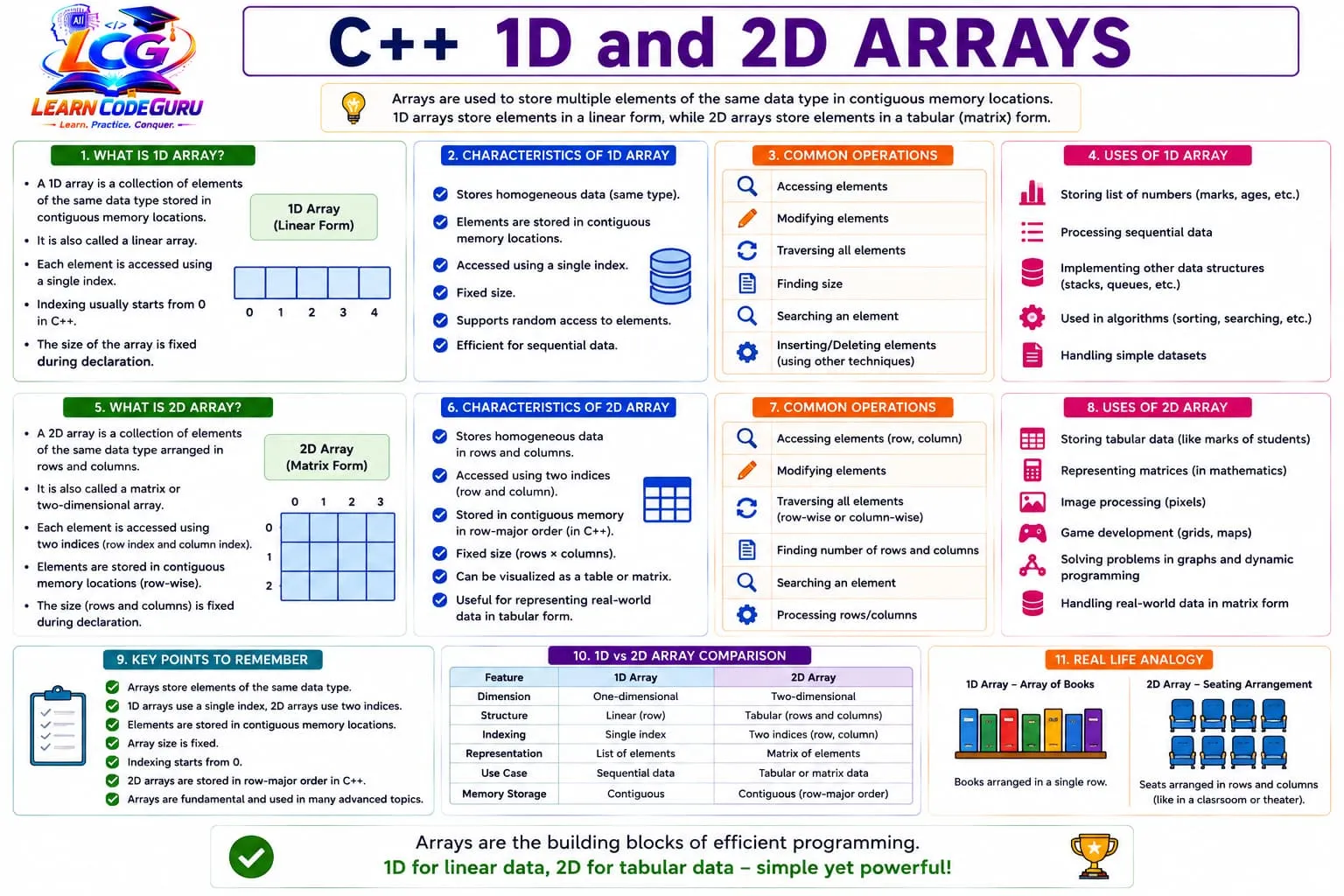
- 1D: one index
a[i]— list of marks, ages, temperatures. - 2D: two indices
a[r][c]— seats, marks sheets, matrices. - Memory: contiguous; 2D stored in row-major order in C++.
- Indexing: starts at
0; size is fixed at declaration.
Why we need 1D arrays
- Without arrays you would invent many separate variables:
m1, m2, m3, m4, m5— hard to loop, search, or pass around. - A **1D array** gives one name + indices so you can process a **list** with a single loop.
- Use 1D when data is a **sequence** of the same kind of value (one dimension is enough).
| Without 1D array | With 1D array | Benefit |
|---|---|---|
int m0,m1,m2,m3,m4; | int marks[5]; | One name, easy loops |
| Repeat print 5 times | for (i=0;i<5;i++) | Scales to N students |
| Hard to find max | Scan marks[i] | Same code for any size |
| Pass many args | Pass array + size | Cleaner functions |
// Painful without array:
int m0 = 80, m1 = 70, m2 = 90, m3 = 60, m4 = 85;
cout << m0 << " " << m1 << " " << m2 << " " << m3 << " " << m4;

// Clean with 1D array:
int marks[5] = {80, 70, 90, 60, 85};
for (int i = 0; i < 5; i++) cout << marks[i] << " ";
Why we need 2D arrays
- Some data is naturally a **table**: rows and columns together (student × subject, seat row × seat number).
- With only 1D you would flatten awkwardly (
index = row * cols + col) or use many separate 1D arrays. - A **2D array** keeps the table shape:
data[row][col]matches how people think about grids. - Use 2D when each value needs **two coordinates** to make sense.
| Problem | Awkward 1D approach | Natural 2D approach |
|---|---|---|
| 3 students × 4 subjects | 12 separate vars / one long list | marks[3][4] |
| Cinema 5×10 seats | 50 flags in one list | seats[5][10] |
| Sales: product × month | Hard to read totals | sales[p][m] |
| Chess 8×8 | Index math everywhere | board[r][c] |
// Same data as a flat 1D list (harder to read):
int flat[12] = {80,70,90,60, 75,85,80,70, 90,88,92,85};
int student = 1, subject = 2;
cout << flat[student * 4 + subject]; // manual formula

// Clear 2D table:
int marks[3][4] = {
    {80, 70, 90, 60},
    {75, 85, 80, 70},
    {90, 88, 92, 85}
};
cout << marks[1][2]; // student 1, subject 2
Array initialization
- **Initialization** means giving array elements values at (or right after) creation.
- Uninitialized local C arrays hold **garbage** until you assign values — always initialize or fill before reading.
- Common styles: full list, partial list (rest zeroed), all zeros, and (for 2D) row-by-row braces.
| Style | Example | Result |
|---|---|---|
| Full init | int a[5] = {1,2,3,4,5}; | All five set |
| Partial init | int a[5] = {1,2}; | 1,2,0,0,0 (rest 0) |
| All zeros | int a[5] = {}; | 0,0,0,0,0 |
| Size from list | int a[] = {1,2,3}; | Size becomes 3 |
| Later assign | a[0]=10; a[1]=20; | Fill in a loop / input |
| 2D rows | int m[2][3]={{1,2,3},{4,5,6}}; | Two rows filled |
| 2D partial row | int m[2][3]={{1},{4,5}}; | Missing cells → 0 |
#include <iostream>
using namespace std;

int main() {
    // 1D initialization forms
    int marks[5] = {80, 70, 90, 60, 85}; // full
    int scores[5] = {50, 60};            // rest become 0
    int zeros[5] = {};                   // all 0
    int autoSize[] = {10, 20, 30};       // size = 3

    // Fill from input / loop
    int temp[3];
    for (int i = 0; i < 3; i++) temp[i] = 30 + i;

    // 2D initialization
    int seats[2][3] = {
        {1, 0, 1},
        {0, 1, 1}
    };
    int grid[2][3] = {{1}, {4, 5}}; // others 0

    cout << marks[0] << " " << scores[2] << " " << seats[1][2] << "\n";
    return 0;
}
1D arrays
- Syntax:
type name[size];— example:int marks[5]; - Valid indices:
0tosize - 1. Access:marks[0],marks[4]. - Traverse with a
forloop from0ton - 1.
| Index | marks[i] | Real-life meaning |
|---|---|---|
| 0 | 80 | Student A score |
| 1 | 70 | Student B score |
| 2 | 90 | Student C score |
| 3 | 60 | Student D score |
| 4 | 85 | Student E score |
#include <iostream>
using namespace std;

int main() {
    int marks[5] = {80, 70, 90, 60, 85};
    for (int i = 0; i < 5; i++) {
        cout << "Student " << (i + 1) << ": " << marks[i] << "\n";
    }
    return 0;
}
Real-life examples of 1D arrays
- **Student marks list:** one mark per student in a class test.
- **Daily temperatures:** 7 values for Mon–Sun weather log.
- **Bus stop times:** arrival minutes for stops on a route.
- **Playlist durations:** length of each song in seconds.
- **Monthly expenses:** spending for months 1–12.
- **Sensor readings:** last 10 humidity samples from a device.
// 7-day temperature log (°C)
int temp[7] = {32, 31, 33, 30, 29, 34, 32};
int sum = 0;
for (int d = 0; d < 7; d++) sum += temp[d];
cout << "Weekly average = " << (sum / 7.0) << "\n";
2D arrays
- A **2D array** is an array of arrays — think of a **table** with rows and columns.
- Syntax:
type name[rows][cols];— example:int seats[3][4]; - Access:
name[row][col]— both indices start at 0. - Nested loops: outer = rows, inner = columns (same idea as nested loops lesson).
| Part | Meaning | Real-life mapping |
|---|---|---|
seats[r][c] | One cell in the grid | Seat in row r, column c |
Row index r | Which horizontal line | Cinema row A/B/C → 0/1/2 |
Column index c | Which seat in that row | Seat number 1–4 → 0–3 |
Nested for | Visit every cell | Check all seats for booking |
#include <iostream>
using namespace std;

int main() {
    int seats[3][4] = {
        {1, 1, 0, 1}, // 1 = free, 0 = booked
        {1, 0, 0, 1},
        {1, 1, 1, 0}
    };
    for (int r = 0; r < 3; r++) {
        for (int c = 0; c < 4; c++)
            cout << (seats[r][c] ? "F " : "B ");
        cout << "\n";
    }
    return 0;
}
Real-life examples of 2D arrays
- **Cinema / stadium seating:** rows × seats — free or booked.
- **Class marks sheet:** students (rows) × subjects (columns).
- **Chess / ludo board:** 8×8 or N×N cells with piece codes.
- **Spreadsheet / fee table:** products × months of sales.
- **Hotel rooms:** floors × room numbers on each floor.
- **Image (tiny grayscale):** height × width pixels (each cell = brightness).
- **Timetable:** days × periods with subject codes.
// 3 students × 4 subjects marks
int marks[3][4] = {
    {80, 70, 90, 60},
    {75, 85, 80, 70},
    {90, 88, 92, 85}
};
for (int s = 0; s < 3; s++) {
    int total = 0;
    for (int sub = 0; sub < 4; sub++) total += marks[s][sub];
    cout << "Student " << (s + 1) << " total = " << total << "\n";
}
Differences between 1D and 2D arrays
- Pick 1D for a list; pick 2D when data naturally forms a table or grid.
| Point | 1D array | 2D array |
|---|---|---|
| Shape | Single list / row | Table / grid |
| Indices | One: a[i] | Two: a[r][c] |
| Typical loop | One for | Nested for |
| Real-life | Marks list, week temps | Seats, marks sheet, board |
| Declaration | int a[5]; | int a[3][4]; |
| Why needed | Avoid m1,m2,m3… for a list | Keep table shape clear |
Memory allocation to 1D arrays
- A local/global C array gets a **contiguous block** of memory: all elements sit one after another.
- If each
intis 4 bytes,int a[5]needs about **5 × 4 = 20 bytes**. - Address of
a[i]≈ base address ofa+i × sizeof(element). - That is why index
0is the start, and why arrays are fast for sequential access. - **Real-life analogy:** 5 lockers in a straight corridor — locker number = index.
| Element | Offset from start | Example address (base 1000) | Bytes (int=4) |
|---|---|---|---|
a[0] | 0 × 4 | 1000 | 4 |
a[1] | 1 × 4 | 1004 | 4 |
a[2] | 2 × 4 | 1008 | 4 |
a[3] | 3 × 4 | 1012 | 4 |
a[4] | 4 × 4 | 1016 | 4 |
#include <iostream>
using namespace std;

int main() {
    int a[5] = {10, 20, 30, 40, 50};
    cout << "sizeof(a) = " << sizeof(a) << " bytes\n";
    cout << "elements = " << sizeof(a) / sizeof(a[0]) << "\n";
    for (int i = 0; i < 5; i++) {
        cout << "&a[" << i << "] = " << &a[i]
             << " value = " << a[i] << "\n";
    }
    return 0;
}
Memory allocation to 2D arrays
- A 2D array
int m[R][C]is also one contiguous block (usually **row-major**): row 0’s columns, then row 1’s columns, … - Total elements =
R × C. Bytes ≈R × C × sizeof(int). Example:int m[3][4]→ 12 ints → ~48 bytes. - Address of
m[r][c]≈ base +(r × C + c) × sizeof(element). - So 2D is “logical table,” but memory is still a **straight line** of cells.
- **Real-life analogy:** classroom desks arranged in rows — row 1 seats, then row 2 seats, in one long seating order in memory.
| Cell | Row-major order | Formula r*C+c (C=4) | Meaning |
|---|---|---|---|
m[0][0] | 1st | 0 | Start of row 0 |
m[0][3] | 4th | 3 | End of row 0 |
m[1][0] | 5th | 4 | Start of row 1 |
m[2][3] | 12th | 11 | Last cell (3×4) |
#include <iostream>
using namespace std;

int main() {
    int m[2][3] = {{1, 2, 3}, {4, 5, 6}};
    cout << "sizeof(m) = " << sizeof(m) << " bytes\n";
    cout << "rows*cols = " << 2 * 3 << " elements\n";
    for (int r = 0; r < 2; r++) {
        for (int c = 0; c < 3; c++) {
            cout << "&m[" << r << "][" << c << "]=" << &m[r][c]
                 << " val=" << m[r][c] << "\n";
        }
    }
    // Flat view: same memory as one 1D sequence 1 2 3 4 5 6
    return 0;
}
std::array (modern fixed array)
std::arrayknows its size via.size()and does not decay as easily as C arrays when passed carefully.- Still fixed length — for dynamic size use
std::vector. - Works with range-based for:
for (int x : arr).
#include <array>
#include <iostream>
using namespace std;

int main() {
    array<int, 5> marks = {80, 70, 90, 60, 85};
    cout << "Count = " << marks.size() << "\n";
    for (int m : marks) cout << m << " ";
    return 0;
}Advanced — Arrays
Memory allocation deep dive
- Stack arrays (typical locals): size usually known at compile time; freed when the function returns.
sizeof(arrayName)on a true array object gives total bytes; after decay to a pointer,sizeofgives pointer size — a common interview trap.- 2D
T a[R][C]is contiguous; “array of pointers” (T* rows[R]eachnew T[C]) is a **different** layout (rows may not be adjacent). - Dynamic 1D:
int* p = new int[n];…delete[] p;— size can come from runtimen. - Going outside bounds still does not “allocate more” — it is undefined behaviour.
| Kind | How memory is obtained | Freed how |
|---|---|---|
Local int a[5] | Stack (automatic) | End of block/function |
std::array | Usually stack object | Destructor / end of scope |
new int[n] | Heap (dynamic) | delete[] |
int m[3][4] | One contiguous block | Automatic if local |
#include <iostream>
using namespace std;

int main() {
    int a[5] = {1, 2, 3, 4, 5};
    cout << sizeof(a) << "\n";          // 20 if int is 4 bytes
    int* p = a;
    cout << sizeof(p) << "\n";          // pointer size (e.g. 8), not 20

    int n = 4;
    int* heap = new int[n]{10, 20, 30, 40}; // dynamic 1D
    cout << heap[2] << "\n";
    delete[] heap;
    return 0;
}
Memory, indexing, and bounds
- Elements of a 1D array sit in contiguous memory;
a[i]is roughly*(a + i). - A 2D array
a[R][C]is stored row-major: row 0’s columns, then row 1’s columns, and so on. - Going outside
0 .. size-1is **undefined behaviour** — no automatic bounds check on C arrays. - Prefer
std::array/std::vectorand.at(i)when you want bounds-checked access. - When passing a C array to a function it **decays to a pointer** — pass the size separately.
void print1D(const int a[], int n) {
    for (int i = 0; i < n; i++) cout << a[i] << " ";
}

// For 2D, columns size must be known in the parameter type:
void print2D(int a[][4], int rows) {
    for (int r = 0; r < rows; r++) {
        for (int c = 0; c < 4; c++) cout << a[r][c] << " ";
        cout << "\n";
    }
}
Common 1D operations
- Sum / average, find max/min, search a value, reverse, count even/odd.
- **Real-life:** highest temperature in a week; total monthly expense; find a roll number in a list.
int a[5] = {80, 70, 90, 60, 85};
int maxv = a[0];
for (int i = 1; i < 5; i++)
    if (a[i] > maxv) maxv = a[i];
cout << "Highest marks = " << maxv << "\n";
Common 2D operations
- Row sum (per student total), column sum (per subject total), transpose, diagonal of a square matrix.
- **Real-life:** total sales per product (row), total sales per month (column).
- Count free seats in a cinema grid; find first booked seat with nested loops + flag.
int sales[2][3] = {{10, 20, 15}, {5, 8, 12}};
// Column totals = sales per month
for (int m = 0; m < 3; m++) {
    int col = 0;
    for (int p = 0; p < 2; p++) col += sales[p][m];
    cout << "Month " << (m + 1) << " total = " << col << "\n";
}
Real-life models (combined)
- 1D: elevators store floor request flags; traffic lights store timer phases.
- 1D: OTP digits or PIN digits as
char pin[4]/int digits[6]. - 2D: parking lot floors × slots; warehouse racks × bins.
- 2D: game map tiles; LED matrix display; seating chart with VIP rows.
- Rule: if you say “list of …”, think 1D; if you say “table of …”, think 2D.
Tricky Interview Points
Q1) What is an array in C++?
Answer A fixed-size collection of elements of the same type stored in contiguous memory and accessed by index (starting at 0).
Q2) What is the difference between a 1D and a 2D array?
Answer A 1D array is a single list accessed as a[i]. A 2D array is a table/grid accessed as a[row][col], usually traversed with nested loops.
Q3) Give a real-life example of a 1D array.
Answer Student marks in one test, daily temperatures for a week, or monthly expenses for 12 months.
Q4) Give a real-life example of a 2D array.
Answer Cinema seats (rows × columns), student-subject marks sheet, hotel floors × rooms, or a chessboard.
Q5) Why do we need 1D arrays?
Answer To store and process a list of same-type values with one name and a loop, instead of many separate variables like m1, m2, m3.
Q6) Why do we need 2D arrays?
Answer When data is naturally a table or grid needing two coordinates (row and column), such as seats or student×subject marks — clearer than flattening into one long 1D list.
Q7) What is array initialization? Give examples.
Answer Giving elements values when created. Examples: int a[5]={1,2,3,4,5}; partial int a[5]={1,2}; (rest 0); int a[5]={}; (all 0); 2D int m[2][3]={{1,2,3},{4,5,6}};
Q8) What happens if a local array is not initialized?
Answer Elements hold indeterminate (garbage) values until assigned. Reading them before writing is undefined behaviour in practice — always initialize or fill first.
Q9) How is memory allocated for a 1D array?
Answer As one contiguous block. Address of a[i] ≈ base + i × sizeof(element). Example: int a[5] needs about 5 × sizeof(int) bytes.
Q10) How is memory allocated for a 2D array?
Answer Usually one contiguous row-major block: row0 columns, then row1, and so on. Address of m[r][c] ≈ base + (r × cols + c) × sizeof(element). Total elements = rows × cols.
Q11) What are valid indices for int a[5]?
Answer 0, 1, 2, 3, and 4. Accessing a[5] or negative indices is out of bounds (undefined behaviour).
Q12) Why do arrays use 0-based indexing?
Answer Histor historically equals base address + index × element size; index 0 means “no offset from the start.”
Q13) What happens when a C-style array is passed to a function?
Answer It decays to a pointer to the first element. The function does not automatically know the array length — pass the size separately.
Q14) How is a 2D array stored in memory?
Answer Typically in row-major order: all columns of row 0, then row 1, and so on.
Q15) std::array vs C-style array?
Answer std::array is a fixed-size container with .size(), better type safety, and STL compatibility. C arrays are lower-level and decay to pointers more easily.
Q16) When should you prefer std::vector over arrays?
Answer When the number of elements can grow or shrink at runtime, or when you want dynamic sizing and rich STL operations.
Q17) How do you traverse a 2D array?
Answer Use nested loops: outer loop over rows, inner loop over columns (or vice versa if column-major traversal is required).
Q18) What is an out-of-bounds access?
Answer Reading or writing an index outside the valid range. In C++ this is undefined behaviour and can crash or corrupt data.
Simple Programs
1D — print and sum marks
#include <iostream>
using namespace std;

int main() {
    int marks[5] = {80, 70, 90, 60, 85};
    int sum = 0;
    for (int i = 0; i < 5; i++) {
        cout << marks[i] << " ";
        sum += marks[i];
    }
    cout << "\nSum = " << sum << "\n";
    return 0;
}
1D — weekly temperature average
#include <iostream>
using namespace std;

int main() {
    int temp[7] = {32, 31, 33, 30, 29, 34, 32};
    int sum = 0, maxv = temp[0];
    for (int i = 0; i < 7; i++) {
        sum += temp[i];
        if (temp[i] > maxv) maxv = temp[i];
    }
    cout << "Avg = " << (sum / 7.0) << "\n";
    cout << "Hottest = " << maxv << "\n";
    return 0;
}
1D — search roll number
#include <iostream>
using namespace std;

int main() {
    int rolls[6] = {101, 104, 108, 110, 115, 120};
    int key = 110, found = -1;
    for (int i = 0; i < 6; i++) {
        if (rolls[i] == key) { found = i; break; }
    }
    if (found >= 0) cout << "Found at index " << found << "\n";
    else cout << "Not found\n";
    return 0;
}
2D — cinema free/booked seats
#include <iostream>
using namespace std;

int main() {
    int seats[3][4] = {
        {1, 1, 0, 1},
        {1, 0, 0, 1},
        {1, 1, 1, 0}
    };
    int freeCount = 0;
    for (int r = 0; r < 3; r++) {
        for (int c = 0; c < 4; c++) {
            cout << (seats[r][c] ? "F " : "B ");
            if (seats[r][c]) freeCount++;
        }
        cout << "\n";
    }
    cout << "Free seats = " << freeCount << "\n";
    return 0;
}
2D — student × subject totals
#include <iostream>
using namespace std;

int main() {
    int marks[3][4] = {
        {80, 70, 90, 60},
        {75, 85, 80, 70},
        {90, 88, 92, 85}
    };
    for (int s = 0; s < 3; s++) {
        int total = 0;
        for (int sub = 0; sub < 4; sub++) total += marks[s][sub];
        cout << "Student " << (s + 1) << " total = " << total
             << " avg = " << (total / 4.0) << "\n";
    }
    return 0;
}
2D — matrix row and column sums
#include <iostream>
using namespace std;

int main() {
    int a[2][3] = {{1, 2, 3}, {4, 5, 6}};
    for (int r = 0; r < 2; r++) {
        int rs = 0;
        for (int c = 0; c < 3; c++) rs += a[r][c];
        cout << "Row " << r << " sum = " << rs << "\n";
    }
    for (int c = 0; c < 3; c++) {
        int cs = 0;
        for (int r = 0; r < 2; r++) cs += a[r][c];
        cout << "Col " << c << " sum = " << cs << "\n";
    }
    return 0;
}
std::array — playlist durations
#include <array>
#include <iostream>
using namespace std;

int main() {
    array<int, 4> sec = {210, 185, 240, 195};
    int total = 0;
    for (int t : sec) total += t;
    cout << "Playlist length = " << total << " seconds\n";
    return 0;
}
Initialization styles demo
#include <iostream>
using namespace std;

int main() {
    int full[4] = {1, 2, 3, 4};
    int partial[4] = {1, 2}; // -> 1 2 0 0
    int zeros[4] = {};
    int m[2][3] = {{10, 20}, {30}}; // rest 0
    for (int i = 0; i < 4; i++) cout << partial[i] << " ";
    cout << "\n";
    for (int r = 0; r < 2; r++) {
        for (int c = 0; c < 3; c++) cout << m[r][c] << " ";
        cout << "\n";
    }
    return 0;
}
Memory layout — print addresses (1D & 2D)
#include <iostream>
using namespace std;

int main() {
    int a[4] = {11, 22, 33, 44};
    cout << "1D contiguous addresses:\n";
    for (int i = 0; i < 4; i++)
        cout << "&a[" << i << "] = " << &a[i] << "\n";

    int m[2][3] = {{1, 2, 3}, {4, 5, 6}};
    cout << "2D row-major addresses:\n";
    for (int r = 0; r < 2; r++)
        for (int c = 0; c < 3; c++)
            cout << "&m[" << r << "][" << c << "] = " << &m[r][c] << "\n";

    cout << "sizeof(a)=" << sizeof(a)
         << " sizeof(m)=" << sizeof(m) << "\n";
    return 0;
}Problem Solving Tricks
- Remember: first index is 0; last index is size − 1.
- Need a list? → 1D. Need a table/grid? → 2D.
- Initialize: full
{…}, partial (rest 0),{}for all zeros, or fill in a loop. - Uninitialized local arrays hold garbage — do not read before writing.
- 1D memory: contiguous; address ≈ base + i × sizeof(T).
- 2D memory: row-major contiguous; address ≈ base + (r × cols + c) × sizeof(T).
- Use sizeof(a)/sizeof(a[0]) for element count on a real array object (not a decayed pointer).
- Always loop with i < n, not i <= n, for 0-based arrays of length n.
- For 2D print, put cout << "\n" after the inner loop (end of each row).
- Name indices meaningfully: day, student, row, col — not only i and j.
- Never read/write outside bounds — that is undefined behaviour.
- Pass size with C arrays: void f(int a[], int n);
- Prefer std::array for fixed size with .size(); prefer vector when size changes.
- Draw a small 3×4 grid on paper before coding 2D logic.
Practice Programs List
- Create a 1D array of 10 integers, read them, and print in reverse.
- Show why 1D is needed: rewrite five separate mark variables into marks[5] and find the average.
- Show why 2D is needed: store 3×4 marks as marks[3][4] and compare with a flat marks[12] index formula.
- Practice initialization: create partial, zero, full, and size-from-list 1D arrays and print them.
- Initialize a 2D array with partial rows and print which cells became 0.
- Print addresses of all elements of int a[5] and verify they increase by sizeof(int).
- Print addresses of int m[2][3] in row-major order and confirm &m[1][0] follows &m[0][2].
- Compute and print sizeof for 1D and 2D arrays; explain the byte totals.
- 1D: store 7 daily step counts and print the day with maximum steps.
- 2D: build a 4×5 cinema seat map; book seat (2,3); reprint the map.
- 2D: 5 students × 3 subjects — print each student average and class topper.
- Write a function that takes a 1D array and size and returns the maximum.
- Transpose a 2×3 matrix into a 3×2 matrix using nested loops.
- Use std::array