
C++ Basics
Introduction to C++
Complete lesson for Introduction to C++ using LEARNCODEGURU’s 6-level learning model — from basics to advanced practice, with C++ OOP and STL where relevant.
Basics — Introduction to C++
Section: C++ Basics. Start C++ with history, features, compilers, C vs C++ differences, and your first Hello World.
What is C++?
- C++ is a general-purpose language created by Bjarne Stroustrup as an extension of C with classes.
- It supports procedural, object-oriented, and generic programming.
- Used in systems, games, finance, embedded, compilers, and high-performance apps.
Differences between C and C++
- C++ builds on C ideas but is not a strict superset — some C code needs changes to compile as C++.
- Use this table as a quick map of everyday differences you will meet in the course.
| Feature | C | C++ |
|---|---|---|
| Paradigm | Procedural | Multi-paradigm (procedural, OOP, generic) |
| I/O | printf / scanf (stdio.h) | cin / cout (iostream), plus C-style I/O |
| Strings | char arrays + string.h | std::string preferred; C-strings still work |
| Memory | malloc / free | new / delete, smart pointers preferred |
| Functions | No overloading | Function overloading allowed |
| Default arguments | Not supported | Supported |
| References | Not available | References (&) as aliases |
| Classes / OOP | Structs only (no methods by default) | Classes, inheritance, polymorphism |
| Access control | No public/private keywords | public / private / protected |
| Templates | Not available | Function and class templates |
| Exceptions | No language exceptions | try / catch / throw |
| Namespaces | No namespaces | namespace and std |
| bool type | Often int / macros historically | Built-in bool (true / false) |
| STL | No STL | Containers, algorithms, iterators |
| Comments | /* */ (C89); // from C99 | // and /* */ |
| Compatibility | C standard | Mostly C-compatible, not 100% |
History of C++
C++ did not appear overnight. It grew from C as Bjarne Stroustrup added object-oriented ideas while keeping C’s speed. The timeline below shows how the language moved from “C with Classes” (1979) to the name C++ (1983), early books and core OOP features (1985), templates/STL era, the first ISO standard C++98, then modern C++ with C++11 and later standards up to today.
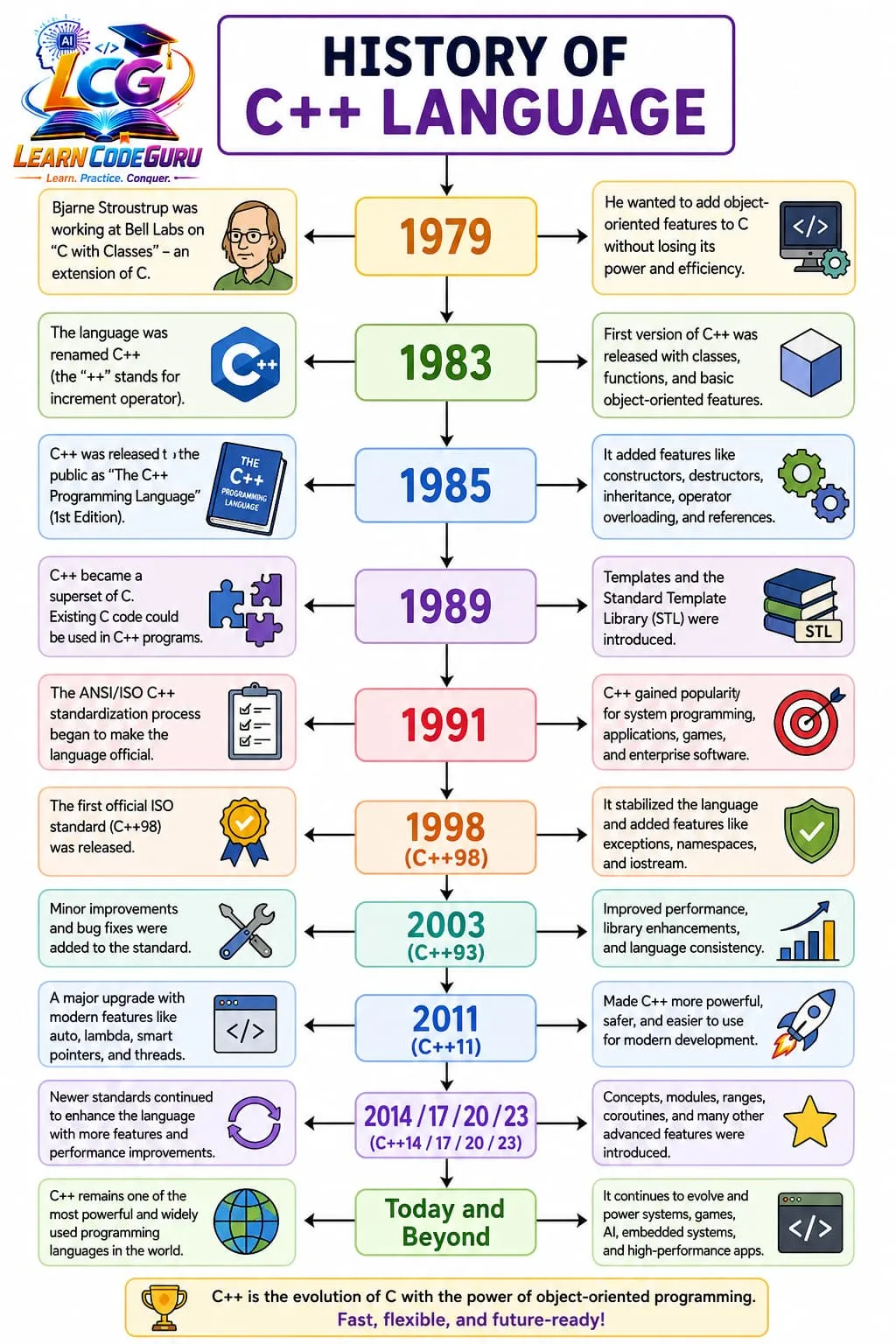
- 1979–1983: Stroustrup starts “C with Classes”; language renamed C++.
- 1985–1998: OOP features expand; first book; path to ISO
C++98. - C++11 onward: modern C++ (auto, lambdas, smart pointers, and later modules/ranges).
- Today: still used for games, systems, embedded, and high-performance apps.
First program
- Save as
hello.cpp, then compile with:g++ hello.cpp -o helloand run./hello(orhello.exeon Windows).
#include <iostream>

int main() {
    std::cout << "Hello, C++!\n";
    return 0;
}Advanced — Introduction to C++
Deeper rules
- Prefer a modern dialect: compile with
-std=c++17or later unless a project forces an older standard. - C++ is not a strict superset of C —
void*conversions, designated initializers rules, and keyword clashes differ. - One definition rule (ODR): each non-inline function/variable should have exactly one definition across the program.
mainmust returnint; falling off the end ofmainimplicitly returns 0 in C++.- Prefer RAII and the standard library over manual
new/deleteand C-style arrays for application code. - Headers vs sources: put declarations in
.h/.hpp, definitions in.cpp(templates are a special case). - Name lookup and overload resolution are compile-time; virtual dispatch is runtime — different costs and rules.
- Undefined behaviour (dangling pointers, out-of-bounds, signed overflow) is not “sometimes wrong” — it is unconstrained.
How a C++ Program Executes
A .cpp file does not run by itself. Your code goes through clear stages:
write source → preprocess headers → compile to object code → link libraries → load and
run from main → show output. Understanding this pipeline helps you fix
compile errors, link errors, and runtime mistakes separately.
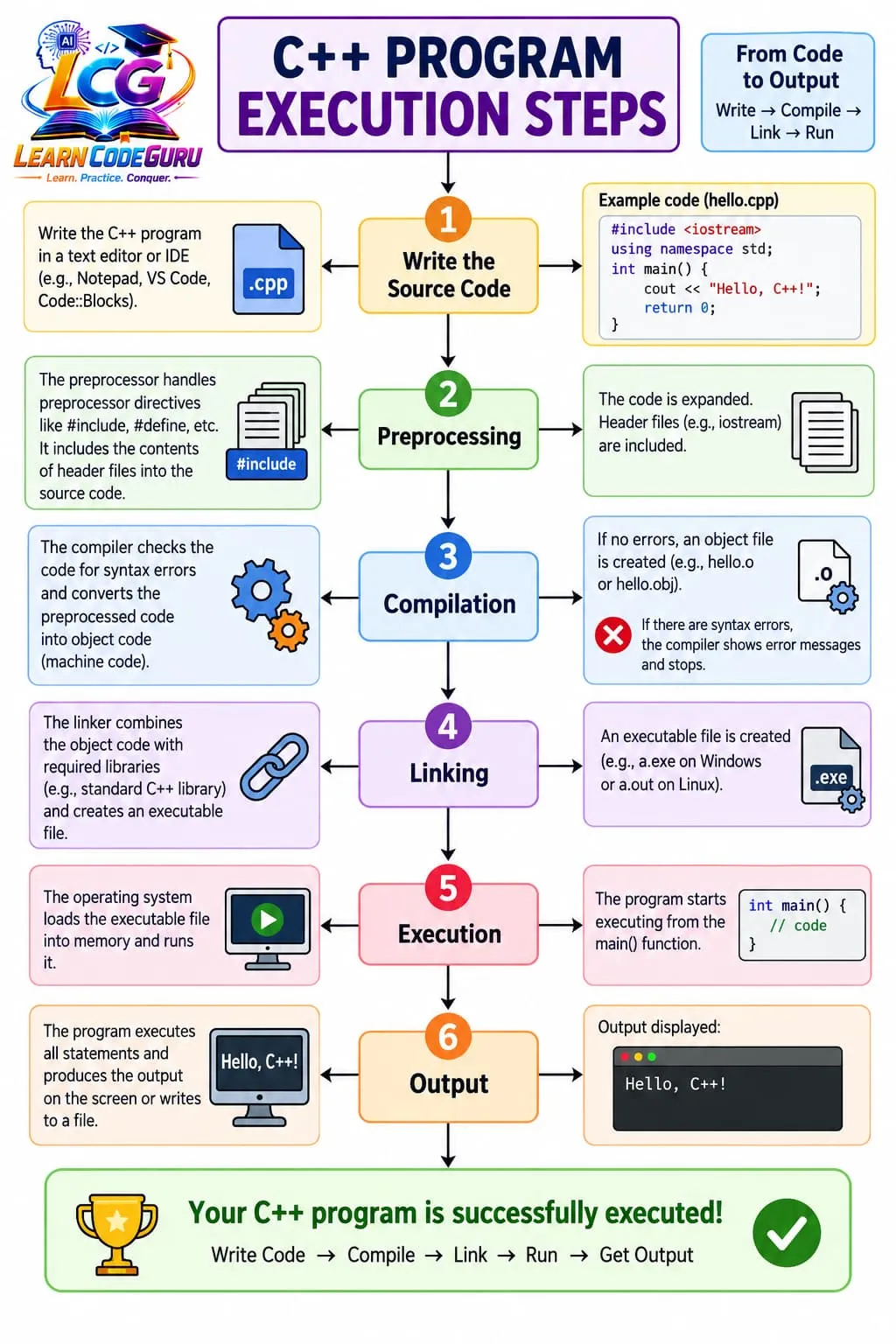
hello.cpp to console output
- Write: create a
.cppsource file in an editor or IDE. - Preprocess: handle
#include/#defineand expand headers. - Compile: check syntax and produce an object file (
.o/.obj). - Link: combine object code with libraries into an executable (
.exe/a.out). - Execute: OS loads the program; run starts at
main. - Output: statements print results (for example
Hello, C++!).
Tricky Interview Points
Q1) What is C++?
Answer C++ is a general-purpose programming language created as an extension of C with classes. It supports procedural, object-oriented, and generic programming.
Q2) Who developed C++?
Answer Bjarne Stroustrup developed C++ at Bell Labs. It was first known as “C with Classes”.
Q3) Is C++ only an object-oriented language?
Answer No. C++ is multi-paradigm: you can write procedural code, OOP with classes, and generic code with templates.
Q4) Is C++ a strict superset of C?
Answer No. C++ is mostly compatible with C, but not 100%. Some valid C programs need changes to compile as C++.
Q5) Name a few important differences between C and C++.
Answer C++ adds classes/OOP, references, function overloading, templates, exceptions, namespaces, bool, and the STL. I/O commonly uses cin/cout instead of only printf/scanf.
Q6) Which header is used for basic input and output in C++?
Answer `<iostream>`. You typically use `std::cout` for output and `std::cin` for input.
Q7) What is the difference between printf/scanf and cin/cout?
Answer In C, I/O uses printf/scanf from stdio.h. In C++, the preferred style is cin/cout from iostream (C-style I/O can still be used).
Q8) What does `#include <iostream>` do in a Hello World program?
Answer It includes the standard iostream library so the program can use input/output facilities like `std::cout`.
Q9) Why do we write `std::cout` instead of just `cout`?
Answer `cout` lives in the `std` namespace. `std::cout` uses namespace qualification. You may also write `using namespace std;` in a .cpp file and then use `cout`.
Q10) What is the role of `main` in a C++ program?
Answer `main` is the entry point of an executable program. Execution starts from `main`.
Q11) How do you compile and run a simple C++ program?
Answer Save the file as something like `hello.cpp`, compile with `g++ hello.cpp -o hello`, then run `./hello` (or `hello.exe` on Windows).
Q12) Give examples of features C++ has that C does not (from this lesson).
Answer Examples: classes and OOP, references, function overloading, default arguments, templates, exceptions, namespaces, built-in bool, and the STL.
Simple Programs
Hello World with namespace qualification
#include <iostream>

int main() {
    std::cout << "Hello, C++!\n";
    return 0;
}
Hello with using directive
#include <iostream>
using namespace std;

int main() {
    cout << "Welcome to C++\n";
    return 0;
}Problem Solving Tricks
- Always enable warnings early:
g++ -Wall -Wextra -Wpedantic -std=c++17 file.cpp -o app. - If you know C, learn the differences table first — many “bugs” are C habits that are illegal or risky in C++.
- Prefer
std::cout << ...overprintfuntil you need formatted C I/O for a specific reason. - Keep
using namespace std;out of headers; it pollutes every file that includes them. - One executable → one
main. Linker “multiple definition of main” means two translation units both define it. - Match the language dialect to the book/course (
-std=c++17vs C++20 features like ranges).
Practice Programs List
- Write a C++ program that prints your name and a welcome message using
std::cout. - Compile the same program with
-Wall -Wextra -std=c++17and fix every warning. - Rewrite a tiny C
printfHello World as idiomatic C++ withiostream. - Create two
.cppfiles: one with a helper function, one withmain, and link them withg++. - List eight differences between C and C++ from memory, then check against the lesson table.
- Write a program that prints the C++ standard macro value (
__cplusplus) and explain what it means. - Intentionally write
int *p = malloc(4);in a.cppfile, observe the error, then fix it the C++ way. - Build Hello World once with
g++and once withclang++(if available) and compare commands.