
Control Flow
Loops
Complete lesson for Loops using LEARNCODEGURU’s 6-level learning model — from basics to advanced practice, with C++ OOP and STL where relevant.
Basics — Loops
Section: Control Flow. for, while, do-while, range-based for, and nested loops — with real-life examples and when do-while is required.
What are loops?
- A **loop** (iteration) repeats a block of statements while a condition holds — useful whenever work must be done again and again.
- Main C++ loop forms:
for,while,do-while, and range-basedfor(C++11+). - **for** / **while** are *entry-controlled* (test first — body may run **0** times).
- **do-while** is *exit-controlled* (body first — runs **at least once**).
- Use the flowchart image below to see init → condition → body → update for each form.
Flowcharts: for, while, do-while & range-based for
Loops repeat statements while a condition holds. The diagram below compares for, while, do-while, and range-based for — notice do-while runs the body before the first check.
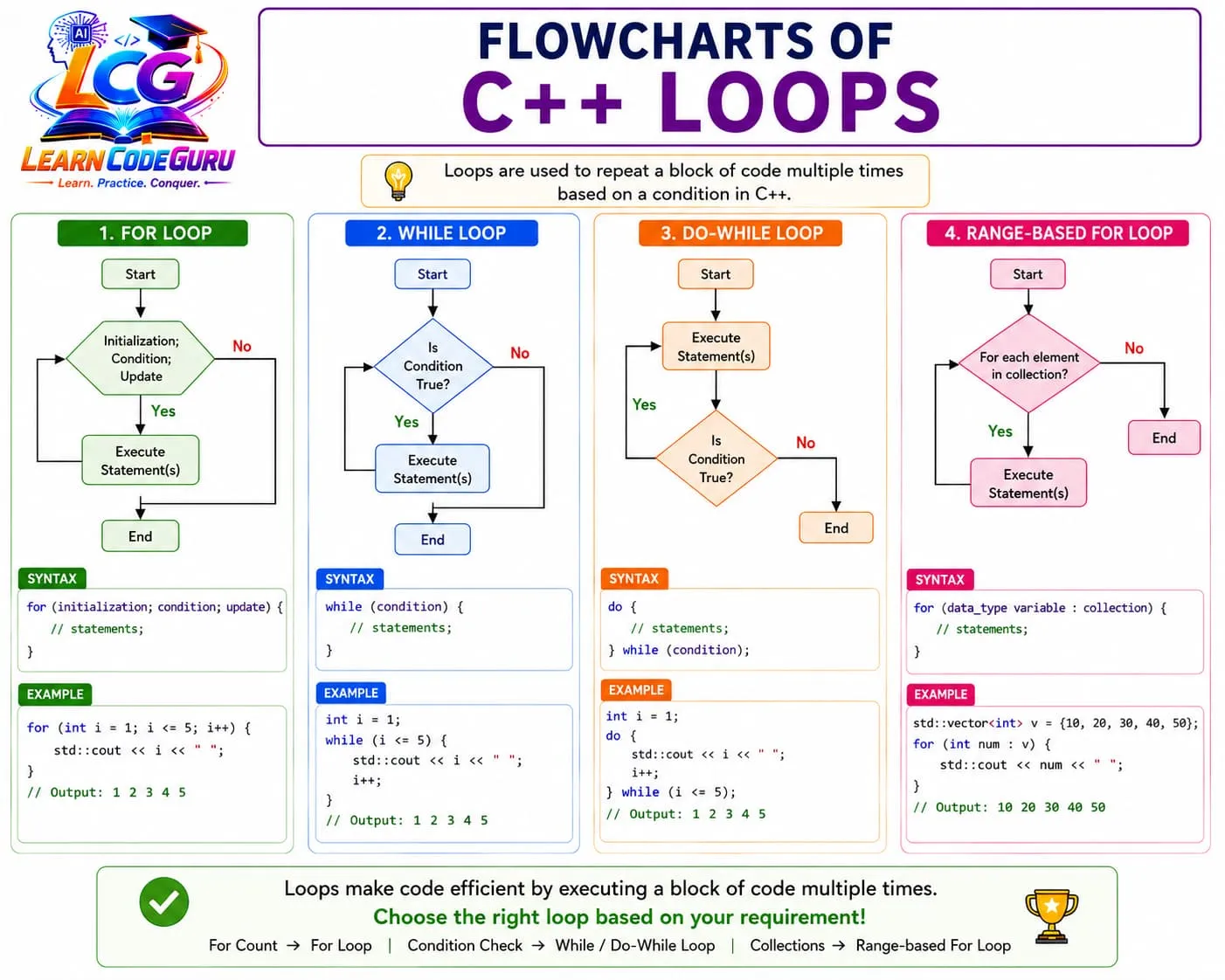
- for: known count — init, condition, and update in one line.
- while: entry-controlled — may run zero times.
- do-while: exit-controlled — body first, required for menus/retries.
- range-for: visit every element in a collection.
for loop
- Best when the **number of repetitions is known** (count, indices, fixed steps).
- Parts:
for (initialization; condition; update) { body }— all three parts are optional. - **Real-life example:** Print attendance numbers 1 to 30 for a class register.
- **Real-life example:** Lift visits floors 1 → N in order (known floor count).
- **Real-life example:** Repeat a workout set exactly 10 times.
| Part | Meaning | Real-life mapping |
|---|---|---|
| Initialization | Start the counter | Set day = 1 |
| Condition | Keep going while true | day ≤ 7 for a week |
| Update | Move toward the end | day++ each morning |
| Body | The repeated action | Show that day’s task |
for (int i = 1; i <= 5; i++) {
    cout << i << " ";
}
// Output: 1 2 3 4 5
while loop
- Entry-controlled: checks the condition **before** the body. If the condition is false at the start, the body **never runs**.
- Best when you repeat **until a condition becomes false**, and the count is not fixed in advance.
- **Real-life example:** Keep withdrawing ATM cash while balance ≥ amount.
- **Real-life example:** Keep reading sensor values while temperature is below a limit.
- **Real-life example:** Keep asking for a password while it is wrong (and you still have attempts).
int balance = 5000;
int amount = 1000;
while (balance >= amount) {
    balance -= amount;
    cout << "Withdrawn. Left: " << balance << "\n";
}
do-while loop
- Exit-controlled: runs the body **first**, then checks the condition. Body runs **at least once** even if the condition is initially false.
- Syntax ends with a semicolon:
} while (condition); - **Real-life example:** Show a restaurant menu at least once, then ask “Order again?”.
- **Real-life example:** Play one round of a game, then ask “Play again?”.
- **Real-life example:** Take at least one exam attempt, then allow a retake if marks are low.
int choice;
do {
    cout << "1. Hello  2. Exit\n";
    cin >> choice;
    if (choice == 1) cout << "Hello!\n";
} while (choice != 2);
Differences between while and do-while
- Both repeat while a condition is true, but they differ in **when** the condition is checked and **minimum** executions.
- Memorize:
while= “check then do”;do-while= “do then check”.
| Point | while | do-while |
|---|---|---|
| Control type | Entry-controlled | Exit-controlled |
| Condition checked | Before the body | After the body |
| If condition is false at start | Body runs **0** times | Body still runs **1** time |
| Minimum executions | 0 | 1 |
| Semicolon after condition | No | Yes — } while (cond); |
| Typical use | Unknown count; may skip entirely | Must run once (menu, retry, confirm) |
| Real-life feel | “Only enter if allowed” | “Do it once, then decide to repeat” |
// while: may print nothing
int n = 0;
while (n > 0) {
    cout << "while body\n";
    n--;
}

// do-while: prints once even when n is 0
n = 0;
do {
    cout << "do-while body\n";
    n--;
} while (n > 0);
Where exactly do-while is required
- Use **do-while** when the body **must execute at least once** before you can decide whether to repeat.
- If skipping the body on a false start condition would be wrong for the problem, do-while is the natural fit.
- Classic required cases below — while can fake some of them, but do-while matches the logic cleanly.
| Situation | Why do-while fits | Real-life example |
|---|---|---|
| Menus / dashboards | Show options first, then read choice | ATM / food court menu |
| Input validation retry | Read once, then re-prompt if invalid | Enter age until it is 1–120 |
| Play again / continue? | One round first, then ask to repeat | Quiz or game rematch |
| Confirm action | Show summary once, then Y/N | “Confirm delete? (y/n)” |
| Post-process then recheck | Action produces the value you test | Read bill, then “Add another item?” |
| At-least-once sensors / polls | Take one sample, then decide | Measure once, repeat while unstable |
do-while required — menu example
- A menu must appear **before** the user chooses Exit. With
while (choice != 2)you would need a fake initial choice; do-while is cleaner.
#include <iostream>
using namespace std;

int main() {
    int choice;
    do {
        cout << "\n=== Cafe Menu ===\n";
        cout << "1. Tea\n2. Coffee\n3. Exit\n";
        cout << "Choice: ";
        cin >> choice;
        if (choice == 1) cout << "Tea served\n";
        else if (choice == 2) cout << "Coffee served\n";
        else if (choice != 3) cout << "Invalid\n";
    } while (choice != 3);
    cout << "Thank you!\n";
    return 0;
}
do-while required — validate input until correct
- You must **read** a value at least once before you know if it is valid. That “read then recheck” pattern is exactly exit-controlled.
#include <iostream>
using namespace std;

int main() {
    int marks;
    do {
        cout << "Enter marks (0-100): ";
        cin >> marks;
        if (marks < 0 || marks > 100)
            cout << "Invalid — try again.\n";
    } while (marks < 0 || marks > 100);
    cout << "Accepted: " << marks << "\n";
    return 0;
}
do-while required — play again
- One round always happens; only after the round do you ask whether to continue.
#include <iostream>
using namespace std;

int main() {
    char again;
    do {
        int a = 7, b = 3;
        cout << "What is " << a << " + " << b << "? ";
        int ans;
        cin >> ans;
        cout << (ans == a + b ? "Correct!\n" : "Wrong.\n");
        cout << "Play again? (y/n): ";
        cin >> again;
    } while (again == 'y' || again == 'Y');
    return 0;
}
When NOT to force do-while
- If the body must **not** run when the start condition is false → use
whileorfor. - **Example:** Process remaining queue items only while
count > 0. If count is already 0, do nothing —while, not do-while. - **Example:** Print 1..n only when n ≥ 1. If n is 0, printing once would be wrong — use
for/while. - Rule of thumb: “Might skip entirely?” → while/for. “Must happen once?” → do-while.
Range-based for loop
- Best for walking every element of a collection (
array,vector,string, etc.). - Syntax:
for (type var : collection) { ... }— no manual index needed. - Use
auto&to modify elements,const auto&to read without copying. - **Real-life example:** Mark attendance for every student name in a list.
- **Real-life example:** Print every product price in a cart.
#include <vector>
#include <iostream>
using namespace std;

int main() {
    vector<int> prices = {10, 20, 30};
    for (int p : prices) cout << p << " ";
    return 0;
}
Nested loops
- A **nested loop** is a loop placed inside another loop. The inner loop finishes all of its iterations for **each** outer-loop iteration.
- Most common form: nested
for— outer = rows / groups, inner = columns / items in that group. - Total inner-body runs ≈ (outer count) × (inner count) when both run fully.
- **Real-life example:** Cinema seats — for each row, visit every seat in that row.
- **Real-life example:** School timetable — for each day, print every period.
- **Real-life example:** Hotel keys — for each floor, check every room number.
- **Real-life example:** Multiplication table — for each multiplicand, print products with 1..10.
| Role | Typical name | Real-life meaning |
|---|---|---|
| Outer loop | row / day / i | Moves to the next group |
| Inner loop | col / period / j | Visits every item in that group |
| Inner body | print / compute | One seat, one cell, one star |
| After inner ends | cout << "\n" | Start a new line / next group |
// 3 rows × 4 columns seat labels
for (int row = 1; row <= 3; row++) {
    for (int col = 1; col <= 4; col++) {
        cout << "R" << row << "C" << col << " ";
    }
    cout << "\n";
}
/* Output:
R1C1 R1C2 R1C3 R1C4
R2C1 R2C2 R2C3 R2C4
R3C1 R3C2 R3C3 R3C4
*/
Nested loops — star patterns
- Pattern problems almost always use nested loops: outer = line number, inner = how many stars/spaces on that line.
- **Right triangle:** row
rprintsrstars (1-based). - Trace with
n = 3on paper before coding — prevents off-by-one mistakes.
int n = 4;
for (int row = 1; row <= n; row++) {
    for (int star = 1; star <= row; star++) {
        cout << "* ";
    }
    cout << "\n";
}
/* Output:
*
* *
* * *
* * * *
*/
Nested loops — multiplication table
- Outer loop chooses the left number; inner loop multiplies it by 1..10.
- **Real-life example:** Printing a full times-table chart for a student workbook.
for (int i = 1; i <= 3; i++) {
    for (int j = 1; j <= 5; j++) {
        cout << i << "x" << j << "=" << (i * j) << "\t";
    }
    cout << "\n";
}
Which loop should you use?
- Match the loop shape to the problem — readability matters more than cleverness.
| Situation | Best choice | Real-life example |
|---|---|---|
| Known count / indices | for | Print 1 to 100, table rows |
| Unknown count; may be zero | while | Drain tank while level > 0 |
| Must run at least once | do-while | Menu, validate input, play again |
| Visit every item in a collection | Range-based for | List all cart items |
| 2D grids / patterns / tables | Nested for | Seats, stars, timetable, matrix |
Advanced — Loops
Entry-controlled vs exit-controlled (deep)
forandwhiletest **before** entry — zero iterations are possible.do-whiletests **after** the body — exactly the right model for “act, then decide”.- You can rewrite do-while as while by duplicating the body once before the loop — that duplication is why do-while exists.
- Infinite loops:
while (true)orfor (;;)— always plan abreak/returnexit.
| Kind | Loops | First action | Min runs |
|---|---|---|---|
| Entry-controlled | while, for | Check condition | 0 |
| Exit-controlled | do-while | Run body | 1 |
Nested loops in depth
- Inner loop restarts from its init for **every** outer iteration — that is why grids and patterns work.
- Time cost grows quickly: nested loops over
nandnare often O(n²) — know this for interviews. - You can nest
whileinsidefor,forinsidewhile, etc., but nestedforis clearest for fixed grids. - Prefer distinct names (
row/col,i/j) — never reuse oneifor both levels without care. - Declare loop variables in the
forheader (for (int row = ...)) so they do not leak and clash.
| Pattern / task | Outer loop | Inner loop |
|---|---|---|
| Seat / matrix print | Rows | Columns |
| Right triangle stars | row = 1..n | star = 1..row |
| Inverted triangle | row = n..1 | star = 1..row |
| Multiplication table | i = 1..n | j = 1..10 |
| Pair every student with every subject mark | Students | Subjects |
// Inverted triangle
int n = 4;
for (int row = n; row >= 1; row--) {
    for (int star = 1; star <= row; star++) cout << "* ";
    cout << "\n";
}
break, continue, and nested loops
breakleaves only the **innermost** loop (or switch) — the outer loop continues.continueskips the rest of the **current** inner (or outer) iteration only.- To stop both levels early, use a
bool foundflag, orreturnfrom a function, or restructure. - In
for,continuestill runs the update (i++). Inwhile/do-while, update yourself beforecontinue.
// Find first zero in a 2D-like nest; break only exits inner loop
bool found = false;
for (int r = 0; r < 3 && !found; r++) {
    for (int c = 0; c < 3; c++) {
        int val = (r == 1 && c == 2) ? 0 : 1;
        if (val == 0) {
            cout << "Found at " << r << "," << c << "\n";
            found = true;
            break; // inner only — outer checks !found
        }
    }
}
for details and range-for pitfalls
- Any of the three
forclauses may be empty:for (;;)is an intentional infinite loop. - Comma operator packs multiple inits/updates:
for (int i = 0, j = n-1; i < j; i++, j--). - Range-for copies by default:
for (auto x : v)copies; useauto&/const auto&when needed. - Do not add/remove elements of a vector while ranging over it — iterators can invalidate.
Real-life loop models (combined)
- Factory belt:
whileitems remain on the belt, pack them. - TV remote menu:
do-whileuntil user selects Exit. - School timetable: nested
forover days and periods. - Cinema booking screen: nested
forover rows and seats — mark booked seats. - Playlist: range-based
forover every song title. - OTP retry:
do-whileuntil code matches or attempts exhausted (combine with a counter).
Tricky Interview Points
Q1) What is a loop in C++?
Answer A control structure that repeats a block of statements while a condition remains true (or for each element in a collection).
Q2) Difference between while and do-while?
Answer while is entry-controlled: it checks the condition first, so the body may run zero times. do-while is exit-controlled: the body runs first, then the condition is checked, so the body runs at least once.
Q3) When is do-while required (or clearly preferred)?
Answer When the body must execute at least once before repeating — menus, input validation retries, “play again?”, confirmations, and any “act then decide” flow.
Q4) What happens if the while condition is false at the start?
Answer The body never executes. Contrast with do-while, which still runs the body once.
Q5) Why does do-while need a semicolon after while (condition)?
Answer The do-while statement ends with while (condition); — the semicolon terminates the statement. Forgetting it is a common syntax error.
Q6) for vs while — when to choose which?
Answer Prefer for when initialization, condition, and update are clear (known counts/indices). Prefer while when the stop condition is event/sentinel based and not a fixed counter.
Q7) What is a range-based for loop?
Answer for (type var : collection) iterates each element without manual indexing — ideal for arrays, vectors, and strings.
Q8) Difference between break and continue?
Answer break exits the innermost loop immediately. continue skips the rest of the current iteration and proceeds to the next one.
Q9) Give a real-life example of while.
Answer Keep pouring water into a bottle while it is not full — check first; if already full, pour zero times.
Q10) Give a real-life example of do-while.
Answer Show a food menu at least once, take an order, then ask whether the customer wants another item.
Q11) Can you rewrite do-while using while?
Answer Yes — run the body once, then use while (condition) { body }. do-while avoids duplicating that first body.
Q12) What is an off-by-one error in loops?
Answer Using the wrong bound (i < n vs i <= n) so the loop runs one time too many or too few — common with 0-based vs 1-based counting.
Q13) What is a nested loop?
Answer A loop inside another loop. For each outer iteration, the inner loop runs completely. Used for grids, tables, and patterns.
Q14) In nested loops, what does break do?
Answer break exits only the innermost loop. The outer loop continues unless you also use a flag, return, or other exit strategy.
Q15) How many times does the inner body run for outer 1..3 and inner 1..4?
Answer 3 × 4 = 12 times, if both loops run fully with no break/continue.
Q16) Give a real-life example of nested loops.
Answer Cinema hall: for each row, check every seat; or a school timetable: for each day, print every period.
Simple Programs
for — print 1 to N
#include <iostream>
using namespace std;

int main() {
    int n = 5;
    for (int i = 1; i <= n; i++) cout << i << " ";
    return 0;
}
while — sum of digits
#include <iostream>
using namespace std;

int main() {
    int n = 1234, sum = 0;
    while (n > 0) {
        sum += n % 10;
        n /= 10;
    }
    cout << "Sum = " << sum << "\n";
    return 0;
}
do-while — cafe menu (required pattern)
#include <iostream>
using namespace std;

int main() {
    int choice;
    do {
        cout << "1. Tea  2. Coffee  3. Exit\nChoice: ";
        cin >> choice;
        if (choice == 1) cout << "Tea\n";
        else if (choice == 2) cout << "Coffee\n";
    } while (choice != 3);
    return 0;
}
do-while — validate marks 0–100
#include <iostream>
using namespace std;

int main() {
    int marks;
    do {
        cout << "Marks (0-100): ";
        cin >> marks;
    } while (marks < 0 || marks > 100);
    cout << "OK: " << marks << "\n";
    return 0;
}
while vs do-while — false start condition
#include <iostream>
using namespace std;

int main() {
    int x = 0;
    cout << "while: ";
    while (x > 0) { cout << "W"; x--; }
    cout << "(done)\n";

    x = 0;
    cout << "do-while: ";
    do { cout << "D"; x--; } while (x > 0);
    cout << "(done)\n";
    return 0;
}
Range-based for — cart total
#include <iostream>
#include <vector>
using namespace std;

int main() {
    vector<int> prices = {50, 120, 30};
    int total = 0;
    for (int p : prices) total += p;
    cout << "Total = " << total << "\n";
    return 0;
}
Nested for — seat grid
#include <iostream>
using namespace std;

int main() {
    for (int row = 1; row <= 3; row++) {
        for (int col = 1; col <= 4; col++)
            cout << "R" << row << "C" << col << " ";
        cout << "\n";
    }
    return 0;
}
Nested for — right triangle stars
#include <iostream>
using namespace std;

int main() {
    int n = 5;
    for (int row = 1; row <= n; row++) {
        for (int s = 1; s <= row; s++) cout << "* ";
        cout << "\n";
    }
    return 0;
}
Nested for — multiplication table
#include <iostream>
using namespace std;

int main() {
    for (int i = 1; i <= 5; i++) {
        for (int j = 1; j <= 10; j++)
            cout << i * j << "\t";
        cout << "\n";
    }
    return 0;
}
Nested for — timetable (days × periods)
#include <iostream>
using namespace std;

int main() {
    for (int day = 1; day <= 3; day++) {
        cout << "Day " << day << ": ";
        for (int period = 1; period <= 4; period++)
            cout << "P" << period << " ";
        cout << "\n";
    }
    return 0;
}Problem Solving Tricks
- Decide first: known count → for; unknown / may be zero → while; must run once → do-while; collection → range-for; grid/pattern → nested for.
- Never forget the semicolon after do-while:
} while (cond); - Always update the control variable inside while/do-while — missing updates cause infinite loops.
- In while, put the update before continue, or the condition may never change.
- Trace with a small N on paper (N = 3) before predicting output.
- Prefer braces
{}even for one-line loop bodies. - Name nested counters row/col — avoid reusing i for both loops.
- For patterns: outer = rows, inner = stars/spaces on that row — draw n=3 first.
- Remember: break in a nested loop exits only the inner loop.
- Watch off-by-one: pick i < n or i <= n once and stick to it.
- Use const auto& in range-for when you only read large objects.
- For menus and validation, do-while is not “style” — it matches the required control flow.
Practice Programs List
- Print even numbers from 2 to 50 using a for loop.
- Use while to compute the reverse of a positive integer.
- Write a do-while ATM-style menu: 1 Balance, 2 Deposit, 3 Withdraw, 4 Exit.
- do-while: keep reading a password until the user types the correct one (limit to 3 tries with a counter).
- Compare while and do-while on the same condition starting false — print how many times each body runs.
- Sum array elements with a classic for and again with range-based for.
- Nested for: print a right triangle of stars for height n.
- Nested for: print an inverted triangle of stars for height n.
- Nested for: print a full multiplication table for 1..n.
- Nested for: simulate a 5×5 cinema and mark seat (3,4) as BOOKED.
- while: keep subtracting a fare from a travel card balance until balance < fare.
- do-while: “Add another student mark?” after each entry, then print the average.
- Use break to stop searching for a number in a list; use continue to skip negatives while summing.
- Nested loops + flag: search a 3×3 grid for value 0 and stop both loops when found.
- Rewrite a duplicated “show menu then while” program into a clean do-while.
- Range-for over a string and count vowels.