
C++ Basics
Data Types & I/O
Complete lesson for Data Types & I/O using LEARNCODEGURU’s 6-level learning model — from basics to advanced practice, with C++ OOP and STL where relevant.
Basics — Data Types & I/O
Section: C++ Basics. Classification of C++ data types, size and range tables, bool, string, and I/O with cin / cout.
Classification of data types
- A data type tells the compiler what kind of value a variable can hold and which operations are allowed.
- C++ types are usually grouped as fundamental (built-in), derived, and user-defined.
- Sizes below are typical on modern desktop compilers; always confirm with
sizeofon your system.
| Category | Examples | What it stores |
|---|---|---|
| Fundamental — Integer | short, int, long, long long (+ unsigned) | Whole numbers |
| Fundamental — Floating | float, double, long double | Decimal / real numbers |
| Fundamental — Character | char, wchar_t, char16_t, char32_t | Single characters / code units |
| Fundamental — Boolean | bool | true / false |
| Fundamental — Void | void | No value (functions / generic pointers) |
| Derived — Pointer | int*, char* | Memory addresses |
| Derived — Array | int a[5] | Fixed sequence of same type |
| Derived — Reference | int& | Alias to an existing object |
| User-defined — String | std::string | Text (sequence of characters) |
| User-defined — Structure | struct | Group of different members |
| User-defined — Class | class | Data + member functions (OOP) |
| User-defined — Enum / Union | enum, union | Named constants / shared storage |
C++ Data Types Overview
Data types decide what a variable can store and which operations are safe. The diagram below groups the main families you will use: integers, floating-point numbers, characters, booleans, void, pointers, strings, arrays, structures, and classes.
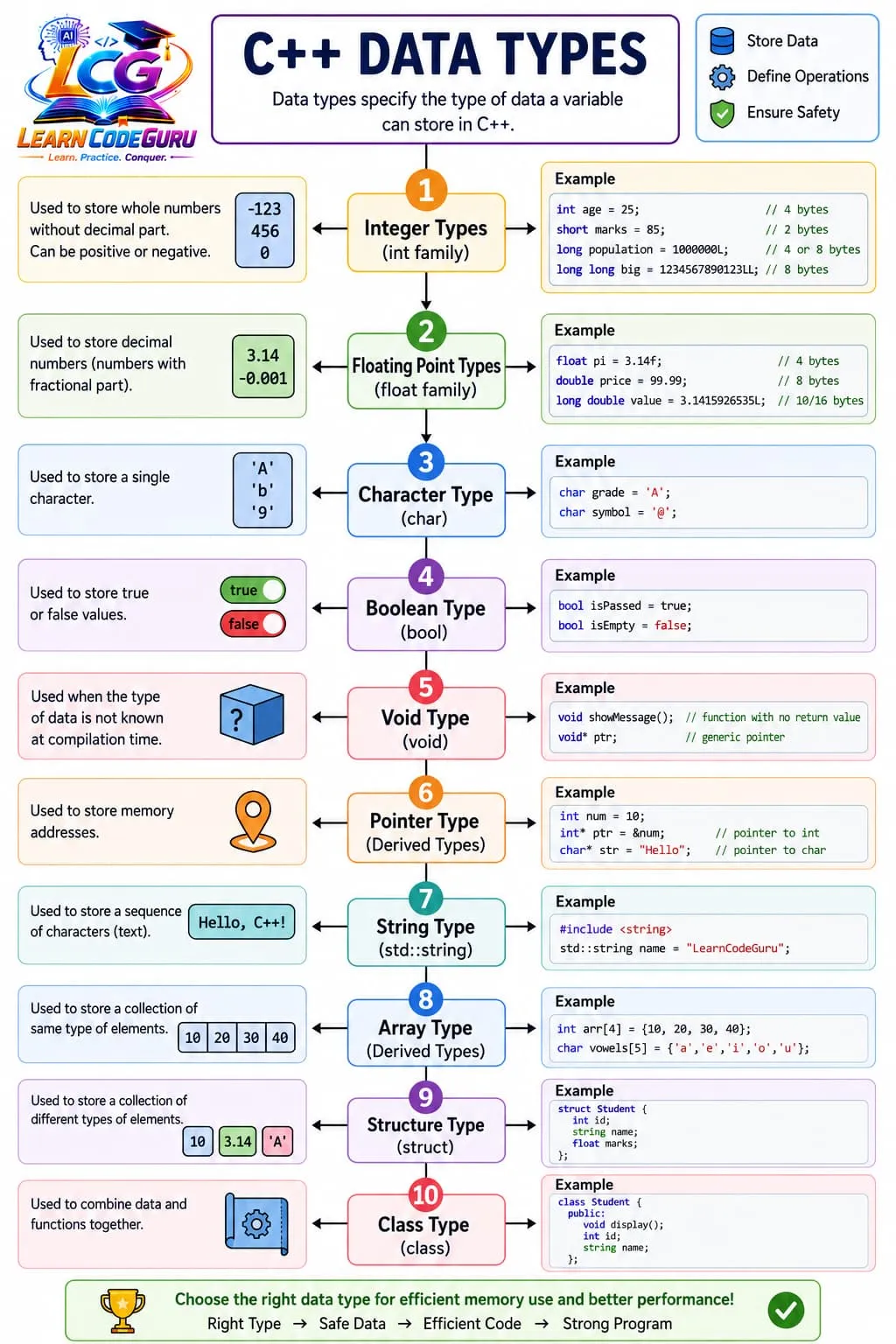
- Integer family:
short,int,long,long long. - Floating family:
float,double,long double. - Simple built-ins:
char,bool, andvoid. - Derived / library: pointers, arrays,
std::string. - User-defined:
structandclassfor custom data models.
Integer types — size and range (typical)
- Prefer
intfor everyday whole numbers unless you need a smaller or larger range. - Use
long longfor very large integers; useunsignedonly when you truly need non-negative wrap semantics.
| Type | Typical size | Approximate range | Example |
|---|---|---|---|
short / short int | 2 bytes | −32,768 to 32,767 | short marks = 85; |
unsigned short | 2 bytes | 0 to 65,535 | unsigned short n = 40000; |
int | 4 bytes | ≈ −2.1×10⁹ to 2.1×10⁹ | int age = 25; |
unsigned int | 4 bytes | 0 to ≈ 4.2×10⁹ | unsigned int count = 0; |
long | 4 or 8 bytes | At least as wide as int | long population = 1000000L; |
long long | 8 bytes | ≈ −9×10¹⁸ to 9×10¹⁸ | long long big = 123LL; |
unsigned long long | 8 bytes | 0 to ≈ 1.8×10¹⁹ | unsigned long long x = 1ULL; |
Floating, char, bool, void — size and range (typical)
- Use
doubleas the default floating type for most calculations; usefloatwhen memory matters. charstores one character;boolstores logical true/false;voidmeans “no type/value”.
| Type | Typical size | Range / notes | Example |
|---|---|---|---|
float | 4 bytes | ≈ ±3.4×10³⁸ (about 6–7 digits precision) | float pi = 3.14f; |
double | 8 bytes | ≈ ±1.7×10³⁰⁸ (about 15 digits precision) | double price = 99.99; |
long double | 8 / 10 / 16 bytes | Implementation-defined; often wider than double | long double v = 3.14159L; |
char | 1 byte | Usually −128..127 or 0..255 (signedness varies) | char grade = 'A'; |
unsigned char | 1 byte | 0 to 255 | unsigned char b = 255; |
bool | 1 byte (typical) | true or false | bool ok = true; |
void | — | No objects of type void; used for no return / void* | void show(); |
I/O with cin and cout
- Use
<<for output and>>for input. - Prefer
getlinewhen you need a full line of text (including spaces).
#include <iostream>
#include <string>
using namespace std;

int main() {
    string name;
    int age;
    cout << "Name: ";
    getline(cin, name);
    cout << "Age: ";
    cin >> age;
    cout << "Hi " << name << ", age " << age << endl;
}Advanced — Data Types & I/O
Deeper rules
- Prefer modern C++ (C++11 and later) idioms over C-style patterns when both work.
- Watch undefined behaviour: dangling references, out-of-bounds access, and use-after-move.
- Use const, RAII, and the standard library as your default tools.
Tricky Interview Points
Q1) What is a data type in C++?
Answer A data type defines what kind of value a variable can store and which operations are allowed on it (for example int for whole numbers, double for decimals).
Q2) How are C++ data types classified?
Answer Common groups are fundamental types (int, float, char, bool, void), derived types (pointer, array, reference), and user-defined types (struct, class, enum, std::string).
Q3) What is the typical size of int, float, double, and char?
Answer On most modern desktop compilers: int ≈ 4 bytes, float ≈ 4 bytes, double ≈ 8 bytes, char ≈ 1 byte. Always confirm with sizeof because sizes can vary by platform.
Q4) What is the difference between signed and unsigned integers?
Answer Signed types can store negative and positive values. Unsigned types store only non-negative values and usually have a larger positive maximum for the same size.
Q5) When should you use float vs double?
Answer Prefer double for most calculations because it has more precision. Use float mainly when memory or performance constraints matter and lower precision is acceptable.
Q6) Is bool a real type in C++?
Answer Yes. bool is a built-in type with values true and false (unlike older C habits of using int 0/1 for logic).
Q7) What does void mean?
Answer void means “no value.” A void function returns nothing. void* is a generic pointer type that can point to any object type (with casting rules).
Q8) Why prefer std::string over a char array for text?
Answer std::string manages length and memory more safely and conveniently. C-style char arrays need manual size handling and null terminators.
Q9) What is the difference between cin >> and getline?
Answer cin >> reads until whitespace (stops at spaces). getline reads a full line, including spaces, until newline.
Q10) How do you print the size of a type at runtime?
Answer Use the sizeof operator, for example cout << sizeof(int); or cout << sizeof(x); for a variable x.
Simple Programs
Print sizeof basic types
#include <iostream>
using namespace std;

int main() {
    cout << "char: " << sizeof(char) << " bytes\n";
    cout << "int: " << sizeof(int) << " bytes\n";
    cout << "float: " << sizeof(float) << " bytes\n";
    cout << "double: " << sizeof(double) << " bytes\n";
    cout << "bool: " << sizeof(bool) << " bytes\n";
    return 0;
}
Declare variables of different types
#include <iostream>
#include <string>
using namespace std;

int main() {
    int age = 21;
    float height = 5.8f;
    double pi = 3.14159;
    char grade = 'A';
    bool passed = true;
    string name = "LearnCodeGuru";

    cout << name << " age=" << age
         << " height=" << height
         << " pi=" << pi
         << " grade=" << grade
         << " passed=" << boolalpha << passed << endl;
    return 0;
}
Simple I/O: read and display
#include <iostream>
using namespace std;

int main() {
    int a, b;
    cout << "Enter two integers: ";
    cin >> a >> b;
    cout << "Sum = " << (a + b) << endl;
    return 0;
}
Read a full line with getline
#include <iostream>
#include <string>
using namespace std;

int main() {
    string line;
    cout << "Enter a full sentence: ";
    getline(cin, line);
    cout << "You typed: " << line << endl;
    return 0;
}Problem Solving Tricks
- Always check type sizes on your machine with
sizeof— never assume every compiler matches textbook sizes exactly. - Write floating literals with
ffor float (3.14f) andLfor long double when needed. - Use
long long(andLLsuffix) for large whole numbers instead of overflowingint. - After
cin >> x;, leftover newline can break the nextgetline— clear it withcin.ignore(...)when mixing both. - Print booleans as text with
cout << boolalpha << flag;. - Prefer
doublefor money/science demos unless the problem forcesfloat. - For characters use single quotes (
'A'); for text use double quotes ("Hello") withstd::stringor C-strings. - Include
std::string; includecin/cout.
Practice Programs List
- Write a program that prints
sizeoffor short, int, long, long long, float, double, and bool. - Declare one variable of each: int, float, double, char, bool, and string — then print all values.
- Read a student’s name (full line) and marks, then print a formatted result line.
- Take two floating values and print their sum, difference, and average using
double. - Read a character and print its ASCII code using an integer cast.
- Create a tiny “type quiz” program that asks the user to enter an int and a double, then reprints both with labels.
- Demonstrate the difference between
cin >> word;andgetline(cin, line);with sample inputs that contain spaces. - Write a program that shows signed vs unsigned behavior by assigning a negative value to an
unsigned intand printing the result. - Store PI as
floatanddouble, print both, and compare the displayed precision. - Build a mini form: name (string), age (int), height (float), isStudent (bool) — read all and print a summary.