
C++ OOP
Encapsulation
Complete lesson for Encapsulation using LEARNCODEGURU’s 6-level learning model — from basics to advanced practice, with C++ OOP and STL where relevant.
Basics — Encapsulation
Section: C++ OOP. C++ encapsulation — wrap data with methods, hide internals, and control access with private/public.
What is encapsulation?
- **Encapsulation** binds **data** (variables) and **methods** (functions) into one unit — a **class**.
- It also **restricts direct access** to internal data so outsiders cannot misuse it.
- Achieved mainly with **access specifiers**:
private,protected,public. - Outsiders use a **public interface** (methods); internals stay hidden.
- **Real-life:** drive a car with steering/pedals (public) — you do not directly tweak the engine internals (private).
- **Real-life:** ATM — you use buttons/menu; you cannot reach into the cash vault directly.
| Idea | Meaning | In code |
|---|---|---|
| Bundle | Data + methods together | Members inside a class |
| Hide | Block direct outside access | private: data |
| Expose | Controlled operations | public: methods |
| Validate | Rules when changing data | Checks inside setters |
Encapsulation — hide data, expose a safe interface
Encapsulation wraps data + methods in a class and restricts direct access to internals. The diagram covers access specifiers, getters/setters, a Student example, the car analogy, and real use cases like banking and authentication.
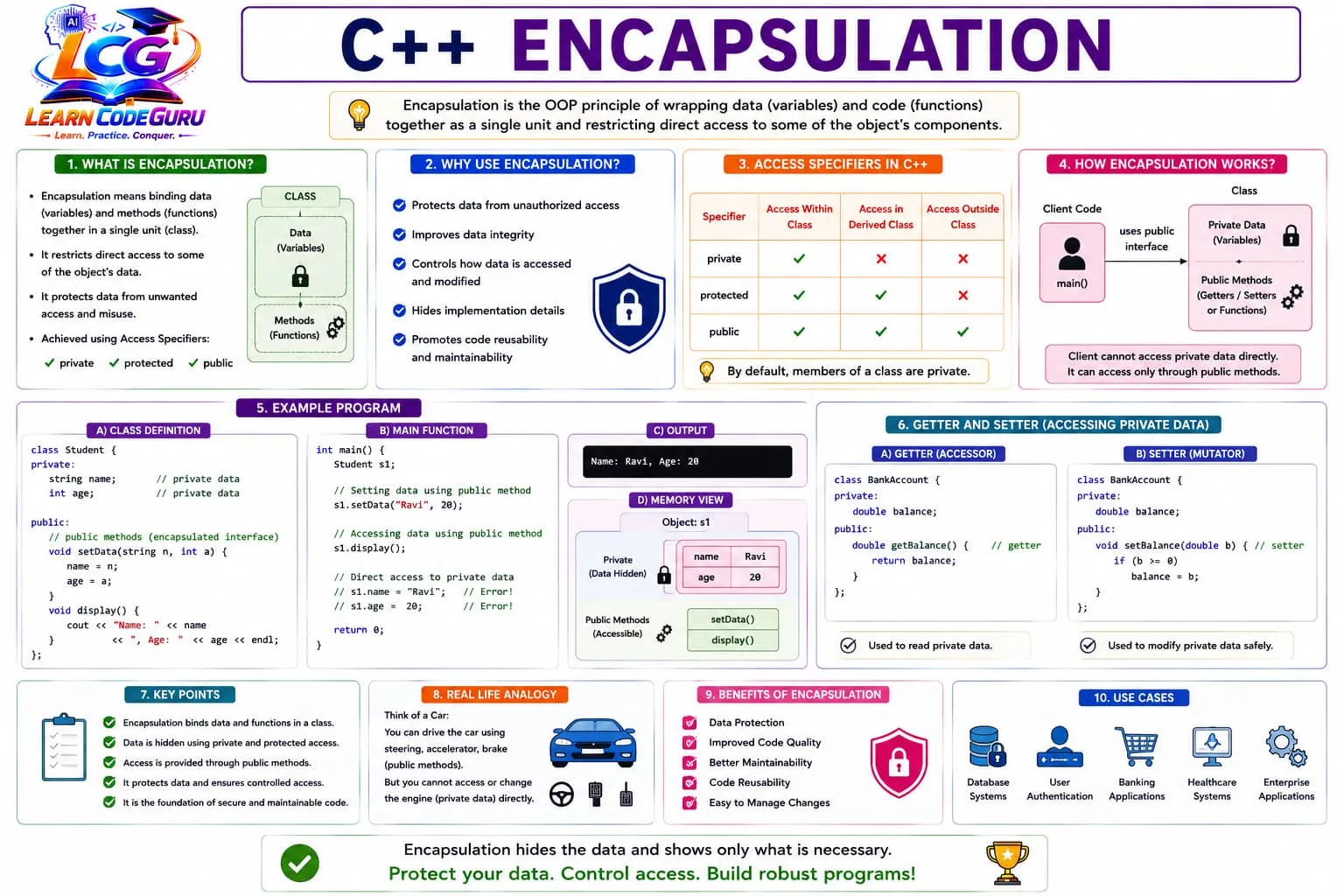
- Bundle: data and functions live together in a class.
- Hide: keep fields
private(default for class). - Expose: public methods / getters / setters with validation.
- Analogy: drive with pedals — do not touch the engine directly.
Why use encapsulation?
- Protects data from unauthorized or accidental changes.
- Improves **integrity** — only valid updates (e.g. balance ≥ 0).
- Hides implementation details — you can change internals without breaking callers.
- Makes code easier to maintain, reuse, and reason about.
| Benefit | What you gain | Example |
|---|---|---|
| Data protection | No random outside writes | private balance |
| Integrity | Rules enforced in one place | withdraw checks funds |
| Flexibility | Swap internals later | Change storage without API change |
| Clarity | Clear public contract | deposit / getBalance |
| Maintainability | Fix bugs in one class | Update validation once |
Access specifiers
- **private** — only the class (and friends) can access. **Default for
class.** - **protected** — class + derived classes (inheritance).
- **public** — accessible from anywhere.
- Encapsulation style: keep data **private**; keep useful operations **public**.
| Specifier | Inside class | Derived class | Outside class | Default for |
|---|---|---|---|---|
private | Yes | No | No | class |
protected | Yes | Yes | No | — |
public | Yes | Yes | Yes | struct |
How encapsulation works
- Client code (
mainor other classes) cannot touch private fields directly. - It must call **public methods** (getters/setters or domain actions).
- Those methods read/update private data safely.
#include <iostream>
#include <string>
using namespace std;

class Student {
private:
    string name;
    int age;
public:
    void setData(string n, int a) {
        name = n;
        age = a;
    }
    void display() const {
        cout << "Name: " << name << ", Age: " << age << "\n";
    }
};

int main() {
    Student s1;
    s1.setData("Ravi", 20);
    s1.display();
    // s1.name = "Ravi"; // ERROR — private
    return 0;
}
Getters and setters
- **Getter (accessor):** reads private data — often
const. - **Setter (mutator):** updates private data — place to **validate**.
- Prefer meaningful actions (
deposit,withdraw) over raw setters when they fit the domain better. - **Real-life:** set volume 0–100 only; reject invalid ages.
#include <iostream>
using namespace std;

class Account {
private:
    double balance = 0;
public:
    double getBalance() const { // getter
        return balance;
    }
    void setBalance(double b) { // setter with validation
        if (b >= 0) balance = b;
    }
    void deposit(double x) {
        if (x > 0) balance += x;
    }
};

int main() {
    Account a;
    a.setBalance(1000);
    a.deposit(250);
    cout << a.getBalance() << "\n"; // 1250
    return 0;
}
With vs without encapsulation
- Public data is easy — and easy to break.
| Approach | Example | Risk |
|---|---|---|
| No encapsulation | acc.balance = -50; | Invalid state possible |
| Encapsulated | acc.withdraw(50); | Rules enforced inside |
| Leaky setter | setAge(-3) with no check | Still unsafe |
| Validated setter | if (age >= 0) … | Integrity kept |
// Bad: public data
struct BadAccount { double balance; };

// Better: encapsulated
class GoodAccount {
private:
    double balance = 0;
public:
    bool withdraw(double x) {
        if (x <= 0 || x > balance) return false;
        balance -= x;
        return true;
    }
};
Real-life analogies & use cases
- **Car:** pedals/steering public; engine internals private.
- **Capsule medicine:** ingredients wrapped; you take the capsule, not raw chemicals.
- **Banking apps:** balance hidden; deposit/withdraw APIs public.
- **Authentication:** password hash private;
login()public. - Also common in healthcare records, shopping carts, and enterprise modules.
Advanced — Encapsulation
Designing a strong public interface
- Expose **intent** (
withdraw) not storage details (balanceField). - Keep methods that preserve invariants close to the data.
- Minimize public surface — fewer ways to misuse the class.
- Mark readers
const; avoid unnecessary setters for immutable fields (e.g. id).
Invariants and validation
- An **invariant** is a rule that must always hold (balance ≥ 0, age in range).
- Enforce invariants in constructors and every mutating method.
- Fail safely: return
bool, throw, or clamp — be consistent.
class Temperature {
private:
    double celsius = 0;
public:
    bool setCelsius(double c) {
        if (c < -273.15) return false; // below absolute zero
        celsius = c;
        return true;
    }
    double getCelsius() const { return celsius; }
};
Encapsulation vs abstraction (quick)
- **Encapsulation:** how you hide and protect data + bundle with methods.
- **Abstraction:** showing essential features and hiding complexity (often via interfaces / abstract classes).
- They work together: encapsulate internals; abstract the useful view.
| Point | Encapsulation | Abstraction |
|---|---|---|
| Focus | Access control & bundling | Essential interface / idea |
| Main tools | private / getters / methods | Abstract classes, interfaces, simple APIs |
| Question | Who can touch the data? | What does the user need to know? |
Friends and encapsulation
friendcan access private members — useful but **weakens** encapsulation.- Use sparingly (e.g. tightly coupled helpers,
operator<<). Prefer public APIs when possible. - Details in the Friend Functions lesson.
Real-life encapsulated designs
Userwith private password hash; publiclogin/changePassword.Cartwith private items; publicadd/remove/total.Batterywith private percent; publiccharge/consumewith clamps 0–100.Employeesalary private; only HR methods adjust it with rules.
Tricky Interview Points
Q1) What is encapsulation in C++?
Answer Bundling data and methods in a class and restricting direct access to internal data using access specifiers, usually exposing a public interface.
Q2) How is encapsulation achieved in C++?
Answer Primarily with private/protected data members and public member functions (getters, setters, or domain operations).
Q3) What are access specifiers?
Answer private, protected, and public — they control visibility of class members. Class members are private by default.
Q4) Difference between private and public?
Answer Private members are accessible only inside the class (and friends). Public members are accessible from outside code.
Q5) What are getters and setters?
Answer Getters read private data; setters modify it, often with validation. They provide controlled access to hidden fields.
Q6) Why not make all data public?
Answer Public data can be set to invalid values from anywhere, breaking invariants and making maintenance harder.
Q7) Give a real-life example of encapsulation.
Answer A car: you use steering and pedals (public interface) without directly manipulating the engine internals (private).
Q8) Encapsulation vs abstraction?
Answer Encapsulation hides and protects data by bundling it with methods. Abstraction focuses on exposing only essential features and hiding complexity.
Q9) What is data hiding?
Answer Making class data private/protected so outside code cannot access it directly — a key part of encapsulation.
Q10) Can encapsulation use protected?
Answer Yes. protected hides data from the outside world but allows derived classes to access it — useful with inheritance.
Q11) Should every private field have a setter?
Answer No. Only expose setters when modification is required and can be validated. Some fields should be read-only after construction.
Q12) How do friends affect encapsulation?
Answer Friends can access private members, which selectively breaks hiding. Use them carefully and rarely.
Simple Programs
Student — private data + public API
#include <iostream>
#include <string>
using namespace std;

class Student {
private:
    string name;
    int age;
public:
    void setData(string n, int a) {
        if (a > 0) { name = n; age = a; }
    }
    void display() const {
        cout << "Name: " << name << ", Age: " << age << "\n";
    }
};

int main() {
    Student s1;
    s1.setData("Ravi", 20);
    s1.display();
    return 0;
}
Account getters/setters with validation
#include <iostream>
using namespace std;

class Account {
private:
    double balance = 0;
public:
    double getBalance() const { return balance; }
    void setBalance(double b) { if (b >= 0) balance = b; }
    void deposit(double x) { if (x > 0) balance += x; }
};

int main() {
    Account a;
    a.setBalance(-10); // ignored
    a.setBalance(500);
    a.deposit(50);
    cout << a.getBalance() << "\n";
    return 0;
}
Withdraw preserves invariant
#include <iostream>
using namespace std;

class Wallet {
private:
    int money = 0;
public:
    void add(int x) { if (x > 0) money += x; }
    bool spend(int x) {
        if (x <= 0 || x > money) return false;
        money -= x;
        return true;
    }
    int get() const { return money; }
};

int main() {
    Wallet w;
    w.add(100);
    cout << w.spend(40) << " " << w.get() << "\n"; // 1 60
    cout << w.spend(100) << " " << w.get() << "\n"; // 0 60
    return 0;
}
Read-only id after construction
#include <iostream>
#include <string>
using namespace std;

class User {
private:
    const int id;
    string name;
public:
    User(int i, string n) : id(i), name(n) {}
    int getId() const { return id; }
    string getName() const { return name; }
    void setName(string n) { if (!n.empty()) name = n; }
};

int main() {
    User u(7, "Neha");
    cout << u.getId() << " " << u.getName() << "\n";
    return 0;
}
Temperature clamp example
#include <iostream>
using namespace std;

class Dimmer {
private:
    int level = 0; // 0..100
public:
    bool setLevel(int v) {
        if (v < 0 || v > 100) return false;
        level = v;
        return true;
    }
    int getLevel() const { return level; }
};

int main() {
    Dimmer d;
    cout << d.setLevel(120) << "\n"; // 0
    d.setLevel(80);
    cout << d.getLevel() << "\n";
    return 0;
}
Public data vs encapsulated (contrast)
#include <iostream>
using namespace std;

struct OpenBox { int value; };

class SafeBox {
private:
    int value = 0;
public:
    void set(int v) { if (v >= 0) value = v; }
    int get() const { return value; }
};

int main() {
    OpenBox o; o.value = -5; // allowed but dubious
    SafeBox s; s.set(-5);    // rejected
    s.set(5);
    cout << o.value << " " << s.get() << "\n";
    return 0;
}Problem Solving Tricks
- Default mindset: data private, operations public.
- Put validation in setters / mutators — one gate for rules.
- Prefer domain methods (deposit) over generic setBalance when clearer.
- Mark getters const.
- Do not auto-generate setters for every field.
- Encapsulation ≠ just “add get/set”; it is about protecting invariants.
- Change private implementation freely if the public API stays stable.
- protected is for inheritance — still hidden from the outside world.
- Avoid public data in classes that own important rules.
- Use friends only when the coupling is intentional and tight.
- Car/ATM analogies help explain encapsulation in interviews.
- Compile a direct private access once to see the compiler protect you.
Practice Programs List
- Create Student with private name/marks; public set/display with marks 0–100 validation.
- Implement Account deposit/withdraw/getBalance; forbid negative balance.
- Write a class with a private password string; only verify via login(password).
- Build Product with private price; setPrice rejects values ≤ 0.
- Refactor a struct with public fields into an encapsulated class.
- Add a const getter and try to call a non-const setter on a const object (observe error).
- Design Cart with private item count; public add/remove with bounds checks.
- Make id read-only (const member) and name updatable via setter.
- Explain encapsulation vs abstraction in 5 lines with an example.
- List five real systems that rely on encapsulated data (bank, hospital, …).
- Show that changing a private field’s type does not break main if API is unchanged.
- Write Battery charge/consume methods clamping 0–100.
- Compare a leaky setter (no checks) vs a validating setter in a short demo.
- Document the public interface of a class in comments; keep data private.