
C++ Basics
C++ Fundamentals
Complete lesson for C++ Fundamentals using LEARNCODEGURU’s 6-level learning model — from basics to advanced practice, with C++ OOP and STL where relevant.
Basics — C++ Fundamentals
Section: C++ Basics. Program structure, tokens, keywords, and how C++ compares with Java and Python.
Typical .cpp layout
- Includes → using / namespace → declarations → main() → statements → return.
- Prefer std::cout / std::cin or using namespace std; carefully in .cpp files only.
#include <iostream>
using namespace std;

int main() {
    int x = 10;
    cout << x << endl;
    return 0;
}
C++ Program Structure
A well-written .cpp file usually follows a clear top-to-bottom order:
documentation comments, preprocessor links (#include), optional global definitions,
the main function, local declarations, executable statements, user-defined functions,
and a successful return 0. The diagram below shows each part with a short example.
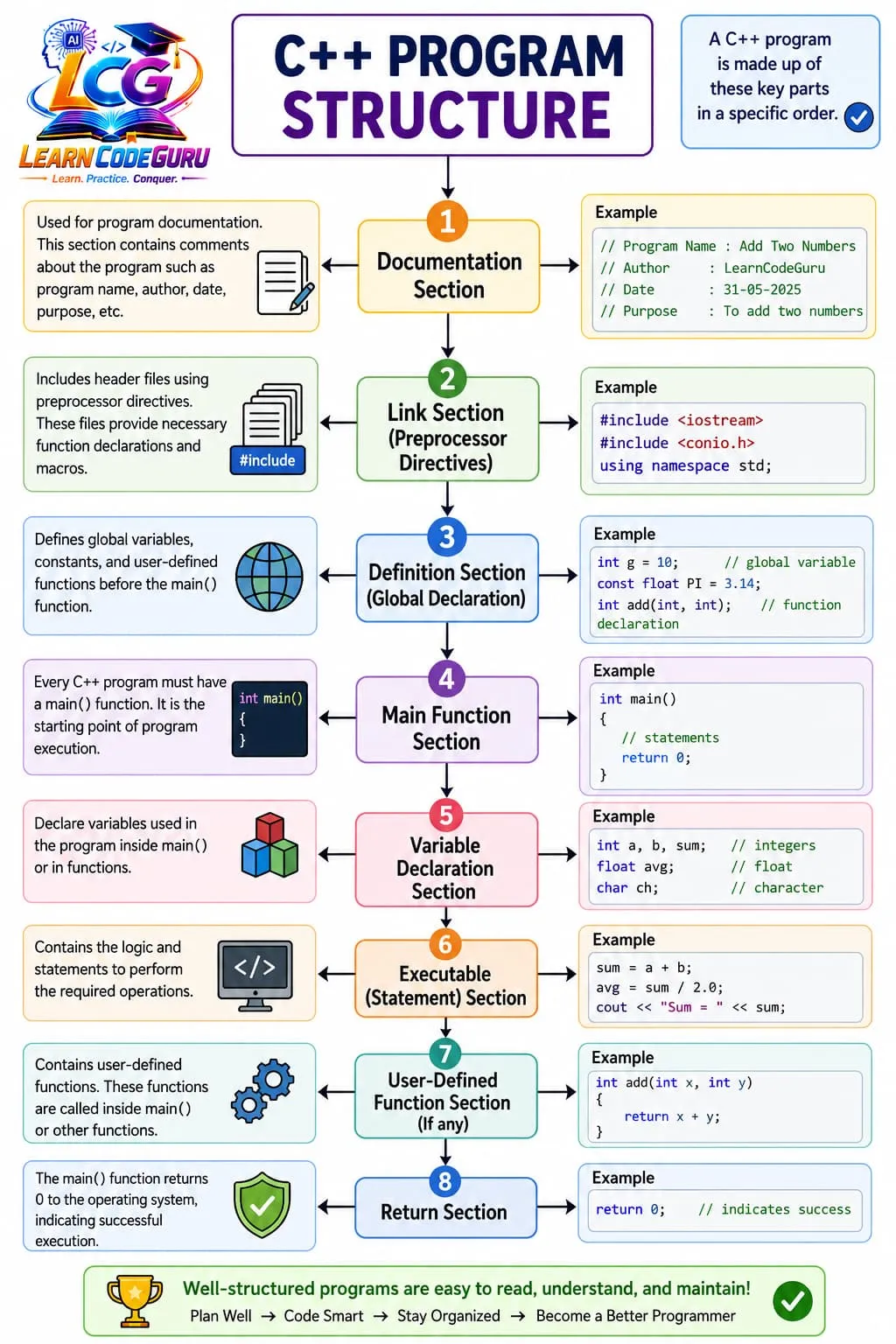
return 0 - Documentation: comments for name, author, date, and purpose.
- Link section:
#includeheaders and optionalusing namespace std;. - Definitions: globals, constants, and function declarations (prototypes).
- main(): program entry point; holds declarations and statements.
- Functions: user-defined helpers usually written after
main. - Return:
return 0;signals successful execution to the OS.
Tokens & keywords
- Tokens include keywords, identifiers, literals, operators, and punctuators.
- C++ keywords include class, public, private, template, typename, noexcept, constexpr, and more.
Differences between C++ and Java
- Both support OOP, but they differ in memory model, compilation, and how programs run.
- Use this table when choosing tools or answering “C++ vs Java” interview questions.
| Feature | C++ | Java |
|---|---|---|
| Paradigm | Multi-paradigm (procedural, OOP, generic) | Primarily OOP (also supports other styles) |
| Compilation | Compiled to native machine code | Compiled to bytecode, runs on JVM |
| Memory | Manual + smart pointers / RAII | Automatic garbage collection |
| Pointers | Yes (raw and smart pointers) | No raw pointers (references only) |
| Multiple inheritance | Allowed for classes (use carefully) | Classes: single; interfaces: multiple |
| Operator overloading | Supported | Not supported (except + for String) |
| Platform | Must rebuild per OS/CPU (usually) | Write once, run on any JVM |
| Speed | Very fast; close to hardware | Fast, but JVM adds overhead |
| I/O basics | cin / cout (iostream) | System.out.println, Scanner, streams |
| Entry point | int main() | public static void main(String[] args) |
| Header / packages | Headers + namespaces | Packages + import |
| Templates / generics | Templates (compile-time) | Generics (type erasure at runtime) |
| Typical use | Systems, games, embedded, HFT | Enterprise apps, Android, backend |
Differences between C++ and Python
- Python is easier for beginners and scripting; C++ focuses on control and performance.
- This table highlights everyday language differences you should remember.
| Feature | C++ | Python |
|---|---|---|
| Typing | Static (types checked at compile time) | Dynamic (types checked mostly at runtime) |
| Execution | Compiled ahead of time | Interpreted / bytecode (CPython) |
| Syntax | Braces { } and semicolons | Indentation defines blocks |
| Speed | Usually much faster | Slower; great for productivity |
| Memory | Manual control + RAII / smart pointers | Automatic garbage collection |
| Pointers | Yes | No (everything is a reference to an object) |
| OOP | Optional; you can write non-class programs | Everything is an object |
| I/O basics | cin / cout | input() / print() |
| Entry point | main() function required for executables | Runs top-to-bottom; if __name__ == "__main__" common |
| Libraries | STL + many native libraries | Huge standard library + ecosystem (pip) |
| Error handling | Exceptions + error codes | Exceptions widely used |
| Learning curve | Steeper (types, memory, compile errors) | Gentler for beginners |
| Typical use | Performance-critical and system software | AI/ML, scripting, web, automation |
Advanced — C++ Fundamentals
Deeper rules
- Prefer modern C++ (C++11 and later) idioms over C-style patterns when both work.
- Watch undefined behaviour: dangling references, out-of-bounds access, and use-after-move.
- Use const, RAII, and the standard library as your default tools.
Tricky Interview Points
Q1) What is Program structure, tokens, keywords, and how C++ compares with Java and Python?
Answer C++ fundamentals: program structure, tokens, keywords, plus C++ vs Java and C++ vs Python comparison tables.
Q2) How does this relate to C?
Answer C++ builds on C but adds stronger typing, classes, references, overloading, and the STL. Prefer C++ features unless you must interoperate with C APIs.
Simple Programs
Minimal demo
#include <iostream>
using namespace std;

int main() {
    cout << "C++ demo\n";
    return 0;
}Problem Solving Tricks
- Compile with warnings: g++ -Wall -Wextra -std=c++17 file.cpp -o app
- Prefer nullptr over NULL and 0 for pointers.
- Use auto for complex iterator / lambda types when it improves clarity.
Practice Programs List
- Rewrite the lesson demo with your own inputs.
- Add edge-case handling and print clear messages.
- Split the code into a header and a .cpp file.
- Write two small programs that combine this topic with functions.