
C++ Basics
Operators
Complete lesson for Operators using LEARNCODEGURU’s 6-level learning model — from basics to advanced practice, with C++ OOP and STL where relevant.
Basics — Operators
Section: C++ Basics. Classification of C++ operators with examples, escape sequences, and deep bitwise operator practice.
What are operators?
- Operators are symbols that tell the compiler to perform an operation on one or more operands.
- Examples:
a + b(arithmetic),a > b(relational),a && b(logical),a & b(bitwise). - Mastering operators helps you write calculations, decisions, and bit-level logic clearly.
C++ Operators & Escape Sequences
Operators perform calculations and decisions; escape sequences format text output.
The chart below summarizes arithmetic, relational, logical, bitwise, assignment, and other
operators, plus common escapes such as \n and \t.
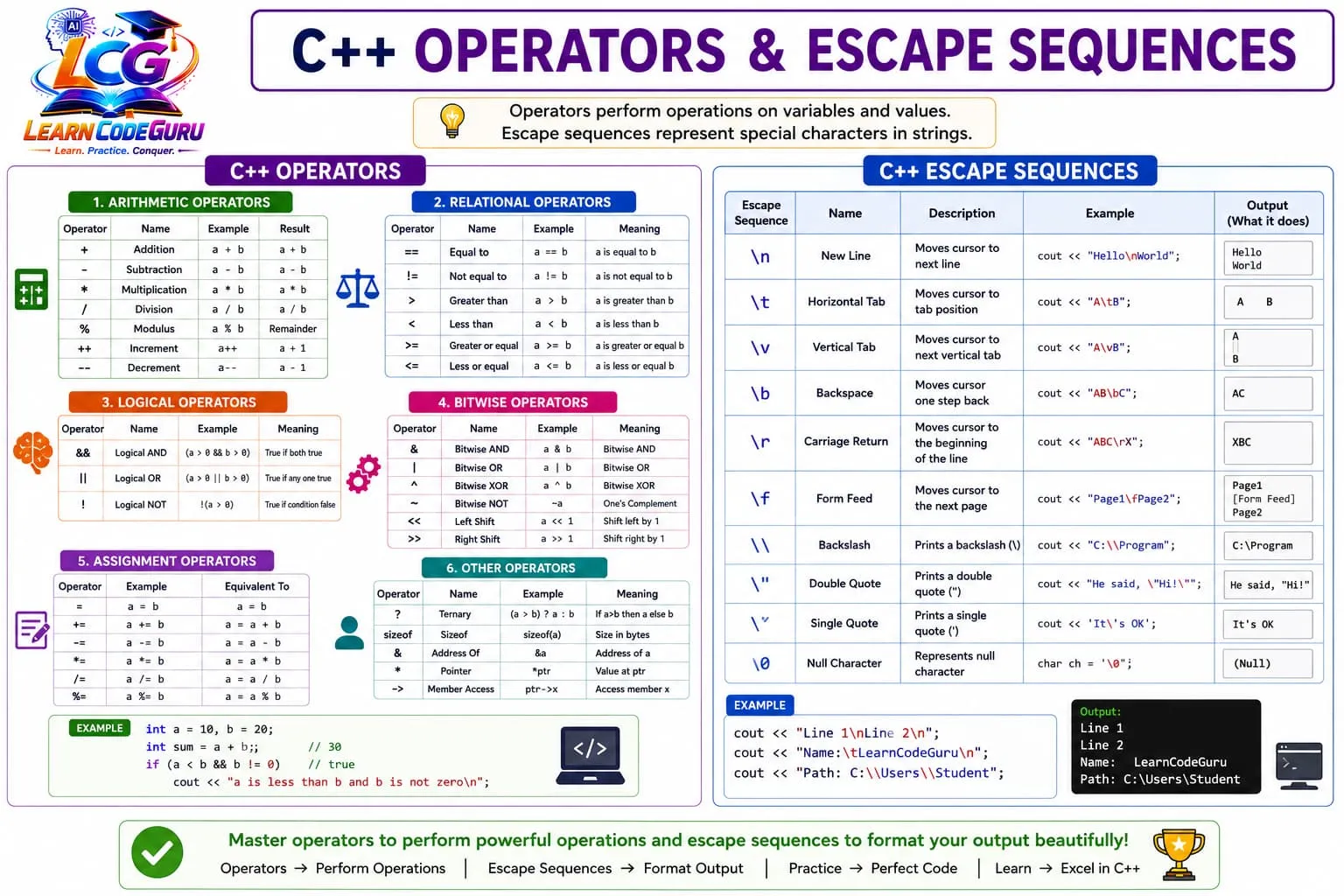
- Arithmetic / relational / logical: everyday math and decisions.
- Bitwise:
& | ^ ~ << >>for bit-level work. - Assignment / other:
+=, ternary,sizeof, pointers, scope. - Escapes:
\n,\t,\\,\"for clean console output.
Classification of operators (overview)
- C++ operators are commonly grouped by the kind of work they do.
- Use the tables below as a quick reference with short examples.
| Category | Operators | Purpose |
|---|---|---|
| Arithmetic | + - * / % ++ -- | Math and increment/decrement |
| Relational | == != > < >= <= | Compare two values |
| Logical | && || ! | Combine or invert conditions |
| Bitwise | & | ^ ~ << >> | Work on bits of integers |
| Assignment | = += -= *= /= %= | Store or update a value |
| Other | ?:, sizeof, &, *, ->, :: | Ternary, size, address, pointer, scope |
Arithmetic operators
- Work on numeric values. Integer division truncates toward zero (e.g.
7 / 2is3). %works with integers (remainder).++/--can be prefix or postfix.
| Operator | Name | Example | Result / meaning |
|---|---|---|---|
+ | Addition | a + b | Sum of a and b |
- | Subtraction | a - b | Difference |
* | Multiplication | a * b | Product |
/ | Division | a / b | Quotient |
% | Modulus | a % b | Remainder |
++ | Increment | a++ / ++a | Increase by 1 |
-- | Decrement | a-- / --a | Decrease by 1 |
int a = 10, b = 3;
int sum = a + b;      // 13
int rem = a % b;      // 1
int q = a / b;        // 3 (integer division)
Relational operators
- Compare two values and produce a boolean result (
true/false).
| Operator | Name | Example | Meaning |
|---|---|---|---|
== | Equal to | a == b | True if a equals b |
!= | Not equal | a != b | True if a is not equal to b |
> | Greater than | a > b | True if a is greater |
< | Less than | a < b | True if a is smaller |
>= | Greater or equal | a >= b | True if a ≥ b |
<= | Less or equal | a <= b | True if a ≤ b |
Logical operators
- Combine conditions.
&&needs both true;||needs at least one true;!inverts. &&and||short-circuit: the second operand may not be evaluated.
| Operator | Name | Example | Meaning |
|---|---|---|---|
&& | Logical AND | (a > 0 && b > 0) | True if both conditions are true |
|| | Logical OR | (a > 0 || b > 0) | True if any condition is true |
! | Logical NOT | !(a > 0) | True if the condition is false |
Assignment operators
- Update a variable. Compound forms are shorter and clear.
| Operator | Example | Equivalent to |
|---|---|---|
= | a = b | Assign b to a |
+= | a += b | a = a + b |
-= | a -= b | a = a - b |
*= | a *= b | a = a * b |
/= | a /= b | a = a / b |
%= | a %= b | a = a % b |
Other useful operators
- These appear often in real C++ code alongside the basic math/compare operators.
| Operator | Name | Example | Meaning |
|---|---|---|---|
?: | Ternary | (a > b) ? a : b | Choose value based on condition |
sizeof | Size of | sizeof(a) | Size in bytes |
& | Address of | &a | Memory address of a |
* | Dereference | *ptr | Value pointed to by ptr |
-> | Member access | ptr->x | Access member via pointer |
:: | Scope resolution | std::cout | Qualify a name with its scope |
int a = 10, b = 20;
int maxv = (a > b) ? a : b;
if (a < b && b != 0)
    cout << "a is less than b and b is not zero\n";
Escape sequences (quick table)
- Escape sequences start with
\inside string/character literals to format output. - Common ones: newline, tab, quotes, and backslash.
| Escape | Name | Example | Effect |
|---|---|---|---|
\n | New line | cout << "Hi\n"; | Move to next line |
\t | Tab | cout << "A\tB"; | Horizontal tab space |
\\ | Backslash | cout << "C:\\"; | Prints \ |
\" | Double quote | cout << "\"Hi\""; | Prints "Hi" |
\' | Single quote | cout << '\''; | Prints ' |
\0 | Null | char c = '\0'; | Null character |
Advanced — Operators
Bitwise operators — deep dive
- Bitwise operators work on the binary representation of integer types (
int,unsigned, etc.). - They are used in flags, masks, compression, graphics, embedded systems, and interview puzzles.
- Know binary first: for example,
12is1100,10is1010.
| Operator | Name | Example | Meaning |
|---|---|---|---|
& | Bitwise AND | a & b | 1 only where both bits are 1 |
| | Bitwise OR | a | b | 1 where either bit is 1 |
^ | Bitwise XOR | a ^ b | 1 where bits differ |
~ | Bitwise NOT | ~a | Flip all bits (one’s complement) |
<< | Left shift | a << n | Shift bits left by n (≈ × 2ⁿ for unsigned) |
>> | Right shift | a >> n | Shift bits right by n (≈ ÷ 2ⁿ for unsigned) |
Bitwise AND, OR, XOR with examples
- AND (
&): useful to test/clear bits. Example:n & 1checks ifnis odd. - OR (
|): useful to set bits. Example:flags | 0b0100turns a flag on. - XOR (
^): useful to toggle bits and for “swap without temp” / find unique number tricks.
int a = 12; // 1100
int b = 10; // 1010

cout << (a & b) << "\n"; // 8  (1000)
cout << (a | b) << "\n"; // 14 (1110)
cout << (a ^ b) << "\n"; // 6  (0110)

int n = 7;
if (n & 1) cout << "odd\n"; // true

// toggle bit 1 (value 2): 7 ^ 2 => 5
cout << (7 ^ 2) << "\n";
Bitwise NOT and shifts
~aflips every bit. For signedint, the printed decimal value uses two’s complement — results can look “unexpected” unless you print bits carefully.- Prefer unsigned types when teaching bit patterns to avoid signed-shift surprises.
a << nshifts left by n positions (fills with 0 on the right).a >> nshifts right. For unsigned, fills with 0; for signed, behavior of the sign bit can be implementation-defined historically — use unsigned for portable bit logic.- Shifting by a negative count or by ≥ width of the type is undefined behaviour.
#include <iostream>
#include <cstdint>
using namespace std;

int main() {
    uint8_t x = 0b00001100; // 12
    cout << int(x << 1) << "\n"; // 24 (00011000)
    cout << int(x >> 2) << "\n"; // 3  (00000011)

    uint8_t y = 0b00000101; // 5
    uint8_t flipped = uint8_t(~y); // low 8 bits: 11111010
    cout << int(flipped) << "\n"; // 250
    return 0;
}
Masks, flags, and practical bit patterns
- Set bit k:
n = n | (1u << k) - Clear bit k:
n = n & ~(1u << k) - Toggle bit k:
n = n ^ (1u << k) - Check bit k:
(n & (1u << k)) != 0 - These four patterns cover most interview and embedded bit-flag tasks.
unsigned n = 0b0000;
n |= (1u << 1);          // set bit 1 -> 0010
n |= (1u << 3);          // set bit 3 -> 1010
bool on = (n & (1u << 3)) != 0; // true
n &= ~(1u << 1);         // clear bit 1 -> 1000
n ^= (1u << 3);          // toggle bit 3 -> 0000
Deeper operator rules (non-bitwise)
- Precedence:
*/%bind tighter than+-; use parentheses when unsure. - Do not modify the same scalar twice in one expression without a sequence point style guarantee — avoid
i = i++. - Prefer
==for equality; a common bug is writing=inside conditions by mistake. sizeofis compile-time for most ordinary types/expressions and does not evaluate side effects in typical cases.
Tricky Interview Points
Q1) What is an operator in C++?
Answer A symbol that performs an operation on one or more operands, such as + for addition or && for logical AND.
Q2) Name the main classifications of C++ operators.
Answer Arithmetic, relational, logical, bitwise, assignment, and other operators (ternary, sizeof, address/pointer, scope resolution).
Q3) What is the difference between / and % ?
Answer / gives the quotient. % gives the remainder. Example: 10 / 3 = 3 and 10 % 3 = 1 for integers.
Q4) What is the difference between == and = ?
Answer == compares two values for equality. = assigns a value to a variable.
Q5) Explain &&, ||, and !.
Answer && is true only if both sides are true. || is true if at least one side is true. ! negates a condition.
Q6) What are bitwise operators in C++?
Answer & (AND), | (OR), ^ (XOR), ~ (NOT), << (left shift), and >> (right shift). They operate on bits of integer values.
Q7) How do you check if an integer is odd using bits?
Answer Use n & 1. If the least significant bit is 1, the number is odd.
Q8) What does a << 1 usually mean for unsigned values?
Answer Left shift by 1 multiplies by 2 (when no overflow occurs). Example: 5 << 1 becomes 10.
Q9) What is the ternary operator?
Answer condition ? value_if_true : value_if_false. Example: max = (a > b) ? a : b;
Q10) Name common escape sequences.
Answer \n (newline), \t (tab), \\ (backslash), \" (double quote), \' (single quote), \0 (null).
Q11) How do you set and clear the k-th bit?
Answer Set: n = n | (1u << k). Clear: n = n & ~(1u << k).
Q12) What is short-circuit evaluation?
Answer For &&, if the left side is false the right side is not evaluated. For ||, if the left side is true the right side is not evaluated.
Simple Programs
Arithmetic and relational demo
#include <iostream>
using namespace std;

int main() {
    int a = 15, b = 4;
    cout << "sum=" << a + b << " rem=" << a % b << "\n";
    cout << boolalpha;
    cout << "a>b? " << (a > b) << "\n";
    cout << "a==b? " << (a == b) << "\n";
    return 0;
}
Logical operators demo
#include <iostream>
using namespace std;

int main() {
    int a = 5, b = -2;
    if (a > 0 && b > 0) cout << "both positive\n";
    else if (a > 0 || b > 0) cout << "at least one positive\n";
    if (!(b > 0)) cout << "b is not positive\n";
    return 0;
}
Bitwise AND OR XOR and shifts
#include <iostream>
using namespace std;

int main() {
    int a = 12, b = 10; // 1100 and 1010
    cout << "AND " << (a & b) << "\n";
    cout << "OR  " << (a | b) << "\n";
    cout << "XOR " << (a ^ b) << "\n";
    cout << "a<<1 " << (a << 1) << "\n";
    cout << "a>>1 " << (a >> 1) << "\n";
    return 0;
}
Set / clear / toggle / check a bit
#include <iostream>
using namespace std;

int main() {
    unsigned n = 0;
    int k = 2;                 // bit index 2 (value 4)
    n |= (1u << k);            // set
    cout << "after set: " << n << "\n";
    cout << "bit on? " << boolalpha << ((n & (1u << k)) != 0) << "\n";
    n ^= (1u << k);            // toggle off
    n |= (1u << k);            // set again
    n &= ~(1u << k);           // clear
    cout << "after clear: " << n << "\n";
    return 0;
}
Escape sequences demo
#include <iostream>
using namespace std;

int main() {
    cout << "Line 1\nLine 2\n";
    cout << "Name:\tLearnCodeGuru\n";
    cout << "Path: C:\\Users\\Student\n";
    return 0;
}Problem Solving Tricks
- Use parentheses for clarity when mixing arithmetic, shifts, and comparisons.
- Remember integer division truncates: write
1.0 * a / bor cast when you need a fractional result. - Prefer
==in conditions; a single=is assignment and a frequent bug. - For portable bit tricks, prefer
unsigned(or fixed-width types likeuint32_t). n & (n - 1)clears the lowest set bit — useful in bit-count algorithms.n & -nisolates the lowest set bit (two’s complement unsigned/signed care).- Left shift by 1 is ×2; right shift by 1 is ÷2 for non-negative values (within range).
- In strings, write
\\to print one backslash and\nfor a newline. - Compound assignments (
+=,&=,<<=) keep code shorter and intent clearer. - Do not shift by a negative amount or by a count ≥ bit-width — that is undefined behaviour.
Practice Programs List
- Write a program that reads two integers and prints sum, difference, product, quotient, and remainder.
- Read two numbers and print the larger one using the ternary operator.
- Demonstrate
&&,||, and!with three integer inputs (positive/negative checks). - Print truth results for
a==b,a!=b,a>b,aboolalpha. - Given integers a=12 and b=10, print
a&b,a|b,a^b,a<<2, anda>>1. - Write functions (or statements) to set, clear, toggle, and check bit k of an unsigned number.
- Count how many 1-bits are in an unsigned integer (Brian Kernighan’s method or a loop).
- Swap two integers using XOR (and also show the normal swap with a temp variable).
- Print a formatted mini report using
\nand\tescape sequences. - Explain with a small program why
7/2is 3 but7/2.0is 3.5. - Create a menu of bit-flag options (read/write/execute style) using OR to combine flags and AND to test them.
- Take an integer and print whether it is a power of two using the bit check
n && !(n & (n - 1)).