
Control Flow
Conditional Control Statements
Complete lesson for Conditional Control Statements using LEARNCODEGURU’s 6-level learning model — from basics to advanced practice, with C++ OOP and STL where relevant.
Basics — Conditional Control Statements
Section: Control Flow. if, if-else, else-if ladder, nested if, switch, and ternary — with real-life examples for each.
What are conditional statements?
- Conditional (decision-making) statements let a program choose different code paths based on true/false conditions.
- Main forms:
if,if-else,else ifladder, nestedif,switch, and the ternary operator?:. - Use the flowchart image below to see how control flows for each if-style statement.
Flowcharts: if, if-else, else-if & nested if
Decision-making statements choose different code paths based on conditions. The diagram below shows flowcharts, syntax, and short examples for if, if-else, else-if ladder, and nested if.
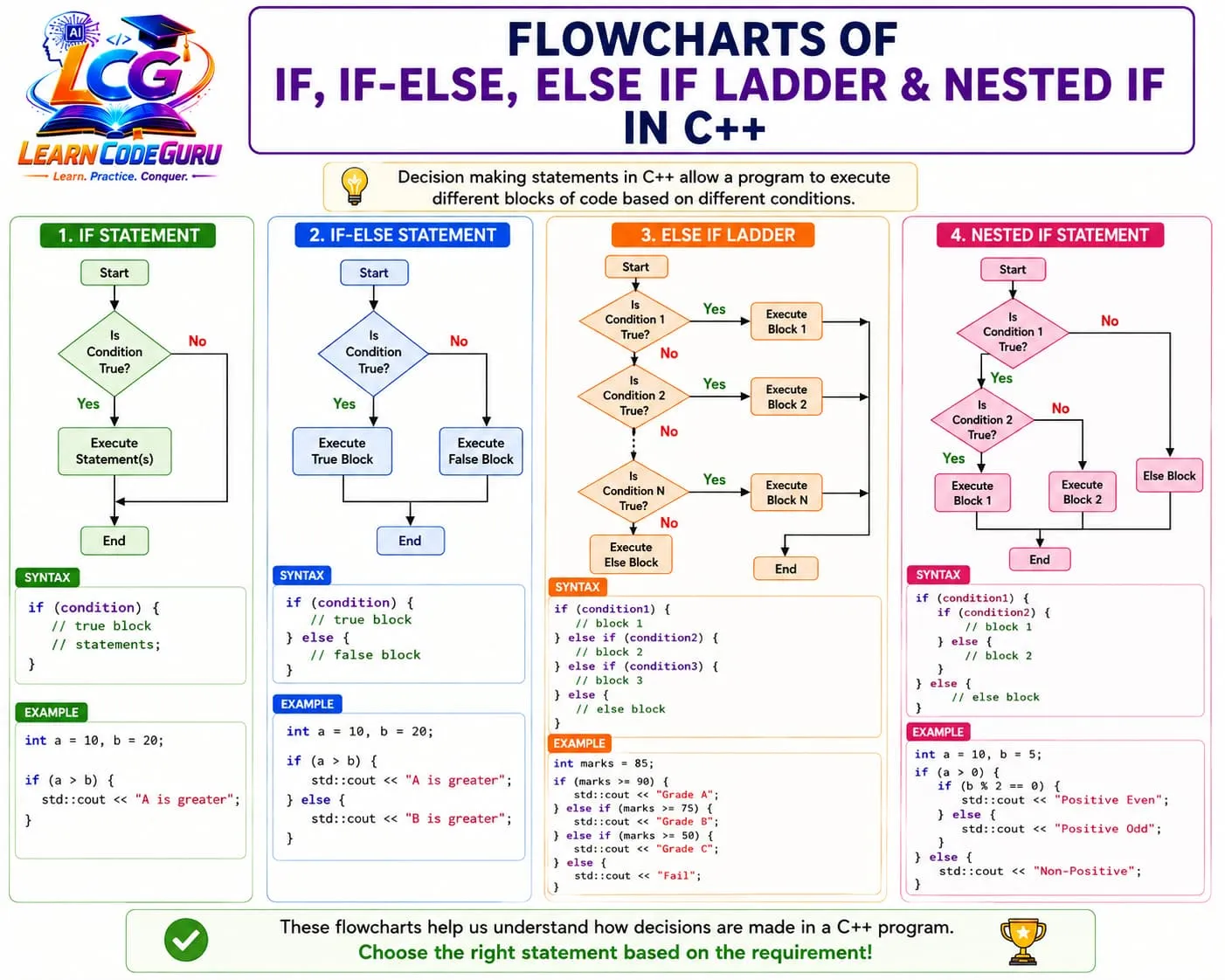
- if: run a block only when the condition is true.
- if-else: choose between two opposite outcomes.
- else-if ladder: check multiple ordered conditions (grades, fares).
- nested if: a second check that depends on the first (login → checkout).
if statement
- Runs a block only when the condition is true; otherwise that block is skipped.
- **Real-life example:** ATM cash withdrawal — if balance is enough, allow withdraw; if not, do nothing in this simple check (or show an error in a fuller program).
- **Real-life example:** Phone unlock — if the PIN is correct, open the home screen.
| Part | Meaning | Real-life mapping |
|---|---|---|
if (condition) | Test a yes/no question | Is balance ≥ amount? |
| True block | Do the action | Dispense cash |
| No else | Skip when false | Stay on the same screen |
int balance = 5000;
int amount = 2000;
if (balance >= amount) {
    cout << "Withdrawal allowed\n";
}
if-else statement
- Chooses exactly one of two paths: true block or false block.
- **Real-life example:** Exam result — if marks ≥ 40 print Pass, else print Fail.
- **Real-life example:** Traffic signal logic (simplified) — if light is green, go; else stop.
int marks = 35;
if (marks >= 40) {
    cout << "Pass\n";
} else {
    cout << "Fail\n";
}
else if ladder
- Checks conditions in order; the first true condition runs, then the ladder stops.
- **Real-life example:** Grading system — A / B / C / Fail based on marks ranges.
- **Real-life example:** Ticket pricing — child / adult / senior fares based on age.
int marks = 85;
if (marks >= 90) {
    cout << "Grade A\n";
} else if (marks >= 75) {
    cout << "Grade B\n";
} else if (marks >= 50) {
    cout << "Grade C\n";
} else {
    cout << "Fail\n";
}
Nested if statement
- An
ifinside anotherif— useful when a second check depends on the first. - **Real-life example:** Online order — if logged in, then if cart is not empty, place order.
- **Real-life example:** Loan check — if salary is high enough, then if credit score is good, approve.
bool loggedIn = true;
int cartItems = 3;
if (loggedIn) {
    if (cartItems > 0) {
        cout << "Order placed\n";
    } else {
        cout << "Cart is empty\n";
    }
} else {
    cout << "Please log in\n";
}
switch statement
- Selects among many fixed choices of an integral/enum/string-like discrete value (commonly
int/char/enum). - Each
caseneedsbreak(unless you intentionally fall through). - **Real-life example:** TV remote / menu — press 1 for volume, 2 for channel, 3 for settings.
- **Real-life example:** Food court order — case 1 Pizza, case 2 Burger, case 3 Pasta, default Invalid.
int choice = 2;
switch (choice) {
    case 1: cout << "Pizza\n"; break;
    case 2: cout << "Burger\n"; break;
    case 3: cout << "Pasta\n"; break;
    default: cout << "Invalid choice\n";
}
Ternary operator (quick form)
- Compact if-else that returns a value:
condition ? valueIfTrue : valueIfFalse. - **Real-life example:** Display “Open” or “Closed” for a shop based on current hour.
int hour = 22;
string status = (hour >= 9 && hour < 21) ? "Open" : "Closed";
cout << status << "\n";
Which statement should you use?
- Pick the form that matches your decision shape — keep code readable.
| Situation | Best choice | Real-life example |
|---|---|---|
| One optional action | if | Show a low-battery warning only when needed |
| Two opposite outcomes | if-else | Pass / Fail |
| Many ranges / ordered checks | else if ladder | Grades, ticket age bands |
| Decision inside another decision | Nested if | Login then checkout |
| Many fixed discrete options | switch | Menu / keypad / day of week |
| Simple value choice | Ternary ?: | Open / Closed label |
Advanced — Conditional Control Statements
Deeper rules for if / else if / nested if
- Conditions must be convertible to bool; non-zero numbers are true, zero is false — prefer explicit comparisons for clarity.
- Brace your blocks
{}even for one line — avoids dangling-else bugs. - Order matters in an else-if ladder: put more specific / higher priority checks first.
- C++17:
if (init; condition)lets you declare a variable scoped to the if/else. - Prefer early returns in functions instead of deep nesting when it improves clarity.
if (auto marks = readMarks(); marks >= 40) {
    cout << "Pass\n";
} else {
    cout << "Fail\n";
}
switch in depth
caselabels must be constant expressions (compile-time).- Without
break, execution falls through to the next case — useful rarely, dangerous often. defaulthandles unmatched values; place it last by convention.- C++17:
switch (init; value)is allowed, similar to if-init. - For ranges (marks ≥ 90), prefer else-if; switch is best for exact matches.
char grade = 'B';
switch (grade) {
    case 'A':
    case 'B':
        cout << "Good\n"; // intentional fall-through from A to shared message? better separate
        break;
    case 'C':
        cout << "Average\n";
        break;
    default:
        cout << "Need improvement\n";
}
Real-life decision models (combined)
- ATM: nested checks — card valid → PIN correct → balance enough → dispense.
- E-commerce coupon: else-if ladder on cart total for discount slabs.
- Elevator panel: switch on floor button number.
- Weather app alert: if raining and temperature < 10 → “Carry umbrella and jacket”.
Tricky Interview Points
Q1) What is a conditional statement in C++?
Answer A statement that chooses which code to run based on whether a condition is true or false (if, if-else, else-if, nested if, switch, ternary).
Q2) Difference between if and if-else?
Answer if runs a block only when true and otherwise skips it. if-else always chooses one of two blocks: true or false.
Q3) What is an else-if ladder?
Answer A chain of if / else if / else checks evaluated in order. The first true condition’s block runs, then the chain stops.
Q4) What is a nested if?
Answer An if statement placed inside another if/else block. Used when a second decision depends on the first (for example login then checkout).
Q5) When should you use switch instead of if-else?
Answer When branching on one discrete value with many exact matches (menu choice, day number, enum). For ranges, else-if is usually clearer.
Q6) Why is break important in switch?
Answer Without break, control falls through into the next case. That can cause multiple cases to run unintentionally.
Q7) What is the ternary operator?
Answer condition ? exprTrue : exprFalse — a compact expression form of if-else that yields a value.
Q8) Give a real-life example of else-if.
Answer Student grading: ≥90 A, ≥75 B, ≥50 C, else Fail — ordered range checks.
Q9) Give a real-life example of switch.
Answer Food court menu: 1 Pizza, 2 Burger, 3 Pasta, default Invalid choice.
Q10) What is a dangling else?
Answer Ambiguity about which if an else belongs to when braces are missing. Always use {} to make pairing clear.
Q11) Can switch work on floating-point values?
Answer No. switch requires integral, enumeration, or (in modern C++) certain other discrete types — not float/double comparisons.
Q12) What does C++17 if (init; condition) help with?
Answer It limits a temporary variable’s scope to the if/else, keeping the surrounding scope cleaner.
Simple Programs
if — low balance warning
#include <iostream>
using namespace std;

int main() {
    int balance = 300;
    if (balance < 500) {
        cout << "Low balance warning\n";
    }
    return 0;
}
if-else — even or odd
#include <iostream>
using namespace std;

int main() {
    int n;
    cout << "Enter number: ";
    cin >> n;
    if (n % 2 == 0) cout << "Even\n";
    else cout << "Odd\n";
    return 0;
}
else-if — ticket fare by age
#include <iostream>
using namespace std;

int main() {
    int age;
    cout << "Age: ";
    cin >> age;
    if (age < 5) cout << "Free\n";
    else if (age < 18) cout << "Child fare\n";
    else if (age < 60) cout << "Adult fare\n";
    else cout << "Senior fare\n";
    return 0;
}
Nested if — login then order
#include <iostream>
using namespace std;

int main() {
    bool loggedIn = true;
    int cart = 2;
    if (loggedIn) {
        if (cart > 0) cout << "Checkout OK\n";
        else cout << "Add items first\n";
    } else {
        cout << "Login required\n";
    }
    return 0;
}
switch — weekday menu
#include <iostream>
using namespace std;

int main() {
    int day = 3;
    switch (day) {
        case 1: cout << "Monday - Start strong\n"; break;
        case 2: cout << "Tuesday - Keep going\n"; break;
        case 3: cout << "Wednesday - Midweek\n"; break;
        case 4: cout << "Thursday - Almost\n"; break;
        case 5: cout << "Friday - Wrap up\n"; break;
        case 6:
        case 7: cout << "Weekend\n"; break;
        default: cout << "Invalid day\n";
    }
    return 0;
}
Ternary — shop open/closed
#include <iostream>
#include <string>
using namespace std;

int main() {
    int hour = 20;
    string s = (hour >= 9 && hour < 21) ? "Open" : "Closed";
    cout << s << "\n";
    return 0;
}Problem Solving Tricks
- Always use braces
{}with if/else — prevents dangling-else mistakes. - In else-if ladders, order ranges from high to low (or most specific first).
- Prefer
else iffor ranges; preferswitchfor exact menu-like choices. - Put
breakafter every switch case unless fall-through is intentional and commented. - Keep nested if depth small; extract helper functions when nesting gets hard to read.
- Write conditions positively when possible:
if (loggedIn)reads clearer than stacking negatives. - Use ternary only for short value choices — not for multi-statement logic.
- Test boundary values in grades/fares (exactly 40, 75, 90) — off-by-one bugs hide there.
- Combine related checks with
&&/||carefully; remember short-circuit evaluation. - For char menus, compare characters in single quotes:
case 'A':.
Practice Programs List
- Write an if program that prints “Eligible to vote” only when age ≥ 18.
- Write if-else to check whether a year is a leap year (basic 4/100/400 rule).
- Build an else-if grade calculator that also prints Pass/Fail.
- Write nested if for ATM: valid PIN → sufficient balance → success message.
- Create a switch calculator menu: 1 add, 2 sub, 3 mul, 4 div of two integers.
- Use switch on a char traffic light: R stop, Y wait, G go.
- Rewrite a Pass/Fail if-else using the ternary operator.
- Write else-if for electricity bill slabs based on units consumed.
- Nested if: if temperature > 30 and humidity > 70 print “Humid heat warning”.
- Switch on day number 1–7 and print weekday name; default for invalid.
- Combine if and switch: if user chooses “Food”, then switch on item codes.
- Find the largest of three numbers using nested if or else-if (no arrays).